


Choose a button-cell battery tester by the exact battery code and test method. A tester that accepts a small round battery is not automatically suitable for every coin cell. Check the voltage, chemistry, contact arrangement and supported sizes before buying.
For a broad selection of watch and coin cells, the ZTS MBT-1 has the clearest published compatibility list of the three options below. The Tenergy T-333 is a simpler voltage-based checker, while the Gardner Bender GBT-500A offers an analog display and test leads. This comparison is based on manufacturer specifications, instructions and exact product listings; it does not claim hands-on accuracy testing.
First, keep loose batteries away from children
A used or apparently dead button battery can still cause a serious injury if swallowed. Keep new and removed batteries out of children’s reach and sight. Do not leave a cell on the counter while you shop for a replacement. Poison Control recommends securely storing unused batteries and covering spent button batteries all the way around with two layers of household tape before disposal or recycling according to local requirements.
If someone may have swallowed a battery, seek immediate medical help and call U.S. Poison Control at 1-800-222-1222 or the National Battery Ingestion Hotline at 1-800-498-8666. Do not wait for symptoms or induce vomiting. A battery stuck in the esophagus can cause severe burns within two hours. Follow the National Capital Poison Center’s emergency guidance; outside the U.S., contact local emergency or poison services. Testing a matching battery must never delay care.
Three button-cell battery testers to compare
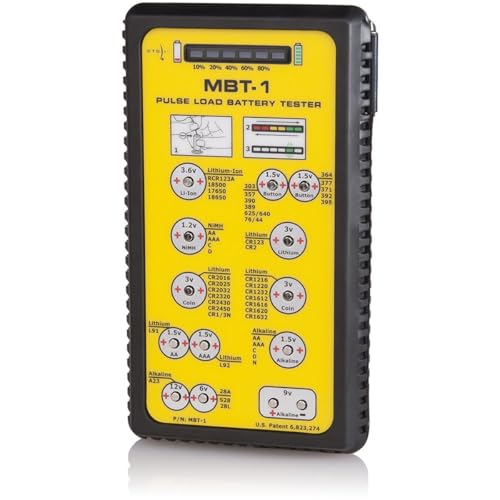
1. ZTS MBT-1: for a wider range of coin and watch cells
The ZTS MBT-1 uses a manufacturer-described pulse-load test and shows an estimated remaining-capacity indication on an LED bar. Its published list includes 1.5-volt button cells such as LR44, 357 and 377, and 3-volt lithium coin cells including CR2016, CR2025, CR2032 and CR2450.
Battery types are marked beside the relevant contacts. The tester has a negative probe and requires four AA batteries, which the manufacturer says are not included. This is the full-size MBT-1; the Mini-MBT is a separate model with its own compatibility list.
Choose it for: a household or workbench with several supported battery types, especially when you want a load-based check. Trade-off: it is larger than a pocket checker, and its indication is not a guaranteed number of hours remaining in your device. Check the exact battery code on the manufacturer’s list before relying on a result.
2. Tenergy T-333: for straightforward voltage screening
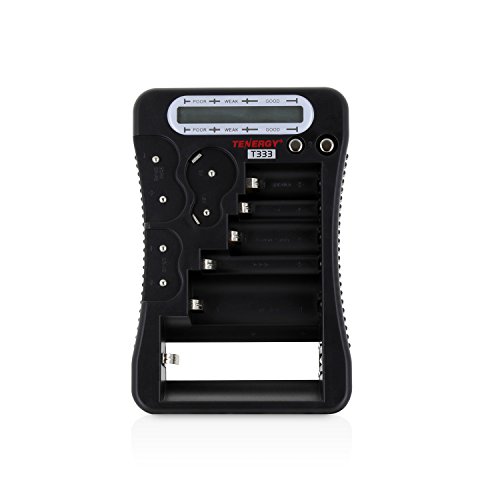
The Tenergy T-333 uses an LCD bar display and accepts a range of household batteries, including button cells. It runs on one AAA battery, included in the manufacturer’s package.
The important qualification is in Tenergy’s own FAQ: this model determines battery status from voltage and does not perform load testing. It can be useful for an initial check, but a reassuring bar display does not prove that a cell will power a particular device successfully.
Fit also matters. Tenergy explicitly excludes CR2320, CR2325, CR2330, CR2354, CR2412, CR2430, CR2450, CR2477 and CR3032. Do not force those cells into the contacts or assume that a product described as universal accepts them.
Choose it for: simple checks across supported household battery sizes. Trade-off: voltage-only assessment and a limited coin-cell fit range. Match the cell to the tester’s marked position and instructions.
3. Gardner Bender GBT-500A: for an analog meter and leads
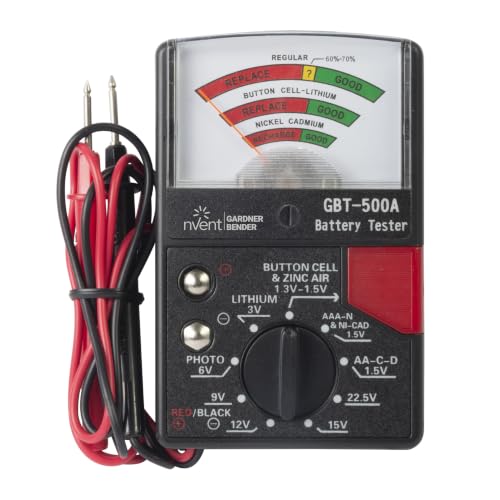
The Gardner Bender GBT-500A has a selector switch, a color-coded analog scale, test leads and a small button-cell retainer. Its documented ranges include 1.5-volt button cells and 3-volt lithium batteries, alongside several larger household battery types.
The owner’s manual specifies a 1 mA test load for the 1.5-volt button-cell and 3-volt lithium ranges. It also directs users to the middle scale for button and lithium cells. That is a more specific basis for choosing it than simply seeing a needle move into a green area.
Choose it for: someone comfortable selecting the correct range and using leads. Trade-off: there is more room for setup error than with a clearly labeled dedicated contact. Follow the manual’s polarity, range and retainer instructions. This is a battery tester, not an instrument for checking wall outlets or household wiring.
Voltage checks, load tests and remaining capacity
A voltage checker measures electrical potential at the battery terminals. A load test also asks the battery to supply current. ZTS explains that its pulse-load approach applies a load for a controlled interval; the load and timing depend on the battery type.
These methods answer related but different questions. A quick voltage reading can identify a clearly depleted cell. A suitable load test adds information about its ability to supply power. Neither a color zone nor a percentage display is a promise that a key fob, watch or sensor will run for a particular number of days.
Do not apply one universal replacement voltage to every button battery. Use the cell maker’s documentation and the device’s requirements. If a device remains unreliable with a correctly installed, specified replacement battery, investigate the device rather than repeatedly swapping cells based only on a tester reading.
What to check before you buy
- Exact cell code: read the marking on the battery or the device’s instructions. Similar diameter does not establish compatibility.
- Rated voltage and chemistry: choose the matching range or contact. Do not treat a 1.5-volt button-cell position as a general-purpose coin-cell input.
- Physical fit: confirm that the battery reaches both contacts securely without force, improvised spacers or shorting the terminals.
- Test method: decide whether basic voltage screening meets your need or whether a documented load test is worth the added expense.
- Readable controls: small markings, a sliding needle or a loose probe may be inconvenient. Choose around the user’s eyesight and hand control.
- Exact model and seller: the MBT-1, T-333 and GBT-500A are distinct products. Check the selected variant and current return terms.
A careful testing routine
- Work on a clear surface away from children and pets. Keep only the battery being checked on the work area.
- Read the device and tester instructions before removing the cell. Do not pry into a sealed product or improvise access to a battery compartment.
- Confirm the battery code, voltage and polarity, then use the correct tester setting or contact.
- Test only as directed. Do not repeatedly hold a test button down or bridge the terminals with metal tools.
- Return a suitable battery to its intended device, or secure a spent one for proper disposal. Close the device’s battery compartment correctly.
A tester does not recharge batteries. Do not attempt to recharge a non-rechargeable coin cell, and do not use a tester to justify continued use of a leaking, damaged or swollen battery.
Bottom line: choose around the cells you actually use. The ZTS offers a published selection of supported coin and watch cells with pulse-load testing, Tenergy supplies a simple voltage check with explicit size exclusions, and Gardner Bender provides a manual-range analog option. Correct compatibility and safe handling matter more than the word “universal.”
Image note: Examples of handheld battery testers; pictured models may differ from the options compared below.
