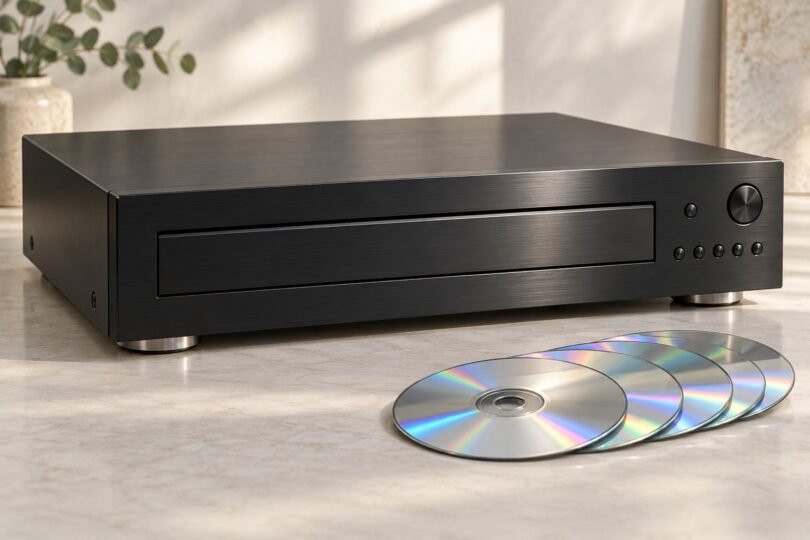

A multi-disc CD changer makes sense when you want several albums ready to play through an existing stereo. The useful comparison is between real carousel players, their connections and the discs you own. A single-disc transport, an external computer drive and a portable CD player solve different problems.
Start with the Yamaha CD-C603 if USB music playback matters; consider the Onkyo DX-C390 if you want six discs or a coaxial digital output. Both have manufacturer documentation worth checking before purchase. This guide compares documented features and practical buying considerations; it does not claim listening tests, measured reliability or a universal sound-quality winner.
Multi-disc CD changers at a glance
| Model | Disc capacity | Audio connections | Main reason to consider it |
|---|---|---|---|
| Yamaha CD-C603 | 5 | Stereo RCA and optical digital | Carousel playback plus USB files |
| Onkyo DX-C390 | 6 | Stereo RCA, optical and coaxial digital | One more disc and both common digital connections |
| Yamaha CD-C600 | 5 | Stereo RCA and optical digital | Discontinued model to assess carefully when buying used |
The capacities and connections above come from Yamaha’s CD-C603 specifications, Onkyo’s DX-C390 product information and the CD-C600 owner’s manual. A listed model or shopping link is not a promise of stock, a particular seller or a particular condition.
Yamaha CD-C603: five discs and USB playback
The CD-C603 is the more flexible starting point if your collection mixes physical CDs with music files. Yamaha lists CD, CD-R and CD-RW support, plus MP3, WMA, AAC, WAV and FLAC playback. Its front USB port provides an alternative to loading discs, and supported WAV/FLAC files extend to 24-bit/96kHz. It is still a stereo source component: budget for suitable amplification and speakers if you do not already have them.
Yamaha’s product overview confirms that PlayXchange lets you replace four discs while the fifth plays. With playback stopped, the fully opening tray makes all five positions accessible. Pure Direct disables the digital output and display, so leave it off when using an optical connection. That setting is an operational consideration, not evidence that one connection must sound better.
Choose it for: a five-album rotation, a USB flash-drive library, or a system with optical or ordinary stereo inputs. If your DAC only accepts coaxial digital, this player’s output selection is a mismatch without additional equipment.

Yamaha CD-C603BL 5-Disc CD Changer with USB Playback, Black
As an Amazon Associate we earn from qualifying purchases.
Onkyo DX-C390: six discs and more output choices
The DX-C390 holds six discs, with five available for replacement while the remaining disc plays. Onkyo documents random playback and a 40-track memory function. Those features suit listeners who want a small stack of albums ready for a long evening, without converting their collection to files.
Its supported-disc guidance covers audio CDs, recordable media and compatible MP3 discs. Do not transfer Yamaha’s WAV, FLAC or USB capabilities to this model. Onkyo also warns that burning settings, disc condition and complex folder structures can prevent otherwise compatible recordable discs from working. Keep a representative homemade disc available when evaluating a unit.
The rear-panel guide confirms RCA analog, optical digital and coaxial digital outputs. The RI sockets are control connections, not additional audio outputs. Onkyo says RI operation also requires analog connections to compatible Onkyo equipment, even if a separate digital cable handles your listening setup.
Choose it for: six-disc capacity, MP3 CDs, or a receiver/DAC that needs coaxial digital. Its extra slot is a convenience advantage; it does not establish better sound or greater durability.

Yamaha CD-C600: a used-market option, not the same player
Yamaha explicitly marks the CD-C600 as discontinued. Its five-disc layout and PlayXchange feature can make listings look similar to the CD-C603, but the file support is different. The older manual documents MP3 and WMA playback from compatible discs and USB devices, plus support for specified older iPods. Do not assume it accepts the newer player’s entire file list or today’s phones.
It has analog RCA and optical outputs. When comparing used examples, prioritize a working tray, reliable reading of every slot, the correct remote and a meaningful return option. A low asking price can become poor value if the mechanism needs repair or essential controls are unavailable.
What “change discs while playing” actually means
These features let you exchange idle discs, not remove the disc currently playing. The procedures are also different. On the Yamaha CD-C603, use PLAYXCHANGE; the manual warns against placing a disc in the rear-most inaccessible position, and DISC SKIP does not operate with the tray open.
For the Onkyo, the loading instructions explain that the playing disc stays inside while DISC SKIP brings the other bays forward. The next disc cannot start while the tray remains open, so close it after making your changes. Use the eject controls rather than pushing or obstructing the tray. Neither system promises seamless DJ-style mixing between albums.
Check formats before comparing DAC specifications
A factory-made audio CD and a CD containing computer files are not interchangeable formats. A player may accept both, but only within its documented rules. Renaming a file extension does not convert the audio. For an audiobook compilation, check track order, supported files and whether your chosen playback mode works with data discs.
The CD-C603 manual specifies finalized recordable discs, supported sample rates and FAT16/FAT32 USB storage. DRM-protected files are excluded. Onkyo’s MP3 guidance limits a disc to 499 files and folders in total, including at most 99 folders. For its digital outputs, the DX-C390 manual specifies MP3 sample rates of 32, 44.1 or 48kHz. Check this if you have low-sample-rate spoken-word files.
Match the changer to your stereo and shelf
For a receiver with a spare line-level CD or AUX input, stereo RCA is the straightforward connection. Match left and right channels and select that input. Do not use a turntable’s phono input. Optical or coaxial digital instead sends audio to a compatible receiver or DAC for conversion. A coaxial digital socket uses a single RCA-shaped connector; it is not the same connection as the red-and-white analog pair.
Measure the shelf, rear cable clearance and space in front for the extended tray. Yamaha specifies a CD-C603 chassis approximately 17 1/8 inches wide and 16 inches deep; Onkyo’s current product page lists the DX-C390 at 17 1/8 inches wide and 17 1/16 inches deep. Allow the ventilation space required by the manual rather than treating these chassis dimensions as minimum cabinet dimensions.
Regional models and secondhand checks
Buy the correct electrical version. Yamaha’s manual specifies 120V/60Hz for U.S./Canadian CD-C603 units and 230V/50Hz for Europe/U.K. versions; other regions have their own ratings. The DX-C390 manual distinguishes North American 120V/60Hz units from other 230V/50Hz versions. A plug adapter does not change voltage. Confirm the actual rear label and local warranty coverage before buying an import.
- Ask for playback from every disc position, including track skips near the end of a disc.
- Check tray opening, carousel selection and exchange-during-play operation.
- Test the output you intend to use; working RCA does not establish that optical or coaxial works.
- Confirm the remote, power cable, cosmetic condition and return terms.
- Ask the seller to remove all discs before packing and follow the model’s transport instructions.
Common buying questions
Can either changer drive passive speakers directly?
No. Their audio connections feed another component. Use an amplifier/receiver with passive speakers, or suitably equipped powered speakers with volume control.
Should I buy a much larger vintage changer?
Only if leaving dozens of albums loaded is worth the extra space and used-equipment uncertainty. Check the exact model’s manual, service options and loading mechanism. A large capacity alone does not tell you whether a particular example still operates reliably.
Which is the most practical choice?
Choose the CD-C603 for documented USB/file flexibility, or the DX-C390 for six discs and coaxial output. Consider the discontinued CD-C600 only after checking condition and its narrower compatibility. The right match is the player that handles your library, fits your system and arrives with clear seller support.