
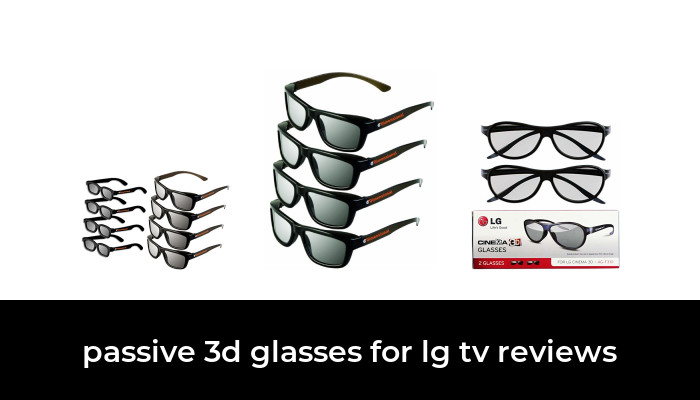

The right passive 3D glasses for an LG TV depend on the television’s 3D system. If your set is a compatible LG Cinema 3D model that uses FPR passive glasses, the ED adult four-pack is a straightforward option for replacing missing glasses or equipping several viewers. LG’s AG-F310 is also a useful original-model reference, although LG marks it discontinued.
Check the full TV model number before ordering. An LG logo, a 4K panel or an OLED screen does not establish passive 3D compatibility. These glasses cannot add stereoscopic 3D support to a television that lacks it, and they do not replace the powered glasses required by an active-shutter system.
Start with the TV, then choose the glasses
Find the model number on the television’s label or in its settings and look up the corresponding manual. Look specifically for Cinema 3D, FPR or passive 3D support and the recommended glasses. Do not rely on a seller’s broad list of TV brands.
For example, LG’s LM6200 specification sheet identifies its 3D system as FPR passive. That is useful confirmation for that model family; it is not a compatibility list for every LG television.
- Compatible passive Cinema 3D TV: choose the circular-polarized movie glasses specified for that system.
- Active-shutter 3D TV: follow its manual for the required powered glasses and synchronization method.
- TV without a supported 3D mode: buying either kind of glasses will not add the missing display feature.
- Projector: use the projector’s own compatibility instructions. A listing that mentions LG TVs does not establish projector support.
ED adult passive 3D glasses: a practical four-person pack
The exact product here is the ED Cinema 3D Glasses four-pack, ASIN B00GTVV3NM. It contains four black, adult-size pairs. The product listing identifies eDimensional as the manufacturer and describes the lenses as passive and circular-polarized. It also lists a cleaning wipe and instructions.

ED Cinema 3D Glasses, Adult-Size Black Passive Circular-Polarized, 4 Pairs
As an Amazon Associate we earn from qualifying purchases.
This is the option to consider when several adults share a compatible LG Cinema 3D set. One multipack keeps the frame type consistent across the group and provides spares if your original glasses have gone missing.
The important limitation is fit. An adult four-pack is not a mixed adult-and-child set, and the listing does not establish a guaranteed fit over every prescription frame. If you wear glasses, compare the frame shape with a pair you already find comfortable. If a smaller viewer needs a different frame size, buying additional adult pairs does not solve that problem.
The manufacturer excludes active 3D televisions, home projectors and IMAX 3D theaters from this product’s intended uses. Those exclusions are more useful than generic claims about being compatible with many brands. Its suitability here rests on matching the passive Cinema 3D system in your TV manual.
Do not pay extra on the assumption that promotional claims about stronger plastic or better lenses guarantee a visible upgrade. The reasons to consider this pack are its specified lens system, adult sizing and four-pair quantity. Comfort and optical performance still need checking with your own television and seating arrangement.
LG AG-F310: an original-model reference for replacement shopping
LG’s official US AG-F310 page identifies these as Cinema 3D glasses with an FPR design, no battery or wires, and a stated weight of 13.5 grams. It also lists a cleaning cloth and storage pouch.
LG marks the model discontinued. Keep the AG-F310 name as a reference when checking an older TV’s documentation or comparing an existing pair. A surviving resale listing needs its own checks for condition, quantity and included accessories. The model name alone does not tell you whether a seller is offering one pair, a two-pair bundle or used glasses without the original pouch.
For most replacement shopping, confirm the required technology first rather than treating an old model number as a reason to buy an uncertain listing. If you specifically want original LG frames, request clear photographs of the model markings and lenses before choosing a resale offer.
Avoid these easy-to-confuse listings
Dual Play glasses
AG-F310 and AG-F310DP are different products. The DP version is for Dual Play gaming. LG’s AG-F310DP manual explains that each player gets a separate full-screen view of a two-player game and that the feature uses 2D images. It explicitly distinguishes Dual Play glasses from regular 3D glasses.
For a 3D film, skip listings labeled Dual Play, Player A or Player B. A familiar LG model prefix does not make that specialized gaming accessory the right purchase for movie viewing.
Glasses that turn 3D into 2D
Some similarly named eDimensional products are designed to let a viewer watch a 3D presentation in 2D. That can serve a different purpose, but it is the opposite of what someone shopping for stereoscopic movie glasses needs. Read the full title instead of stopping at the words “passive” and “LG.”
Colored-filter glasses and costume props
Red-and-cyan anaglyph glasses are a separate format. Paper party props may also resemble movie glasses without providing the required filters. For Cinema 3D, the listing must identify the correct passive circular-polarized viewing system.
Check comfort before ordering a large pack
The useful questions are simple: does the bridge stay in place, do the arms pinch, and can you look through the lenses naturally from your usual seat? If you wear prescription glasses, check that the two frames do not press against each other or force the 3D lenses into an awkward position.
Clip-ons and over-glasses frames can be worth investigating for prescription wearers, but they need their own verified compatibility and sizing. A product called “universal” is not enough evidence. Start with a small quantity when fit is uncertain, and check the seller’s return terms before ordering.
If the image still looks doubled
First confirm that you are playing supported 3D content on the correct input. LG’s external-device 3D instructions describe selecting the input, starting the video and choosing the matching 3D image format. The exact menus vary by model.
- Check the source device and video format against your TV manual.
- Make sure the TV is in the appropriate 3D mode rather than ordinary 2D viewing or Dual Play.
- Compare with a known-working pair, if you have one, using the same content and seat.
- Inspect both lenses for dirt, obvious damage or an incorrect product type before assuming the TV has failed.
A clean, soft cloth and a protective place to store the glasses are sensible basics. Follow the supplied cleaning instructions rather than experimenting with household solvents. If a pair is damaged or viewing feels uncomfortable, stop using it and reassess the setup.
Which option should you choose?
Choose the ED adult four-pack when your TV manual confirms compatible passive Cinema 3D viewing and you need several adult-size pairs. Use LG’s AG-F310 documentation to identify the original accessory, with extra care around discontinued-product resale listings. For any uncertain TV, resolve the model compatibility first; that check matters more than the number of glasses in the box.
Image note: Relevant existing category illustration retained.
