

The right remote control for an RC car depends on the receiver already inside the vehicle. Start with that model number. A handset marked “2.4GHz” will not automatically bind to every 2.4GHz car, and a hobby transmitter is rarely a direct replacement for a lost toy-car remote.
For a hobby car with separate, replaceable electronics, a matched transmitter-and-receiver set is a practical upgrade. The Spektrum SLT3 set below suits straightforward driving with physical controls; the Flysky FS-GT5 set adds channels and saved setups for more involved builds. Neither is a universal remote.
Which replacement route fits your car?
- Lost remote for a toy-grade car: Look for the exact vehicle model, production version and replacement handset specified by its manufacturer. A matching body shape or frequency label is insufficient.
- Working hobby receiver, broken transmitter: Identify the receiver’s exact protocol and compatible transmitters before buying a handset alone.
- Hobby car with a separate receiver and ESC: A matched radio set can be an option, provided its receiver fits and works with the steering servo and electronic speed controller.
- Combined receiver/ESC board: Check the vehicle’s documentation first. Changing radio systems may also require a separate ESC, compatible servo connections and additional space.
If the car will not respond, first check charged batteries, battery contacts, the vehicle’s power switch and the manufacturer’s pairing sequence. A replacement radio will not fix a damaged servo, failed ESC or loose power connection.
Two RC transmitter-and-receiver sets to compare
Spektrum SLT3 with SLR300: physical controls for a simple setup
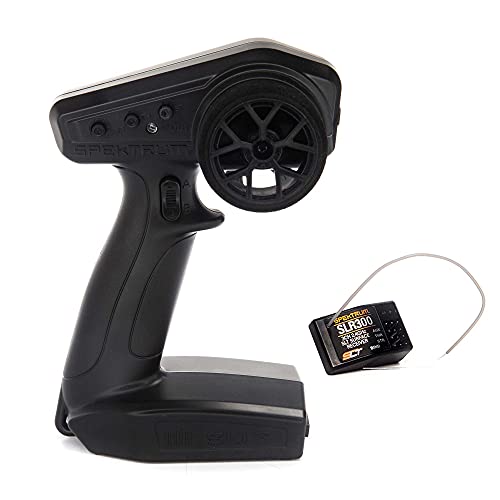
Spektrum SLT3 SPMSLT350, 3-Channel SLT with SLR300 Receiver, 1 Radio Set
As an Amazon Associate we earn from qualifying purchases.
This is the SPMSLT350 package: one SLT3 transmitter and one SLR300 receiver. It is worth considering when steering, throttle/braking and one auxiliary channel cover the job. Steering and throttle trims are accessible without navigating a display, and the steering-rate control makes travel adjustment straightforward.
The throttle-limit switch offers 50%, 75% and 100% settings. Those limit the radio’s throttle command; they are not a measured speed limit or a substitute for a suitable driving area. The transmitter uses four AA batteries. Its third channel is a three-position momentary switch, so confirm that behavior suits the accessory you intend to operate.
Compatibility limit: The included SLR300 uses SLT FHSS. It is not a DSMR receiver, even though other Spektrum products use DSMR and some SLT3 packages contain different receivers. Check “SLR300” and “SPMSLT350” on the listing rather than relying on the Spektrum name. See the manufacturer’s package contents and SLT3 receiver and control instructions.
Flysky FS-GT5 with FS-BS6: extra channels and model memory

The selected HOBBYMATE listing contains the Flysky FS-GT5 transmitter and FS-BS6 gyro receiver. Its six channels leave more room for functions beyond steering and throttle, and its 20-model memory is useful when several compatible vehicles need different trims and travel settings.
Flysky specifies AFHDS 2A, crawler steering modes and SVC stabilization for this system. That makes it a candidate for a crawler with additional steering functions or a car where adjustable gyro assistance is wanted. Check how each auxiliary channel operates: a dial, switch and trigger serve different jobs even if they all count as channels.
Trade-off: There is more setup to understand. Gyro direction, receiver orientation and channel assignment must be correct before driving. Six channels alone do not guarantee support for every winch, light controller or steering arrangement. The official GT5 feature page and GT5 manual are the appropriate references for supported modes.
Choose the selected transmitter-and-BS6 bundle carefully. A receiver-only listing or a differently bundled radio does not provide the same package.
Compatibility checks before spending money
Match protocol, then confirm the receiver model
Frequency describes the radio band; protocol determines how the transmitter and receiver communicate. These sets illustrate the distinction: SLT FHSS and AFHDS 2A both use 2.4GHz, but they are different systems. Also avoid assuming that every product from one brand shares a protocol. The GT5 specifications explicitly identify AFHDS 2A.
Check connections and receiver power
Inspect the car while it is switched off and its battery is disconnected. Identify where the servo and ESC connect, note plug orientation, and compare the receiver’s supply-voltage range with the ESC’s BEC output or receiver battery. The vehicle’s drive-battery voltage is not necessarily the voltage delivered to its receiver. Do not connect the drive battery directly unless the equipment documentation specifically supports that arrangement.
Budget for the entire conversion
Include any required receiver, mounting materials, transmitter batteries and electronics replacements. Photograph the original wiring before removal. If the current system has telemetry, stabilization, lights or a multi-speed transmission, list those features and confirm which will remain available. Replacing an integrated board can turn a cheap handset purchase into a much larger project.
Set up the new radio safely
- Secure the model. Keep driven wheels clear of the surface and hands clear of rotating parts. For a fuel-powered vehicle, perform initial radio adjustments with the engine off.
- Follow the exact binding instructions. The sequence varies by receiver. A solid link indicator establishes the radio connection, not correct steering, throttle calibration or failsafe behavior.
- Verify direction and neutral. Confirm that steering moves as intended, the vehicle does not creep at neutral and the ESC recognizes throttle and braking correctly. Recalibrate the ESC using its own manual when required.
- Set travel without binding the mechanism. Check both steering directions and avoid driving a servo against a mechanical stop. Understand the difference between centering trim and end-point adjustment.
- Configure and test failsafe. Use the receiver’s procedure and verify its actual response with propulsion safely restrained. Spektrum specifically directs SLR300 users to set zero throttle for failsafe.
- Check control at low speed in a clear area. Complete the manufacturer’s range check. Stop if response becomes intermittent or abnormal, rather than compensating with more throttle.
Common questions
Can a phone replace the remote?
Only when the car has a supported app-control system or a manufacturer-approved interface. An ordinary phone does not become an SLT or AFHDS 2A transmitter by installing a generic RC app.
Does a gyro make the car safe to drive faster?
Gyro assistance can change steering behavior, but it cannot guarantee traction, avoid obstacles or compensate for an incorrectly configured radio. Start with the manual’s setup procedure and conservative driving.
Which set should I choose?
Choose the SLT3/SLR300 package when its three channels and physical controls match a simple build. Choose the GT5/BS6 package when its additional channels, memory and supported steering modes solve a real need. For a lost toy-car handset, confirm an exact replacement before considering either conversion.
Image note: AI-generated editorial illustration; not a photograph of a named product or an installation/compatibility diagram.


