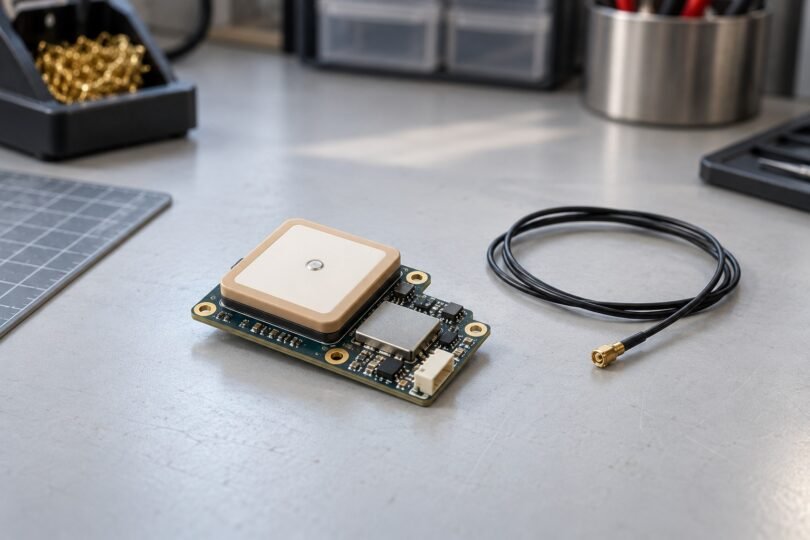

The right FPV GPS module is one your flight controller and installed firmware can configure reliably. Start with the receiver model, supply voltage, available UART and mounting space. Choose a compass-equipped version only when your flight system needs it and you can install and calibrate it correctly.
A GPS receiver supplies position and motion data. Rescue, return-to-home and waypoint behavior come from the flight controller’s software and setup. A new receiver alone cannot guarantee that an aircraft will return safely.
What to choose for your flight system
- Betaflight quad: prioritize a documented u-blox receiver, a spare hardware UART and clean satellite reception. An optional compass needs clean, validated data to help GPS Rescue.
- INAV navigation build: choose hardware around the navigation requirements for your aircraft type and firmware release. Check the compass and altitude-sensor requirements before buying.
- ArduPilot build: match the receiver interface and connector to the controller, then follow the relevant vehicle’s navigation setup. A serial GPS and a DroneCAN GPS are different products.
Use the Betaflight GPS Rescue guide, INAV navigation documentation and ArduPilot Copter RTL guide for the applicable system. Compatibility with one firmware family does not establish compatibility with another controller or connector.
Two documented compact modules and their differences
These are useful reference models when checking an existing build or a replacement listing. Matek marks both as end-of-life, so the documentation is not evidence of current stock or a recommendation to pay a premium for old inventory.
| Exact module | Receiver and compass | Electrical interface | Size and manufacturer package |
|---|---|---|---|
| Matek SAM-M10Q | u-blox SAM-M10Q; maker notes specify SAM-M10Q-00B. No compass. | 4–9 V board input; UART TX/RX; UBX or NMEA; four-pin JST-GH connector. | 26 × 16 × 8 mm; 7.5 g. One module and one 20 cm four-pin cable. |
| Matek M10-5883 | u-blox MAX-M10S receiver and QMC5883L compass. | 4–9 V board input; UART for GNSS and separate I2C for the compass; six-pin JST-GH connector. | 23 × 23 × 10 mm; 9 g. One module and one 20 cm six-pin cable. |
The SAM-M10Q suits a build that needs position data without an integrated compass. The M10-5883 adds compass wiring and installation requirements. Neither should be confused with the similarly named M10Q-5883, an older M8Q product or a bare u-blox component.
Matek lists minimum host-firmware versions of Betaflight 4.3.0 and INAV 5.0.0 for both models. Its ArduPilot minimum is 4.3 for SAM-M10Q and 4.1 for M10-5883. These are the maker’s compatibility floors, not advice to install old releases; verify the exact flight-controller target and the documentation for the release you actually use.
Check wiring before connecting power
For these two Matek boards, receiver TX connects to the flight controller’s UART RX, and receiver RX connects to UART TX, with a common ground and an approved supply. UBX communication is bidirectional, so the return connection matters for automatic configuration. On the M10-5883, the compass additionally uses DA/SDA and CL/SCL. Follow the exact product diagram rather than wire colors or connector shape.
The 4–9 V figure is the assembled Matek board’s power-input rating. It does not make a bare receiver, UART signal pin or another brand’s module tolerant of that voltage. Do not connect a flight battery directly unless the exact board documentation explicitly permits its voltage.
Remove propellers for bench work, disconnect power before changing wiring, and use the flight controller’s documented power arrangement. USB does not power the GPS rail on every board. Confirm the physical UART assignment and select the corresponding GPS port and protocol in the configurator. Betaflight explains its UBLOX automatic configuration and USB-power caveats in its GPS setup documentation.
Mount the antenna for reception, then align the compass
For a conventional flat patch-antenna installation, the antenna face should have an unobstructed view upward toward the sky. Keep nearby electronics, large obstructions and transmitting antennas out of its immediate surroundings. The u-blox SAM-M10Q integration manual explains why the antenna’s ground plane, nearby components and interference affect reception. Smaller dimensions alone do not establish better installed performance.
A compass arrow is a separate alignment issue. For the M10-5883 mounted flat with its arrow and the flight controller’s arrow forward, Matek specifies CW 270° Flip in INAV/Betaflight and Rotation None in ArduPilot. It also calls for 10 cm separation from power wiring, ESCs, motors and iron-containing material. If your frame cannot accommodate that placement, do not assume the compass data will be usable.
GPS Rescue is version-dependent
Betaflight’s current guide covers 4.4 and later and describes a return sequence that can descend, land and disarm. Its 4.1–4.3 guide describes the older emergency behavior without automatic landing. Advice written for one generation can be wrong for another.
Rescue still depends on a valid home position, satellite data, correctly working leveling and suitable configuration. Strong wind, poor heading information or a failed sanity check can prevent a successful return; some failures cause disarming. It does not promise obstacle avoidance or crash prevention. Use the current release’s complete setup and validation procedure before relying on it.
INAV also provides waypoint navigation, while ArduPilot’s RTL behavior has its own altitude and landing settings. Those functions are configured at the aircraft level. Buying a module advertised as “return home” does not add a complete autonomous navigation system.
Why a detected GPS can still have no fix
A receiver appearing in the configurator confirms communication, not satellite reception. If it is not detected, first check the supply, UART selection and crossed TX/RX connections. If it is detected but has no usable fix, move to a clear outdoor location and investigate interference from nearby video equipment. Keep propellers removed during these ground checks.
A cold start and a restart with retained satellite data are different conditions, so a seller’s fastest acquisition claim is not a reliable comparison. Matek’s GPS troubleshooting notes also explain why a PPS light may lag a position fix. Inspect the actual fix and data in the configurator rather than using an LED as the only acceptance test.
Before you buy
- Record the flight controller model, firmware target/version and free UART.
- Match the full receiver-board name, revision, voltage and protocol to its manufacturer documentation.
- Measure space for the module, cable bend and antenna clearance; check whether a compass can be positioned properly.
- Confirm the exact connector pin order and included cable. A matching plug is not proof of matching wiring.
- Check the seller’s actual item photos, package quantity, condition and return policy. A GPS mount, telemetry radio, complete drone or camera accessory is not a standalone GPS receiver.
Finally, GPS capability does not grant permission to fly beyond visual line of sight or remove other operating obligations. For U.S. recreational flights, check the FAA’s current recreational-flyer requirements, including visual-observer, airspace, registration and Remote ID requirements where applicable.