The best fairy lights with a remote are the ones that fit your power source and decorating plan. For separate table displays, choose short battery-powered strands. For a permanent shelf or window display, USB or plug-in lights avoid regular battery changes. A remote is especially useful when the control box will be difficult to reach, but you still need to leave its receiver accessible.
The two verified options below cover warm-white battery lights and color-changing USB lights, followed by guidance on battery, USB and plug-in arrangements. Recommendations are based on documented features and exact product variants, rather than hands-on brightness or battery-life testing.
Fairy lights with remotes to compare
Homemory HXD6MT4NBYK for several separate battery-powered displays
This warm-white set contains four separate 20-foot strands, each with 60 LEDs. That makes it a practical choice for four small decorating areas, such as centerpieces, shelves, or wreaths. The battery boxes let you place the lights away from wall outlets, provided you can keep the boxes accessible for battery replacement.
Homemory’s product information describes a 13-key remote, a control button on the battery box, brightness adjustment, eight lighting modes, and a repeating timer that runs for six hours and then stays off for 18 hours. The box includes a hook for positioning it within a display.
Good fit: separate decorative arrangements that would be awkward to join with a power cable. Trade-off: four powered strands also mean four battery boxes to maintain. Check the battery size and quantity on the supplied product, and budget for replacements. Four 20-foot strands do not form a single continuous 80-foot string.
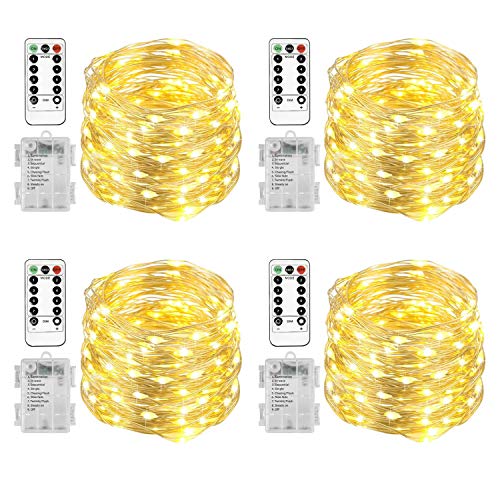
Homemory HXD6MT4NBYK Fairy Lights, Warm White, 20 ft and 60 LEDs Each, 4-Pack
As an Amazon Associate we earn from qualifying purchases.
Homemory HUSBQC10MT1 for a color-changing USB display
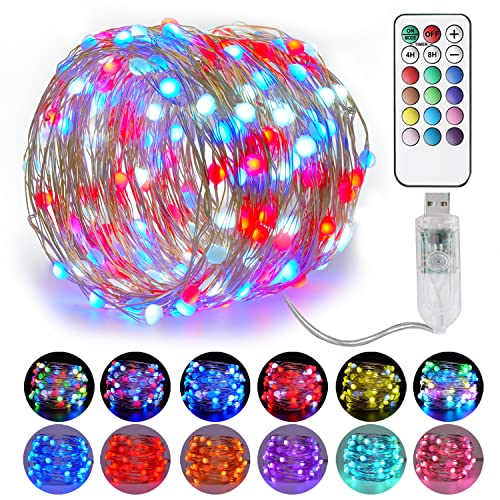
The HUSBQC10MT1 is a single 33-foot strand with 100 LEDs, a USB power connection, and remote control. It is worth considering when you want to change the mood of a shelf or party display without replacing warm-white lights with a different set.
Homemory’s color-changing product page confirms USB power, remote-controlled effects, and a timer. The exact HUSBQC10MT1 listing specifies a six-hour-on, 18-hour-off timer and a memory function. The manufacturer page and listing describe different counts of colors and effects, so check the actual remote and instructions if a particular color combination matters to you.
Good fit: decorative lighting near a suitable USB power supply, with more color flexibility than a fixed warm-white strand. Trade-off: USB describes its power connection, not a rechargeable battery inside the lights. Confirm whether the offer includes a wall adapter, and protect the USB connection from water. A power bank may be convenient, but its automatic shutoff behavior can affect low-power accessories.
Choose the power source before the light count
Battery-powered lights suit temporary displays and places without outlets. The real maintenance cost depends on how many strands you use, brightness, operating time, and the batteries specified by the manufacturer. A remote does not eliminate battery changes, and a timer does not guarantee a particular runtime. Keep every battery compartment reachable.
USB-powered lights suit desks, shelves, and small displays near a compatible supply. Check the required voltage and current, the connector type, and what comes in the package. A laptop USB port may stop powering accessories when the computer sleeps. If you want an unattended schedule, test the exact supply you plan to use.
Plug-in lights are convenient for repeated daily use when a safe outlet is available. Route the cable without trapping it in a door or stretching it across a walkway. Use only the adapter specified for that set. Similar-looking connectors do not establish that two power supplies are interchangeable.
Measure illuminated length and lead length separately
Measure the path you want to decorate, including loops and droops. Then measure the distance from the first light to the power source. A product’s headline length may describe the illuminated section, the full cable, or the total across several strands. Check which measurement the seller provides.
For example, four 20-foot strands work well for four separate tables. They are less convenient if your goal is one uninterrupted 60-foot outline. Conversely, one long strand can leave excess wire to hide when the display is small. LED count affects spacing and visual density, but it is not a standardized brightness measurement across brands.
Check what the remote actually controls
Look for the functions you want: power, steady-on mode, effects, brightness, and timer. Color-changing lights need their own compatible controller; a remote cannot make a warm-white-only strand produce red or blue light.
Infrared remotes normally need a clear path to the receiver. Radio-frequency remotes can behave differently, so confirm the control type rather than assuming it works through a cabinet. If you plan to run several sets in the same room, test whether one remote changes them together. Shared remote codes can be useful for a group display and frustrating when you want independent control.
A repeating six-hour timer usually follows the time it was activated. To light a display in the evening, activate it at your intended start time and observe a full cycle. Mode memory, timer memory after a power loss, and a programmable clock are separate features. Test the behavior before adding a smart plug or relying on a daily schedule.
Treat outdoor claims component by component
The light wire, battery box, controller, plug, and power adapter may have different protection levels. A water-resistant strand does not automatically make the complete system suitable for exposed rain. Keep connections away from standing water, and do not submerge a set unless its instructions explicitly permit it.
For mains-powered outdoor decorations, use products and extension equipment labeled for that use and a GFCI-protected supply. The CPSC’s decorating guidance recommends checking outdoor suitability, inspecting for damaged wiring, and turning decorative lights off when leaving home or going to bed.
Install lights without creating a new hazard
Use appropriate clips or hooks without puncturing the wire. Avoid sharp bends, pinched insulation, heaters, and locations where pets can chew the strand. Fairy lights are decorations rather than toys; keep loose wires away from sleeping areas where they could become tangled around someone.
Remote controls may contain coin batteries, including the remote identified in the Homemory USB listing. Store remotes and spare batteries securely, and stop using a remote whose battery compartment will not close properly. The CPSC’s button-battery guidance explains why accessible small batteries need particular care around children.
Bottom line: pick the four-pack of battery lights for separate displays or the USB RGB strand for changing colors near a suitable power supply. For longer plug-in runs, match the illuminated length, adapter and remote features to your planned display. Confirm the power supply, exact pack size, receiver placement, and full timer behavior before mounting the lights where they will be hard to reach.
Image note: Existing category illustration retained from original article.