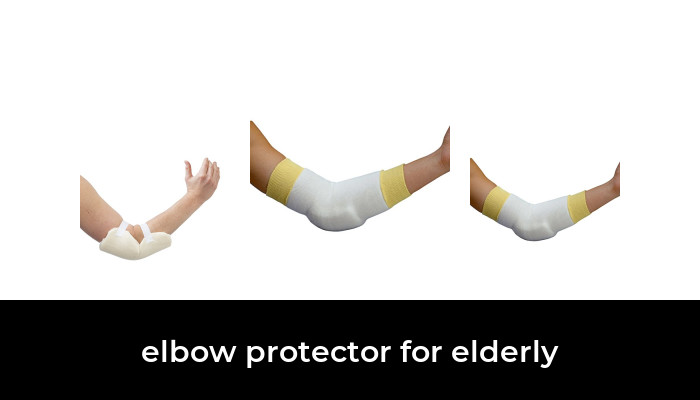
A call bell for an older adult at home is most useful when someone nearby can respond. A simple wireless button can ring a receiver in another room, helping a person ask for assistance without shouting. Choose the system around the person’s ability to press the button, the caregiver’s ability to notice the alert and the rooms where it must work.
The plug-in caregiver pagers below are local calling devices. They do not establish a connection to emergency services, provide automatic fall detection or guarantee that help will arrive. If the person spends time alone or may be unable to press a button, discuss a broader support plan and an appropriate emergency-alert service with their care team.
Start with the person and the response plan
Try the button together before relying on it. Can the person find it, recognize its purpose and press it comfortably while sitting or lying down? Can they reach it from the places they actually use? A small pendant may be convenient for one person and difficult for another. A fixed button can be easier to locate, but offers no help when it is out of reach.
Decide who is responsible for responding during each part of the day. A receiver that rings in an empty room accomplishes little. If the caregiver works outside, wears headphones or sleeps in a separate area, plan receiver placement and a backup communication method around those circumstances. The device should complement regular check-ins.
CallToU CC01 1+1: one button and one plug-in receiver
The CallToU CC01 1+1 configuration is a straightforward starting point for one main calling location and one caregiver area. The selected white kit contains one call button and one plug-in receiver. The button uses a battery; the receiver needs a suitable electrical outlet. “Wireless” describes the signal between them, not a battery-powered receiver you can carry while unplugged.
The manufacturer describes adjustable alert volume and selectable tones. Those settings let you choose an alert that the caregiver can recognize, but they do not establish audibility for a particular person or house. Begin at a comfortable level and test it in ordinary conditions. Keep the plug-in receiver dry and follow the manual’s placement limits rather than treating broad waterproof advertising as permission to wet mains-powered equipment.

CallToU CC01 Caregiver Pager, White, One Call Button and One Plug-in Receiver
As an Amazon Associate we earn from qualifying purchases.
CallToU CC01 2+2: two calling points and two listening locations
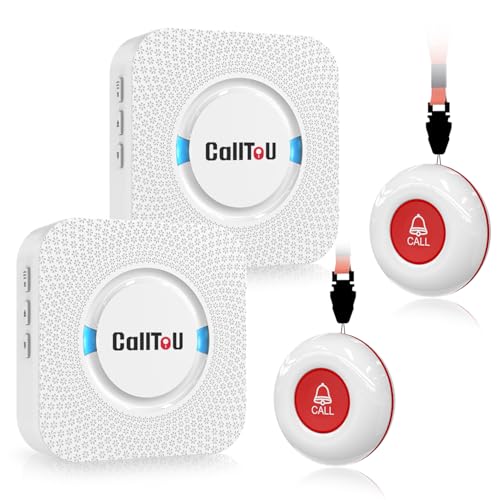
The CC01 2+2 kit contains two call buttons and two plug-in receivers in white. It is worth considering when a bedroom and sitting area both need a button, or when the caregiver moves between two parts of the home. Both receivers still require power from outlets; the extra receiver does not convert the kit into a monitored emergency service.
CallToU advertises a range of more than 500 feet in an open area. Walls, floors, metal and placement can change performance, so that figure is not a promise of coverage through a particular house. Test every intended button-to-receiver combination. Confirm the pairing and alert behavior in the supplied instructions before assuming both receivers respond to both buttons.
Features that matter more than a long range claim
- Button accessibility: consider its size, required pressure, contrast and mounting. Include the person using it in the choice.
- Alert type: sound, flashing light and vibration serve different needs. Verify the exact receiver has the type required; a flashing plug-in chime is not a vibrating portable pager.
- Power behavior: find out what happens when the outlet loses power, a button battery runs low or a receiver is moved.
- Call identification: if several people or rooms share a system, check whether you can identify the caller and whether the alert remains visible until acknowledged.
- Expansion: confirm compatibility by receiver and button model. Similar-looking accessories or matching brand names do not prove they pair together.
- Water exposure: check the rating of the button separately from the receiver and the specific permitted use. Splash resistance does not automatically permit immersion.
Set up and test the whole route
- Read the supplied instructions, install the correct button battery and plug the receiver into an appropriate dry location.
- Pair the devices as directed, then test each button before attaching it permanently.
- Place buttons where they can be reached without an unsafe stretch or transfer. Keep any strap or mounting arrangement suitable for the person and the care setting.
- Test from the bed, chair and other intended locations with doors closed and ordinary household noise present.
- Have the caregiver confirm the alert from their actual working and sleeping locations. Do not assume a high volume setting wakes every sleeper.
- Agree on a response and backup plan, then repeat checks after battery changes, moving equipment or changing room arrangements.
Consider a short written checklist beside the care plan: where the spare batteries are, how to recognize a failed test and who handles replacements. If alerts become intermittent, return to the manual and manufacturer support rather than accepting occasional success as adequate reliability.
When a call bell is not enough
A local pager cannot notify a caregiver who has left its range. It also depends on the person remembering and being able to activate it. Someone with changing mobility, dexterity, hearing or cognition may need a different arrangement. An occupational therapist or other relevant clinician can help assess how the device fits the person’s abilities and home.
The National Institute on Aging’s guide to home support explains that emergency medical alert systems need correct setup, use and battery maintenance and cannot replace regular check-ins. If a monitored service is needed, compare who receives an alert, how communication works, coverage, power backup and ongoing charges. For an immediate emergency, contact local emergency services directly when possible.
For a household with a nearby caregiver, choose the smaller CC01 kit when one alert location is enough, or the two-button/two-receiver kit when the layout benefits from extra calling and listening points. The decisive check is successful use in the actual home, together with a clear plan for someone to respond.
Image note: AI-generated editorial illustration of a generic home call button and receiver.