
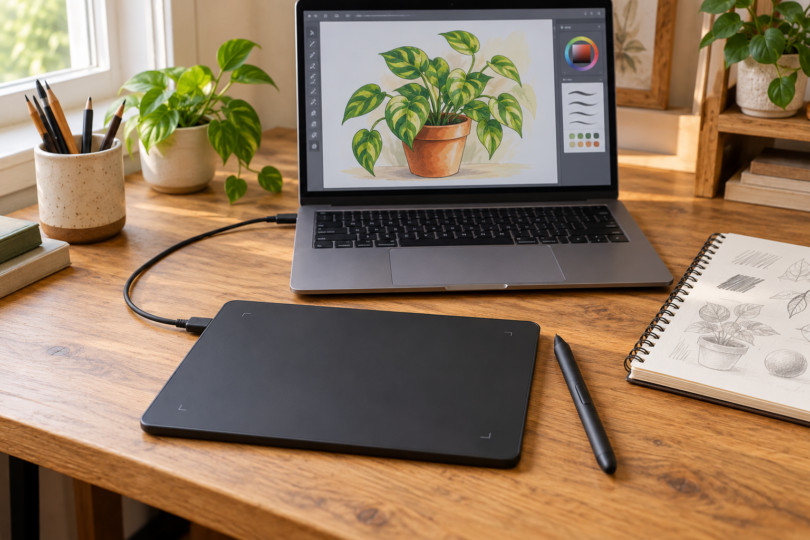

The Wacom Intuos Small wired tablet is our first choice for a beginner who already has a compatible computer and wants to learn digital drawing without adding another display. Choose the Huion Inspiroy 2 M for a larger drawing area, the XPPen Artist 12 (2nd Gen) to draw directly on a computer-connected screen, or an iPad (A16) with Apple Pencil (1st generation) to draw without a separate computer.
That last distinction matters more than pressure-level numbers. A screenless pen tablet, a pen display and a standalone tablet solve different problems. An inexpensive LCD doodle board is a different category again: it is not a substitute for a digital-art device that runs, or controls, drawing software.
Best drawing tablets for beginners: quick picks
| Pick | Best fit | What else you need | Main compromise |
|---|---|---|---|
| Wacom Intuos Small, wired CTL-4100 | A compact first pen tablet | Compatible computer, drawing app and suitable USB connection | You draw on the pad while looking at the computer screen |
| Huion Inspiroy 2 M, H951P | More room for hand movement | Compatible host device and drawing app | A larger desk footprint; no built-in display |
| XPPen Artist 12 (2nd Gen), CD120FH | Drawing directly on a screen at a desk | Compatible computer or supported Android host, correct video connection and power | Cables and host requirements remain |
| iPad (A16), 128GB Wi-Fi, plus Apple Pencil (1st generation) | A portable standalone sketchbook | Separate Pencil purchase and an iPad drawing app | Pairing the Pencil uses an adapter and cable |
Wacom Intuos Small: best first tablet for a computer
Choose the black wired CTL-4100, rather than assuming every Intuos Small listing includes Bluetooth. Its 6.0-by-3.7-inch active area and included battery-free Wacom Pen 4K (LP-1100K) provide a straightforward starting setup. The four ExpressKeys are customizable on Windows and Mac. The computer runs the drawing application; the pad supplies pen input. This makes it a sensible choice when you already like your laptop or desktop screen.
The learning hurdle is hand-eye coordination: your hand moves on the desk while the line appears elsewhere. Start with short line and shape exercises before deciding that you need a screen. Choose the larger Huion below if you prefer broad arm movements.
Check your exact model and operating system in Wacom’s driver selector. Current driver support is narrower than some legacy operating-system lists on product pages. Included software offers also have registration, operating-system and license conditions; do not count a trial as a permanent application license.
See Wacom Intuos specifications and choose the Small wired model.
Huion Inspiroy 2 M: best for a larger screenless drawing area
The Inspiroy 2 M, model H951P, suits beginners who want more drawing space without buying a display. Its PC active area measures 8.7 by 5.4 inches. The included battery-free PW110 pen supports pressure and tilt, while eight programmable keys, three shortcut-group keys and a scroller give you room to grow into shortcuts.
Choose the M size in Black or Pine Green; the S and L models have different dimensions. The standard package includes the pen, holder, replacement nibs, USB-C-to-USB-A cable and a USB-C OTG adapter. It is a wired input device, so it still needs a host and software.
Huion lists Windows, macOS, ChromeOS, selected Linux configurations and compatible Android/HarmonyOS devices. Check the current driver for your computer. Android use needs OTG support and uses a smaller mapped drawing area, so the full PC-area measurement should not guide a phone-only purchase. This is not an iPad accessory.
See the Huion Inspiroy 2 M package and color choices.
XPPen Artist 12 (2nd Gen): best compact pen display
Choose the Artist 12 (2nd Gen), model CD120FH, if looking directly at your pen strokes matters more than keeping the setup minimal. It has a fully laminated 1920-by-1080 display, eight shortcut keys and an included X3 Elite pen. The first-generation Artist 12 and the Artist 12 Pro are different products.
This screen does not run art apps by itself. The standard box includes a 3-in-1 cable for the host connection. A full-featured USB-C-to-USB-C cable is a separate purchase, and the host port must support the required video output; a USB-C connector alone is insufficient. Check power requirements too. Do not assume a stand is included in the standard package.
Review the connection instructions and model-specific driver downloads before ordering. Supported Android connections require the specified USB/DisplayPort capabilities. Older macOS versions may require legacy drivers rather than the newest download.
See the XPPen Artist 12 (2nd Gen) and standard box contents.
iPad (A16): best standalone option with a pressure-sensitive Pencil
The 128GB Wi-Fi iPad (A16) is the pick for drawing away from a computer. It runs iPad apps directly, and its approximately 11-inch display is large enough to make a portable sketchbook practical without requiring a keyboard-and-monitor setup.
For pressure-sensitive drawing, pair it with Apple Pencil (1st generation), sold separately. Apple lists the USB-C to Apple Pencil Adapter in the current first-generation Pencil package; use it with the iPad’s USB-C cable to pair and charge. Check that adapter is present when buying older stock or a used Pencil. The compatible Apple Pencil (USB-C) lacks pressure sensitivity, while Pencil Pro and Pencil (2nd generation) are not compatible with this iPad.
Budget for your drawing app as well. Procreate’s compatibility guidance is a useful check before purchase. Your existing desktop software license does not automatically provide its iPad counterpart.
Choose iPad (A16), 128GB, Wi-Fi at Apple and check the first-generation Apple Pencil package.
How to choose your first drawing tablet
Start with the device and software you already own
Write down your computer or tablet model, operating-system version, available ports and intended drawing app. Check both the hardware maker’s driver page and the app’s requirements. A compatible tablet driver does not make every art application available on that operating system.
Choose a comfortable working area
A small pad fits beside a laptop; a medium pad gives your hand more travel. Compare the active drawing area, not the outside dimensions. With a pen display, allow room for the host computer, cables and a comfortable viewing angle. Consider an appropriate stand if the bundle does not include one.
Compare the complete setup
Include the required pen, adapters, cables, stand and software in your budget. Pressure-level counts alone do not establish how a pen will feel. Driver behavior, brush settings and the way you draw also matter. Check the seller’s return conditions so you have a practical way to address a poor fit or compatibility problem.
Frequently asked questions
Can I use a drawing tablet without a computer?
A standalone device such as the iPad can run drawing apps itself. The Intuos and Inspiroy are input pads; the Artist 12 is a pen display. Those require a compatible host device. Some supported Android connections can replace a computer, but they do not turn the accessory into a standalone tablet.
Is a screen better for a beginner?
A screen lets you watch the line beneath the pen, which may make the first steps more familiar. A screenless pad is still a useful way to learn digital drawing, especially if you already have a comfortable computer setup. Choose based on that working arrangement rather than treating a screen as mandatory.
Will any stylus work?
No. Match the pen to the tablet’s exact compatibility list. A basic capacitive stylus does not add the pressure-sensitive pen system of a graphics tablet, and Apple Pencil versions are not interchangeable across all iPads.
Do I need to buy professional software immediately?
Choose an app that suits your operating system and learning goals before paying for a larger bundle. Check whether a bundled offer expires, requires registration or renews as a paid subscription. Learn basic layers, brushes and file export before paying for features you do not yet use.
Which drawing tablet should you buy?
Start with the Wacom Intuos Small wired if you already have a computer and can work while looking at its screen. Choose the Huion Inspiroy 2 M for more pad space, or the XPPen Artist 12 (2nd Gen) for direct-on-screen drawing with a host. Choose the iPad (A16) and first-generation Apple Pencil when portability and drawing without a separate computer are the priorities.
