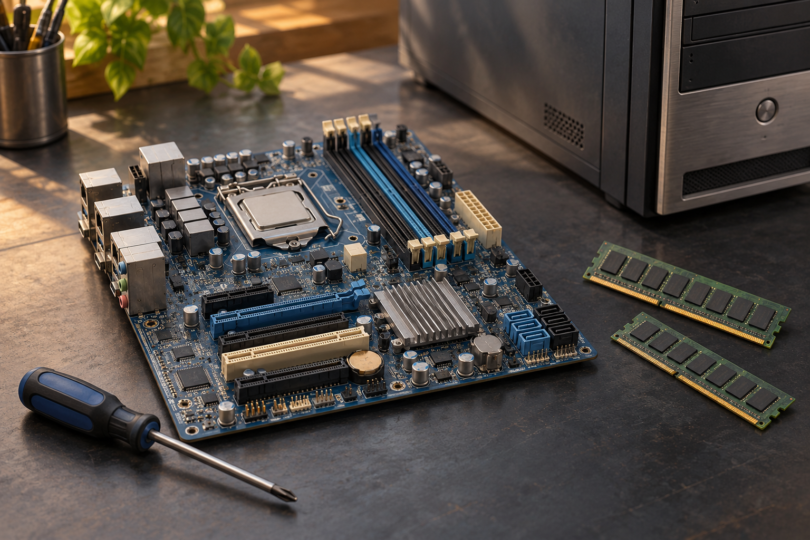

The best LGA 1155 motherboard for gaming is the one that can reliably reuse the processor, DDR3 memory and other parts you already own. For a repair or a deliberately older PC build, three documented models are worth comparing: the ASUS P8Z77-V LX, P8H77-M PRO and P8B75-M LX. The choice depends on case size, memory slots, storage connections and the condition of the individual board.
These are legacy replacement candidates, with specifications documented in manuals from 2013. This shortlist is based on manufacturer manuals and exact CPU-support lists, not hands-on testing or gaming benchmarks. A motherboard replacement does not establish that an older CPU and graphics card meet a current game’s requirements. If you need to buy the processor and memory as well, compare the complete cost with a newer platform before committing.
Which LGA 1155 motherboard should you look for?
| Exact model | Useful buying scenario | Main limit to weigh |
|---|---|---|
| ASUS P8Z77-V LX | An ATX replacement with four DDR3 slots and up to 32GB listed capacity | Needs an ATX-compatible case; the second full-length expansion slot runs at x4 |
| ASUS P8H77-M PRO | A micro-ATX replacement retaining four DDR3 slots and up to 32GB listed capacity | Its extra Marvell SATA connections have a data-storage-only restriction |
| ASUS P8B75-M LX | A simpler micro-ATX repair using two existing DDR3 modules | Two memory slots, a 16GB listed maximum and only one SATA 6Gb/s port |
All three require compatible non-ECC, unbuffered DDR3 desktop memory. The capacities above are board limits, not a promise that any kit will work. Check the memory part numbers and population guidance in the model’s manual. The manufacturer links are support references; they do not confirm a seller’s inventory, price, condition or remaining warranty.
1. ASUS P8Z77-V LX: for an ATX replacement
The P8Z77-V LX is the first model to compare if your existing case accepts ATX and you want to retain a four-module memory arrangement. Its Z77 chipset provides two SATA 6Gb/s and four SATA 3Gb/s connections. A single graphics card belongs in the blue full-length slot; the second full-length slot is PCIe 2.0 at x4, so the similar physical length does not mean equivalent bandwidth. PCIe 3.0 operation of the primary slot depends on a supported third-generation Core processor. These details are in the P8Z77-V LX manual.
Buy it for: a documented ATX layout that fits the parts you are keeping. Prioritize evidence of stable operation with those parts over an asking-price premium for the Z77 name. An older board’s advertised tuning features do not prove that a used sample remains suitable for overclocking.
Check the suffix: the recommendation is specifically P8Z77-V LX. Do not substitute a listing for P8Z77-V, LX2 or another similarly named board without starting the compatibility checks again.
2. ASUS P8H77-M PRO: for four memory slots in micro-ATX
The P8H77-M PRO is useful when a smaller case still needs four memory slots. Its H77 chipset supplies two SATA 6Gb/s and four SATA 3Gb/s ports. A separate Marvell controller adds one internal SATA 6Gb/s connection and one rear eSATA port, but ASUS limits those Marvell connections to data storage and excludes ATAPI devices. The P8H77-M PRO manual also lists DisplayPort, HDMI, DVI and VGA outputs for use with a compatible processor’s integrated graphics.
Buy it for: a compact repair where retaining existing memory and the required connections matters more than adding another platform feature. Check how a thick graphics card will affect access to the remaining slots and connectors in your case.
Know the limits: its second full-length slot is PCIe 2.0 at x4. ASUS conditions DDR3-1600 and higher memory frequencies, and PCIe 3.0 operation, on third-generation processors. CPU support alone is not a promise of identical features or memory speeds with every processor. The exact name is P8H77-M PRO, not P8H77-M or P8H77-V LE.
3. ASUS P8B75-M LX: for a straightforward two-module repair
The P8B75-M LX is worth considering when its simpler layout already covers your needs. Alongside its two DDR3 slots, it has one full-length graphics slot, one SATA 6Gb/s port and five SATA 3Gb/s ports. The rear display connections are DVI-D and VGA; this exact model does not list HDMI. ASUS specifies third-generation processor support for DDR3-1600 and higher frequencies, and third-generation Core support for PCIe 3.0 speed. See the P8B75-M LX manual.
Buy it for: an economical repair only when the actual offer, tested condition and return terms make sense. Its two-slot layout is a poor match if your plan depends on retaining four separate memory modules. If you have several SATA SSDs, count the faster ports you need before choosing it.
Check the exact board: P8B75-M LX, P8B75-M LX PLUS and P8B75-M/CSM are different model names. A seller’s generic “ASUS B75” title is insufficient. Ask for a clear photograph of the model and PCB revision printed on the board.
Verify the CPU, PCB revision and installed BIOS
A matching socket is only the first check. Search the manufacturer’s CPU list for your exact processor, including its suffix and listed revision. For illustration, these are the minimum BIOS versions ASUS gives for two specific processors:
| Exact motherboard | Core i5-2500K, revision D2 | Core i7-3770, revision E1 |
|---|---|---|
| P8Z77-V LX CPU list | 0312; PCB: ALL | 0312; PCB: ALL |
| P8H77-M PRO CPU list | 0416; PCB: ALL | 0416; PCB: ALL |
| P8B75-M LX CPU list | 0206; PCB: ALL | 0206; PCB: ALL |
“ALL” is the PCB-validation entry for those CPUs on that exact model. It does not extend support to another board with a similar name. The numbers are minimum validated BIOS versions for these examples, not a recommendation to install an old release. Other CPUs can require a later BIOS.
Before paying, ask the seller for the actual board’s BIOS-version screen and evidence that it boots with the advertised processor. If an update is needed, establish how it will be completed before purchase. Do not assume an unbootable board can update itself without a working supported CPU. Use only the instructions and firmware for the exact model.
What to ask before buying a used motherboard
- Does the item match the description? Obtain photographs of the actual board, its model marking, PCB revision, rear connectors and CPU socket. Stock images do not show the condition of the unit being sold.
- What has been checked? Ask about booting, memory-slot operation, the main graphics slot, SATA ports, USB, network and audio. “Powers on” alone leaves much unverified. A BIOS screen is useful evidence, but does not establish stability under load.
- Are there visible faults or repairs? Look for damaged socket contacts, corrosion, cracked connectors, scorching or repair work. Ask directly about intermittent faults and previous repairs. A clean photograph is not a full functional test.
- Will it fit the complete system? Check case mounting points, graphics-card clearance, power connectors, CPU cooler mounting, front-panel wiring and the supplied I/O shield. A prebuilt PC may need additional compatibility checks even when its old CPU uses LGA 1155.
- What happens if it fails your checks? Read the seller’s return window, condition exclusions, return postage and any stated warranty. Do not assume a 2013-era manufacturer’s warranty follows a used board. Include shipping and missing parts when comparing the total repair cost.
When is an LGA 1155 repair worth doing?
A replacement is easiest to justify when you already have a known-working compatible CPU, DDR3 kit and graphics card, and a returnable board costs little enough to make the repair worthwhile. Choose the P8Z77-V LX for its ATX layout, the P8H77-M PRO when four memory slots matter in micro-ATX, or the P8B75-M LX when two slots and its connections are sufficient.
If the purchase also requires a CPU, memory, adapters or uncertain repairs, compare a complete newer system or platform bundle. Check the requirements of the games, operating system and drivers you intend to use. None of these motherboard specifications establishes modern-game frame rates, and the better documented model is still a poor purchase when the individual unit’s condition is uncertain.