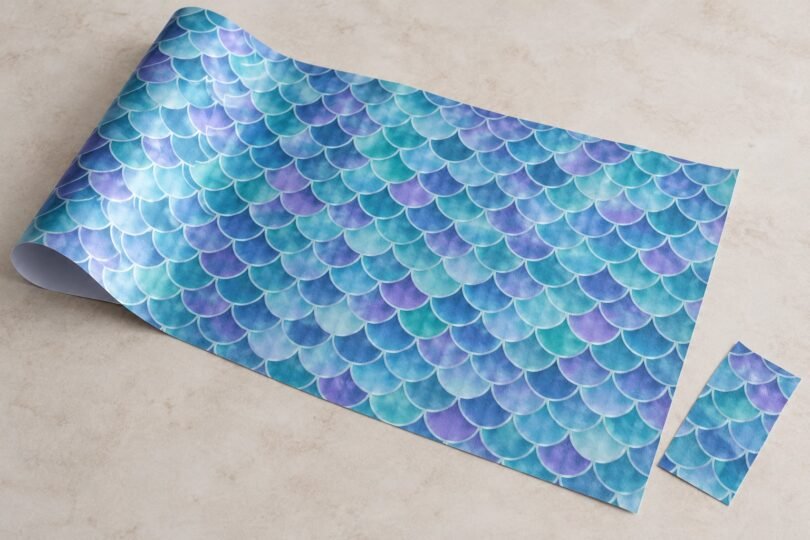

Mermaid vinyl HTV is usually heat-transfer material decorated with a repeating scale pattern. The important part of the listing is the material type, not the word “mermaid.” Similar-looking sheets can be iron-on film for fabric, self-adhesive vinyl for hard surfaces, or printable media that needs a compatible printer.
For a shirt or fabric tote, start with a named heat-transfer product and its current instructions. Check the exact product version before deciding whether to mirror the artwork, use a separate heat-transfer mask, or peel the carrier while hot or cold. A color swatch alone cannot answer those questions.
Choose the right kind of mermaid-patterned material
Preprinted heat-transfer vinyl
This category already has its design printed on the film. You cut the outline of your lettering or artwork, remove the unwanted material, and apply the retained design to a compatible fabric. A printer is unnecessary for the existing pattern. Siser’s official color guide lists Mermaid Scales Teal under EasyPatterns Plus, providing a specific product family to investigate.
Adhesive craft vinyl
Siser EasyPSV Patterns also includes a Mermaid Scales design, but it is pressure-sensitive vinyl for hard surfaces such as glass, wood, plastic, metal, and ceramic. Its process uses application tape and a squeegee; it is not the HTV process for a shirt. Siser instructs users to cut it without mirroring and warns against use near heat sources. Do not put an unfamiliar adhesive sheet under a heat press.
Printable transfer material
If you want to print your own scale artwork, choose media explicitly compatible with your printer. For example, Siser EasyColor DTV is designed for desktop inkjet printing and follows a print, cut, mask, and heat-application workflow. That capability does not make ordinary preprinted HTV printable, and it does not make every sheet sold as “printable vinyl” a garment transfer.
Original EasyPatterns and EasyPatterns Plus cut differently
Closely related product names can require opposite preparation. Siser’s instructions for original EasyPatterns say to cut with the printed face up, without mirroring. After weeding, that material needs a separate transfer mask; Siser’s European guide recommends TTD Easy.
EasyPatterns Plus is pre-masked. Its manufacturer data sheet instructs users to mirror the artwork before cutting. Do not transfer the original product’s no-mirror rule to Plus simply because the same pattern name appears on both packages.
Identify the film and carrier using the seller’s supplied instructions before loading your cutter. “Shiny side down” is an unreliable substitute for knowing which layer you have. Keep the original label with leftover sheets so an unlabeled offcut does not become a guessing game later.
Use the settings for the exact product version
There is no universal temperature for mermaid HTV. Two manufacturer examples show why the full name matters:
- EasyPatterns Plus: Siser Europe’s March 2025 technical sheet specifies 155°C/311°F, 15 seconds, medium pressure, and a hot peel. It lists cotton, polyester, and cotton/polyester blends, excluding treated and dye-sublimated textiles. The film is polyurethane on an adhesive polyester carrier.
- EasyPatterns Plus Satin: the current Siser Store instructions specify 320°F/160°C for 15 seconds with medium pressure and a cold peel for a heat press. This is a separately named finish; those instructions are not a replacement for the Plus sheet above.
Match the supplied material to its region-specific manufacturer instructions and the actual press being used. If your package and an online chart disagree, resolve that with the supplier before pressing. Do not average the temperatures or choose whichever peel timing sounds convenient. Settings for a conventional heat press also should not be copied blindly into a handheld press or household-iron workflow.
What to check before ordering
- Material and version: the listing should identify HTV, its manufacturer or supplier, and any finish such as satin or glitter.
- Sheet or roll dimensions: compare the usable width and length with your final design, cutter capacity, and space needed for test cuts.
- Quantity: distinguish a single patterned sheet from a bundle of separate patterns. Count the designs you can actually use.
- Carrier or mask: confirm whether it is pre-masked, whether a heat-transfer mask is required, and whether the correct mask is included.
- Fabric compatibility: read the garment’s fiber label and the transfer manufacturer’s exclusions, including coatings or prior printing.
- Instructions: obtain cutting, pressing, peeling, and washing directions for that exact material before committing a garment.
Compare cost per usable design rather than judging only by sheet count. A small inexpensive sheet may be sufficient for one large tail silhouette but leave too little material for a test and a second attempt.
Design so the scale pattern remains visible
Large, uncomplicated shapes show a repeating pattern more clearly than narrow lettering. Preview your design at its finished size and ask whether each letter contains enough of the repeat to look intentional. A tiny cut may show only one color patch instead of recognizable scales.
Decide which direction the scallops should face before arranging the artwork. Rotating pieces to save material can change the visual direction across matching items. Mark the intended top on the backing or a separate layout note, without drawing on the transfer surface.
Use an original tail silhouette, an abstract wave, simple initials, or appropriately licensed artwork. Generic scale patterns do not require recognizable film characters or logos. For a crisp outline, plan the relationship between solid-color and patterned pieces before cutting; do not assume one film can be layered over another.
A practical test-cut and application workflow
- Label the material. Write down the exact product, carrier or mask requirements, compatible fabric, and press instructions.
- Size the artwork. Check the layout on the actual garment, keeping seams, pockets, and other raised areas out of the pressing zone where possible.
- Set the correct orientation. Follow that product’s mirror or no-mirror rule, then use the manufacturer’s starting cutter settings.
- Make a small test cut. Include a corner and a small interior detail. Check that the unwanted film weeds cleanly while the carrier remains usable.
- Weed and mask as directed. Use the specified heat-transfer mask if required. Adhesive-vinyl application tape is not automatically a suitable substitute.
- Test the application. Use a spare piece of the same fabric or a sacrificial garment before working on the final item. Follow the specified heat, pressure, time, and peel sequence.
- Record what worked. Keep the product label, cutter setup, press setup, and care instructions together for any remaining material.
A test on a different fabric is less informative than one on the intended blank. Check both the transfer’s appearance and the fabric itself before repeating the process across a batch.
Troubleshooting without guessing at more heat
Small pieces lift during weeding: examine the test cut, blade condition, design detail, and material orientation before recutting the full sheet. Siser notes that cutter settings can vary with equipment and blade condition.
The design stays on the carrier: stop and verify peel timing and the instructions for the exact transfer. A hot-peel process and a cold-peel process are not interchangeable. Also check whether seams prevented even contact.
The fabric changes color or develops an unwanted mark: stop before pressing another garment. Recheck fabric compatibility and the temperature specified for the equipment. Repeatedly adding heat is not a reliable way to diagnose an unidentified material.
Keep the care instructions with the finished project
The March 2025 EasyPatterns Plus sheet calls for waiting 24 hours before the first wash, washing up to 40°C preferably inside out, avoiding bleach and aggressive chemicals, and respecting the textile’s care instructions. It does not permit dry cleaning.
Plus Satin’s current directions instead specify cold washing with mild detergent after a 24-hour wait and do not recommend liquid fabric softener. Give the recipient the instructions for the material actually used. Successful application starts with identifying the sheet, and successful care depends on keeping that identification through the finished project.