
The best Mini-ITX motherboard for a NAS depends on how many drives you need, whether you want error-correcting memory, and what else the server will run. A two-drive backup box has different requirements from an eight-drive system handling virtual machines and a fast network.
Start with the complete build: case, drives, boot device, memory, power supply and network. The three boards below illustrate useful choices and important limitations. These recommendations are based on manufacturer specifications and manuals; they are not hands-on benchmark results.
Three Mini-ITX NAS motherboard options
| Motherboard | Why consider it? | Main buying caution |
|---|---|---|
| ASRock Rack E3C256D4I-2T | ECC SO-DIMMs, dual 10GbE and IPMI | Separate processor; SATA needs OCuLink breakout cables |
| ASRock N100DC-ITX | Integrated processor for a modest two-SATA-drive build | Discontinued; non-ECC operation and 1GbE |
| ASRock Rack C3558D4I-4L | Older integrated server platform with ECC and IPMI | SATA availability changes with PCIe configuration |
ASRock Rack E3C256D4I-2T: for ECC and faster networking
This board makes sense when remote management and network connectivity matter more than a simple parts list. ASRock Rack specifies four DDR4 ECC/non-ECC SO-DIMM slots, two Intel X550 10GbE ports, IPMI, a PCIe x16 slot and an M.2 socket. It supports Xeon E-2300 and selected 10th-generation Pentium processors; check the exact CPU support list before ordering.
The eight SATA connections are delivered through two OCuLink connectors in SATA mode. Budget for compatible OCuLink-to-four-SATA cables, and confirm what the seller includes. Those connectors cannot provide their PCIe and SATA functions simultaneously.
CPU choice also affects expansion. The E3C256D4I-2T manual says the M.2 socket does not function with supported 10th-generation Pentium processors, while the expansion slot drops to PCIe 3.0. With an appropriate Xeon, the advertised PCIe 4.0 features are available. Check cooler clearance, SO-DIMM compatibility and the board’s power-adapter cable requirements before committing.
View E3C256D4I-2T specifications and support lists
ASRock N100DC-ITX: a limited two-drive option

ASRock N100DC-ITX Mini-ITX Motherboard, Intel N100
As an Amazon Associate we earn from qualifying purchases.
The N100DC-ITX combines an Intel N100 processor with two SATA ports, one PCIe 3.0 x2 NVMe M.2 socket and one Realtek 8111H gigabit Ethernet port. Its single DDR4 slot supports up to 32GB according to ASRock’s current specification. ECC modules, if used, operate without error correction.
A separate NVMe boot device can leave both SATA connections available for data drives. Expansion is constrained: the PCIe slot is physically x4 but electrically x2. Check both the dimensions and lane requirements of any storage or network card.
It requires a compatible 19V external adapter, which is not included. Account for disk spin-up demand and the supplied SATA power arrangement. Its passive CPU heatsink does not remove the need for case and drive airflow.
Lifecycle warning: ASRock marks this model discontinued in January 2026. Consider it for reuse or suitable remaining stock, after checking warranty and support terms.
ASRock Rack C3558D4I-4L: check the SATA configuration carefully
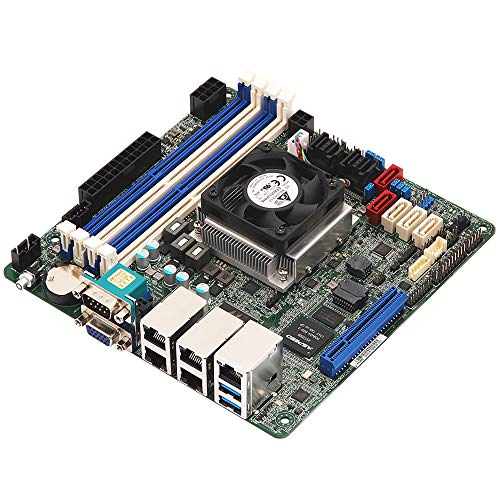
This older Atom C3558 board offers ECC-capable memory, four gigabit Ethernet ports and dedicated IPMI management. It can be worth considering when reusing compatible server hardware, but the often-advertised “13 SATA” description needs explanation.
There are five individual SATA connectors and two mini-SAS HD connectors providing additional SATA paths through breakout cables. However, the manual’s board-configuration table does not show all 13 active together on the C3558 model. Its listed modes allow up to nine SATA channels without a PCIe allocation, five SATA channels with PCIe x4, or one SATA channel with PCIe x8.
Choose the BIOS configuration and cable layout before buying drives or an expansion card. Confirm firmware availability, included cables, seller warranty and operating-system driver support. Four gigabit ports also do not automatically give one client a four-gigabit connection.
What to check before buying
Count usable drive connections
Write down your data-drive count, boot-device connection and likely expansion. Distinguish connector shape from supported protocol: an M.2 socket might support NVMe, SATA or a wireless module. Check the manual for shared lanes, disabled ports and required breakout cables. Include drive bays, power connectors and cable clearance in the same plan.
Match memory and networking to the workload
ECC requires a compatible processor, motherboard, memory and configuration. The TrueNAS 25.10 hardware guide describes ECC as an additional data-integrity safeguard and notes that many systems operate without it. Allow memory headroom for applications and virtual machines rather than buying only the installation minimum.
Choose network speed for the whole path: NAS, switch, client and storage. A 10GbE motherboard cannot make a gigabit-connected laptop transfer at 10GbE. If you expect to add a faster network card later, reserve an appropriate slot instead of using the only expansion slot for extra disks.
Verify software, cooling and recovery
Check the intended release of TrueNAS, Unraid or OpenMediaVault against the exact network and storage controllers. These boards are not presented as certified for every NAS operating system. Test installation, drive detection, sustained transfers and restart behavior before entrusting the system with your only copy of anything.
Processor TDP does not establish whole-system idle consumption. Drives, network controllers, management hardware and power-supply efficiency all affect the result. Budget for airflow and adequate startup power. Keep IPMI on a protected management network, maintain separate backups, and test restoring important files.
For a new build needing ECC, remote management and 10GbE, investigate the E3C256D4I-2T’s full parts cost first. The N100DC-ITX fits a much narrower two-drive plan, while the C3558D4I-4L needs especially careful lane planning. Buy the configuration that meets your actual requirements, including room to recover from failures.