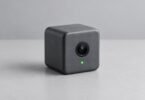
A useful security camera for dogs should let you check the places your dog actually uses, save footage you can review later, and make its subscription requirements clear. For indoor monitoring, the TP-Link Tapo C225 is worth considering for its pet-detection features and physical lens cover. The Wyze Cam Pan v3 suits owners who want a rotating camera with local recording and may also need a properly powered outdoor installation.
These are specification-based recommendations. Neither camera replaces a dog walker, a safe home setup, or someone who can respond in person. Choose the recording and alert features you will use before paying for extras.
Two cameras worth comparing
TP-Link Tapo C225 for indoor pet monitoring and a visible privacy cover
The C225 combines 2K QHD video, motorized pan and tilt, two-way audio, motion tracking, and on-device detection that includes pets. Its lens turns into the housing when physical privacy mode is activated. That is useful for a camera in a living room where you want a clear distinction between monitoring while away and privacy while home.
TP-Link lists local microSD storage up to 512GB, with the card purchased separately, and optional Tapo Care cloud recording. The camera requires a power adapter and 2.4GHz Wi-Fi; it is not a battery camera to leave anywhere without a cable. It also supports selectable infrared night-vision wavelengths. Check the C225 specifications for the hardware revision being supplied: TP-Link maintains different V1 and V2 pages, and detailed capabilities can differ.
Choose it if: you want a dedicated indoor view of your dog’s room, pet-related detection, and a built-in lens-concealment mode. Check first: that the camera’s downward view reaches the bed or crate from your proposed shelf, and that your preferred notification features are included without a cloud plan.

TP-Link Tapo C225 Pan/Tilt Camera, 2K QHD, White, 1 Camera
As an Amazon Associate we earn from qualifying purchases.
Wyze Cam Pan v3 for wide pan-and-tilt coverage with local recording
Wyze’s Pan v3 records at 1080p and offers 360-degree horizontal rotation, 180-degree vertical movement, two-way audio, and a privacy mode that points the lens downward. Its IP65-rated camera body can be used outdoors with the appropriate outdoor power accessories. The adapter included with the standard camera is for indoor use; an outdoor installation needs the compatible outdoor adapter and cable arrangement described by Wyze.
Local recording is the attraction for owners who want to review what happened between check-ins. Buy the microSD card separately. Wyze’s current card-compatibility guide lists a 256GB maximum for Pan v3. Some retail copy says 512GB, so follow the model-specific manufacturer guidance rather than assuming a specification for a newer Wyze camera applies.
Choose it if: you want to scan a larger area and review local recordings. Check first: the subscription requirements for pet-specific alerts and cloud history. Motion tracking and an alert explicitly labeled “pet” are different functions.

Understand what a subscription buys
Separate three questions when comparing cameras: Can you watch live? Can you save recordings? Can the system classify an event as a dog or other pet? A camera may handle the first two without a monthly bill while reserving some smart alerts or cloud features for subscribers.
Wyze describes pet, person, package, and vehicle detection as benefits of Cam Plus or related paid plans. Its Pan v3 does not support the older Cam Plus Lite service. Do not buy it expecting an old review’s free-cloud arrangement to apply.
Continuous cloud recording can also be a separate purchase. Wyze’s Cloud CVR documentation describes it as an add-on to an eligible subscription, rather than a feature automatically included with every camera. Compare the camera, card, optional outdoor power equipment, and any recurring plan together. Check renewal terms if you activate a trial.
Local storage and cloud storage solve different problems
A microSD card keeps recordings on the camera. That can avoid a cloud-recording fee and help you examine a longer sequence, such as whether barking followed a delivery or a noise outside. It also means the recording may be lost if the camera and card are stolen or damaged. Save important clips elsewhere before they are overwritten.
Cloud history can preserve an uploaded event away from the device, but it depends on the service, your account, an internet connection, and the plan’s retention rules. Event recording captures selected moments; continuous recording gives you the intervening context. Neither option guarantees that every important moment will be captured.
Local recording also does not automatically mean a camera is fully offline or independent of its manufacturer’s account system. Wyze says compatible cameras, including Pan v3, can continue configured microSD recording during a Wi-Fi outage while powered, but the recording must be set up beforehand. See its offline-recording guidance. Remote viewing and new phone alerts still need a working connection.
Place the camera for your dog, then test it
- Start with a specific view. Frame the bed, crate door, water area, or exit you want to observe. A camera high above a room may miss a small dog behind furniture.
- Secure the camera and cable. Keep cords and small parts beyond chewing reach. Use a stable shelf or suitable mount, rather than balancing the camera where a dog can knock it down.
- Test the darkest conditions. Check the image after sunset with your normal lights off. Infrared reflections from nearby glass or glossy surfaces can make the useful view worse.
- Check it from outside your Wi-Fi. Open the app using your phone’s mobile connection and confirm you can see and hear the right area.
- Test alerts deliberately. Walk through the view and observe your dog’s ordinary movements. Adjust sensitivity and notification schedules to reduce alerts you would otherwise ignore.
A rotating camera sees only the direction it faces at that moment. The phrase “360-degree coverage” does not mean it records every direction simultaneously. For two separated rooms or two dogs who move independently, two well-positioned fixed views may be more useful than one camera constantly turning.
Use audio and alerts thoughtfully
Try two-way talk while someone is home to observe your dog’s response. Some dogs may react to a familiar voice; others may become more alert or search for the person. Keep volume modest and stop using the feature if it seems unsettling. A treat dispenser is optional, and neither of these cameras includes one.
Motion, barking, and pet alerts are prompts to look at the footage, not explanations of behavior. A quiet camera feed cannot tell you that your dog is comfortable all day, and a detected sound does not establish its cause. If footage reveals a recurring concern, keep useful clips and discuss them with the professional who helps care for your dog.
Protect the people your dog camera can see
Use a unique account password, enable two-factor authentication where available, and keep the camera, app, and router updated. Review who can access the live view and remove access when it is no longer needed. The FTC’s camera-security guidance also recommends securing the home network and thinking carefully about remote access to private rooms.
Tell household members and visitors when audio or video recording is active. Use privacy mode or disconnect power when you want the camera off, and verify the result in the app. Lens concealment is a useful visible control, but it does not remove old recordings or replace account security.
Bottom line: choose the C225 for an indoor pet-focused feature set and lens concealment. Choose the Pan v3 when its movement range, local recording, or correctly equipped outdoor use fits your layout. In either case, test the actual view and recording workflow before depending on it during a longer absence.
Image note: Existing category illustration retained from original article.