
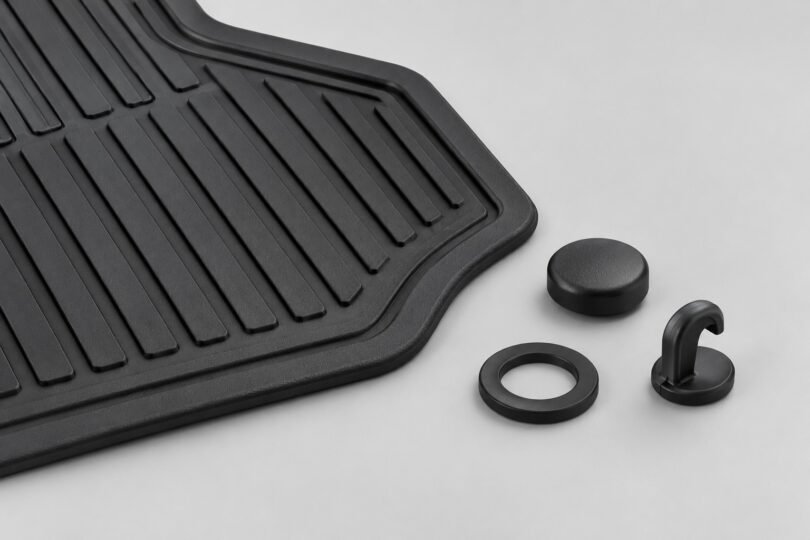

The right replacement for a WeatherTech floor-mat retention clip depends on the vehicle, the exact mat or liner and the retention system already fitted. There is no verified universal clip that can be recommended for every WeatherTech application. Start with the molded mat part number and the vehicle’s year, make and model, then have WeatherTech identify the appropriate replacement.
If the driver’s mat will not stay securely attached, remove it from use until the problem is resolved. A loose liner is more than an annoyance: it can move toward the pedals. Buying a large assortment of automotive trim clips is not a substitute for matching the floor-mat retention system.
First identify which part is missing or damaged
“Retention clip” can describe several different pieces. Before shopping, inspect the mat outside the vehicle and look at the existing floor anchor without removing or modifying it. Work out whether the failed component belongs to the vehicle, the liner or a supplied attachment kit.
- Floor-side anchor or post: a component that attaches to the vehicle floor and holds the mat in position.
- Mat-side grommet or socket: the matching opening or fitting in the mat that engages a post or hook.
- Supplied replacement hook: application-specific hardware provided with certain WeatherTech products.
- Damaged mat material: a torn opening or distorted liner may require more than a replacement fastener.
These are diagnostic categories, not interchangeable product names. A cap that resembles your missing piece may have a different mating profile; a hook may connect to the wrong base. If you cannot tell which component has failed, photograph the intact opposite attachment point, if one exists, and the damaged area for support.
WeatherTech uses several retention arrangements
WeatherTech’s FloorLiner FAQ describes vehicles with posts, snaps, hook-and-loop fasteners and attachments that release with a quarter turn. It directs owners to the vehicle manual and the instructions supplied with their specific liners. Therefore, there is no single removal technique to apply to every clip. See WeatherTech’s FloorLiner retention FAQ.
Factory posts, snaps and hooks
Some liners engage the vehicle’s existing retention points. In that case, first establish whether the floor-side hardware is intact and whether the correct mat is being used. A missing vehicle anchor and a broken mat grommet are different repair requests. Ask WeatherTech which side of the connection needs replacement; a vehicle dealer may be needed for a factory component.
T-bottom and auger-style supplied hooks
WeatherTech publishes separate illustrated sequences for T-bottom and auger retention hooks. Its T-bottom and auger instruction sheet also separates All-Weather Floor Mat and FloorLiner installations. That distinction matters when matching a replacement to an older kit.
The document identifier 67RHINS2 identifies this instruction sheet; it is not verified here as a purchasable replacement-hook SKU. Do not order by the document code alone or interpret the presence of an auger illustration as permission to add an anchor anywhere in your vehicle.
Application-specific hook replacements
Another official sheet, the Toyota/Lexus retention-hook instructions, illustrates three existing hook arrangements, labeled A, B and C, before showing installation. The printed identifier is 67RHINS1. Again, this is an instruction reference, not a verified retail part number or proof that a kit fits every Toyota or Lexus.
Use these drawings to explain what you have to support. Do not choose a replacement solely because your car belongs to the brand named in the document. Vehicle generations, floor configurations and the mat itself still need to match.
What to collect before requesting a replacement
A clear identification request is more useful than a message saying only “I need WeatherTech clips.” Gather the following before calling or using the help center:
- Vehicle details: year, make, model and relevant trim or cab configuration. Mention any unusual flooring configuration, such as a vinyl floor.
- Product family: FloorLiner, FloorLiner HP, All-Weather Floor Mat or Trim-to-Fit. Do not assume a part from one family or generation fits another.
- Molded part number: copy all digits, letters and side markings from the underside. The number on an individual mat may differ from the set’s order number.
- Location and quantity: driver or passenger side, row, and how many attachment points are missing or broken.
- Photos: the full mat, its underside number, the failed connection and the vehicle’s existing anchor. Take close-ups with the pieces unobstructed.
- Purchase information: order number or receipt if available, particularly if requesting warranty assistance.
WeatherTech’s installation guide explains that side markings and part numbers are generally molded underneath. Its vehicle selector is also a useful cross-check for the intended application, but entering a vehicle does not by itself identify a loose replacement clip. Find the installation guide and vehicle-specific FloorLiner selector.
Where to get a confirmed replacement
Use the official WeatherTech Help Center or call 800-441-6287. Ask for the exact hardware or kit identifier, its contents and the installation instructions for your recorded mat part number and vehicle. If the floor-side piece is original vehicle equipment, ask whether it must instead be sourced through the vehicle manufacturer.
A useful request is: “My vehicle is [year/make/model], and the driver-side mat is marked [part number]. The [floor anchor/mat grommet/supplied hook] is damaged. Which replacement fits this specific combination, and what instructions should I use?” Attach your photos rather than guessing at the hardware name.
No generic marketplace clip pack is endorsed here because its compatibility with a particular WeatherTech mat and vehicle has not been established. Before buying from any seller, obtain the actual manufacturer part number, included components, quantity and an explicit application match. A title containing “WeatherTech compatible” or “universal” is not sufficient evidence.
Replacement cost and warranty eligibility require confirmation. WeatherTech’s limited warranty covers qualifying defects under stated conditions, requires proof of purchase for claims and excludes normal wear. It does not establish that every lost or damaged clip will be replaced free of charge.
Check retention and pedal clearance before driving
Follow the instructions supplied for your exact product. WeatherTech’s installation and safety sheet makes these checks essential:
- Remove other floor mats before fitting the liner. Never stack a WeatherTech mat over a carpet mat.
- Use the correct vehicle application and side, right side up.
- Engage every specified retention point, then pull forward to check that the mat remains secured.
- Before starting the vehicle, check the accelerator, brake and clutch, if fitted, through their full movement for interference.
- Recheck after cleaning, detailing or servicing, and before use. Keep loose items out of the driver’s footwell.
If the mat cannot be secured or touches a pedal, do not use it. If it shifts while driving, stop somewhere safe before addressing it. Remove it and store it outside the footwell if correct installation cannot be achieved. Do not reach down to adjust it while driving.
If the new hardware still does not solve the problem
Stop and reassess the fit rather than forcing the connection. Check whether the delivered kit matches the confirmed identifier, whether a broken fragment remains in the mating part, and whether the liner number matches your vehicle. Send support photographs of the attempted fit with the vehicle stationary.
Do not enlarge a grommet, drill arbitrary holes in the floor, defeat a factory retainer or substitute adhesive, cable ties or unrelated body-panel fasteners. A loose anchor, torn mounting area or distorted mat needs the correct repair or replacement. For a new vehicle or a secondhand set of mats, repeat the application check even if the overall outline appears close.
Common questions
Can I use the passenger-side clip on the driver’s side?
Only after the manufacturer confirms that the pieces and applications are identical. Visual similarity does not establish that the driver’s mat will stay correctly located.
Can I drive with the unsecured mat while waiting for parts?
Remove the unsecured mat from the driver’s footwell. Do not leave it loose or rely on its weight to keep it away from the pedals.
What is the best replacement to buy?
The replacement specifically confirmed for your vehicle, mat number and attachment system. Identifying that combination is the essential step; buying the largest clip assortment does not solve a fitment uncertainty.


