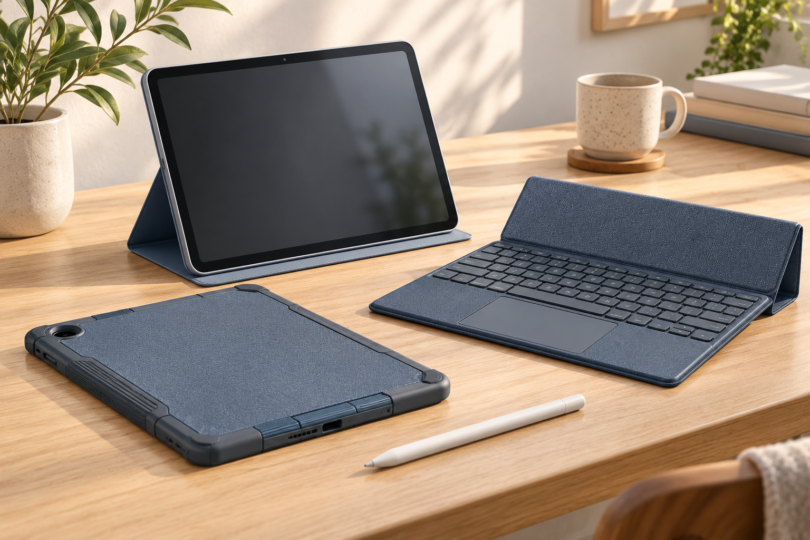

The best Samsung tablet case is the one made for your exact Galaxy Tab, then for the way you use it. A slim Book Cover suits reading and video calls; a keyboard cover makes sense for regular typing. Start by finding the model number in Settings → About tablet. A case described only as “for a 10-inch Samsung” is not a reliable fit.
The shortlist below names specific Samsung accessories and the tablet models they are being recommended for. It compares manufacturer-documented fit and features, not hands-on drop tests. If your tablet is outside these examples, use the same model-code checks rather than assuming a similarly sized cover will work.
Best Samsung tablet cases by use
| Your tablet | Case to compare | Best use |
|---|---|---|
| Galaxy Tab S10 FE 10.9-inch, SM-X520 Wi-Fi | Smart Book Cover, Blue, EF-BX710PLEGUJ | Reading and a two-way tabletop stand |
| Galaxy Tab S10 FE+ 13.1-inch, SM-X620 Wi-Fi | Book Cover Keyboard Slim, Black, EF-DX620UBEGUJ | Typing with a slimmer keyboard cover |
| Galaxy Tab S10 FE+ 13.1-inch, SM-X620 Wi-Fi | Book Cover Keyboard, White, EF-DX625UWEGUJ | Typing plus a built-in touchpad |
| Galaxy Tab A9+ 11-inch, SM-X210 Wi-Fi | Book Cover, Black, EF-BX210TBEGUJ | Everyday cover and portrait/landscape viewing |
1. Samsung Smart Book Cover: best simple cover for Tab S10 FE
For the 10.9-inch Galaxy Tab S10 FE SM-X520, the Blue EF-BX710PLEGUJ is an official Smart Book Cover option. Samsung’s product title explicitly includes the S10 FE among its supported tablets. This recommendation is for the smaller FE, whose body measures 254.3 × 165.8 × 6.0mm. The 13.1-inch FE+ is a different size and is not covered by this recommendation. Check the Blue Smart Book Cover.
Samsung’s FE accessory guide describes the Smart Book Cover as a two-way standing cover. That makes it the straightforward choice when you want to prop up the tablet for reading, following a recipe or a video call without carrying a keyboard. It is a cover-and-stand purchase; it does not add a keyboard or a touchpad.
Choose it for a tablet that moves between your hands and a table. If your main concern is repeated drops, exposed edges or rough use in a work bag, compare a wraparound protective case that explicitly names SM-X520 and provides the protection details you need. This slim folio recommendation carries no claimed drop certification.
2. Book Cover Keyboard Slim: best for lighter typing on Tab S10 FE+
The Black EF-DX620UBEGUJ is the Book Cover Keyboard Slim – AI Key for Galaxy Tab S10 FE+. It is the appropriate family for the 13.1-inch SM-X620 tablet, which measures 300.6 × 194.7 × 6.0mm. The accessory itself is listed at 196.7 × 301.3 × 13.1mm and 0.87lb. These are case dimensions, not a second set of tablet dimensions. See the exact Keyboard Slim.
Samsung specifies 64 keys, a POGO connection, magnetic attachment and a compartment for the S Pen. Choose it when you want a physical keyboard for email or a document but are comfortable using the tablet screen, pen or a separate mouse for pointing. If a built-in touchpad is essential, use the EF-DX625 option below rather than treating “Keyboard Slim” and “Book Cover Keyboard” as the same product.
A slim keyboard cover is a sensible middle ground for someone who types often but still uses the tablet for handwriting and reading. Check the local keyboard layout before ordering an import. The AI shortcut is not a reason by itself to choose the case: supported services can require internet access and account sign-in, and a shortcut key does not include a subscription.
3. Book Cover Keyboard with touchpad: best for desk work on Tab S10 FE+
The White EF-DX625UWEGUJ is Samsung’s Book Cover Keyboard – AI Key for the same Galaxy Tab S10 FE+. The manufacturer lists a POGO connection, 80 keys and a touchpad. Its listed dimensions are 202.5 × 301.3 × 14.4mm, and it weighs 578g. Check the White keyboard cover with touchpad.
Choose this one when moving a pointer and selecting text are routine parts of your work. The cost in portability is concrete: Samsung lists the Wi-Fi FE+ tablet at 664g, so tablet and keyboard together are about 1.24kg before a charger or bag. That calculated total is worth comparing with the laptop you might otherwise carry. If you mainly annotate pages with the pen, the touchpad may be extra weight without much benefit.
Neither FE+ keyboard cover changes the tablet’s external-display support. Samsung says the S10 FE and FE+ do not support HDMI output or Wireless DeX, although DeX runs on the tablet itself. Buy the keyboard for typing and navigation, not as a way to unlock a wired monitor connection.
4. Samsung Book Cover for Tab A9+: best straightforward A-series option
The Black EF-BX210TBEGUJ is a Book Cover for the Galaxy Tab A9+. The Wi-Fi SM-X210 is the 11-inch A9+ family, measuring 257.1 × 168.7 × 6.9mm. Samsung documents portrait and landscape viewing positions for this cover. See the exact A9+ Book Cover.
It suits video watching and everyday reading when a folding cover is more useful to you than a keyboard. Check current availability before making it your only option. The name must include the plus sign: the smaller Galaxy Tab A9, an older Tab A model and the A9+ are different tablets. Do not assume fit for another generation because its screen is also advertised as 11 inches.
Four checks before buying any Samsung tablet case
1. Match the tablet code before the screen size
Compare your tablet’s model code with the case maker’s compatibility list, including the generation and any FE, Plus, Ultra or Lite suffix. The screen diagonal does not describe camera placement, button cutouts, speaker openings, magnetic attachment or keyboard contacts. Dimensions are a useful cross-check, but they cannot prove compatibility on their own.
2. Separate a stand from a keyboard
“Book Cover” is not a universal promise of a keyboard. The Smart Book Cover and A9+ Book Cover above are cover-and-stand options; the FE+ keyboard models are distinct accessories. Think about the surface you use, too. A stand that props up a tablet on a table is not automatically comfortable on a lap or a narrow train tray.
3. Check the pen arrangement and total package
Look for an explicitly documented pen compartment or holder if you carry a stylus. A place to store a pen does not prove charging support, and a case does not add active-pen support to a tablet. Confirm whether the listing includes the tablet, pen, keyboard or only the cover; the accessories in this guide are separate purchases from the tablet.
4. Ask what protection is actually documented
For travel or rough handling, inspect the corner coverage, screen lip, closure and exposed openings. If a seller uses a drop-test or military-standard claim, look for the named test, conditions and exact case version. A product called “rugged” is not a guarantee against damage. None of the folio recommendations here is being presented as waterproof or as certified drop protection.
Frequently asked questions
Will a Samsung tablet case fit another tablet with the same screen size?
Not necessarily. Match the complete Galaxy Tab name and model code to the case maker’s compatibility list. Similar diagonals can hide different dimensions, camera positions and attachment points.
Will a Galaxy Tab S9 FE+ case fit the S10 FE+?
Do not assume so. The S10 FE+ recommendations here are the 13.1-inch EF-DX620 and EF-DX625 accessories. Buy a different case only when its maker explicitly lists your exact tablet as compatible.
What is the difference between Keyboard Slim and Book Cover Keyboard?
For the S10 FE+ versions here, EF-DX620 is the slimmer 64-key model, while EF-DX625 has 80 keys and a built-in touchpad. Their weight and dimensions differ, so compare the full accessory code rather than just “Samsung keyboard case.”
Does a tablet’s water resistance make its case waterproof?
No. Treat a case and a tablet as separate products with separate specifications. A folding folio or keyboard cover should not be assumed to seal the tablet against water.