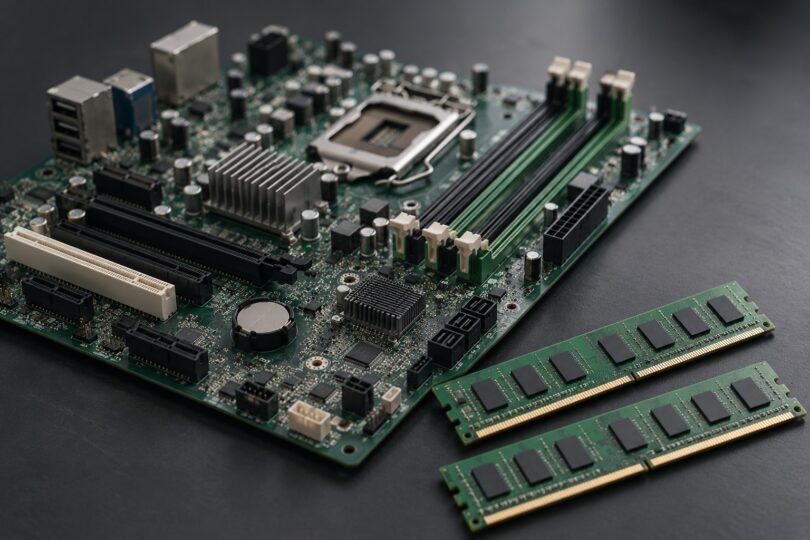

Some LGA 775 motherboards support DDR3, but the socket alone does not identify the memory type. For a repair or retro build, match the exact board model and revision, CPU support list, installed BIOS and memory specification before buying. A board advertised simply as “G41 LGA775 DDR3” leaves too much unresolved.
Two documented examples are the DDR3-only Gigabyte GA-G41MT-S2PT rev. 1.0 and the ASRock G41C-GS R2.0, which has separate DDR2 and DDR3 slots. These are legacy products. Manufacturer support pages verify specifications; they do not establish that a particular used listing is available, complete or working.
LGA 775 DDR3 board comparison
| Exact motherboard | Memory configuration | Chipset and CPU bus | Form factor |
|---|---|---|---|
| Gigabyte GA-G41MT-S2PT rev. 1.0 | Two 1.5 V DDR3 DIMM slots; 8 GB maximum total. DDR3-800/1066, with 1333 marked overclocked. | Intel G41 + ICH7; 800/1066/1333 MHz FSB. Check the exact CPU and stepping against the revision-specific support list. | Micro-ATX, 24.4 × 19.4 cm. |
| ASRock G41C-GS R2.0 | Two DDR3 slots plus two DDR2 slots. Use one memory type at a time; 8 GB maximum total. DDR3-800/1066/1333(OC); non-ECC, unbuffered. | Intel G41 + ICH7; 533/800/1066/1333 MHz FSB. Supported speed depends on the CPU and memory configuration. | Micro-ATX. Verify the actual board dimensions and case mounting positions before purchase. |
Choose the Gigabyte example when you specifically want a board with only DDR3 sockets. Consider the ASRock example when you need the option to reuse DDR2 or change to DDR3 later. Its four physical memory slots do not allow four mixed-generation modules or a combined 16 GB capacity. ASRock identifies the R2.0 model as discontinued in April 2021.
CPU compatibility: match more than “LGA 775”
Write down the complete CPU model and stepping, then look it up for the exact board revision. Supported processor families are only a starting point: BIOS support, front-side bus and the board’s hardware design also matter. Gigabyte’s rev. 1.0 support page explicitly says CPU support depends on both BIOS and hardware.
A concrete example is the Core 2 Quad Q9650 with E0 stepping: ASRock’s CPU compatibility list includes G41C-GS R2.0 and lists its supported BIOS as “All.” That entry establishes this particular pairing. It does not establish support on an unnamed G41 board or on a different model with similar-looking sockets.
Ask the seller for a BIOS-screen photo showing the actual board and BIOS version. If the CPU needs a later BIOS, resolve how the update will be performed before ordering. Do not assume a non-booting board can update itself with an unsupported CPU. Use only the manufacturer’s procedure and files for that exact model and revision.
LGA 1150, 1151, 1155, 1200, 1366 and 2011 boards are different platforms. AMD AM3+ and AM4 boards are also different. DDR3 support on one of those platforms does not make it an LGA 775 replacement, and a modern Core or Ryzen CPU does not fit merely because a socket looks familiar.
DDR3 capacity, voltage and memory organization
For both comparison boards, the published 8 GB maximum is the system total. It is not permission to install an 8 GB module in each slot. Before choosing a 2 × 4 GB kit, compare the full RAM part number and organization with the board’s memory support information.
ASRock specifically calls for 4 GB modules with 16 memory chips, or 2 GB modules with at least eight, to maximize supported memory. That makes the exact module important: a generic “4 GB DDR3” description is insufficient. Its G41C-GS R2.0 manual also warns against combining DDR2 and DDR3.
The Gigabyte model specifies 1.5 V DDR3 sockets. A DDR3L label or a higher speed printed on a kit does not establish compatibility: confirm that the precise module supports the voltage and settings required by the board. Do not assume registered server RAM, laptop SO-DIMMs or a newer high-density kit will work.
DDR3-1333 is an overclocked setting on these examples. ASRock’s manual ties available memory frequencies to CPU FSB and documents a jumper requirement for its FSB1333/DDR3-1333 combination. For a straightforward repair, choose a supported standard configuration instead of treating the highest advertised speed as automatic.
Check the case, power connectors and display connection
Micro-ATX describes a board family, not a guarantee that every old desktop case will accept it. Compare mounting holes, I/O shield opening, front-panel connections and cooler clearance. An OEM desktop may have a proprietary layout or wiring, so identify the original system before replacing its board.
The Gigabyte example has 24-pin main power and a separate 4-pin CPU power connector, VGA display output, USB 2.0 and SATA 3 Gb/s. Check those against the equipment you intend to reuse. An HDMI monitor, USB 3 device or NVMe drive can introduce additional compatibility decisions; those features should not be assumed from “DDR3” in a listing.
Before installation, disconnect AC power and follow the Gigabyte hardware-installation precautions. Check the socket for damaged contacts and the case for misplaced standoffs. Never force a CPU or a memory module into a socket.
Common listing mistakes to avoid
- ASUS P5Q without another suffix: this is an LGA 775 board, but its manual specifies DDR2. It is not the DDR3 board you are looking for. Use the exact model’s ASUS manual, rather than borrowing specifications from a similarly named product.
- “G41M” without a manufacturer and revision: request clear board markings, the matching manual, CPU support and memory limits. A chipset name does not establish a complete specification.
- A memory kit or processor shown as a motherboard result: confirm what the package actually includes. A photograph of a bundle does not mean the CPU, RAM, cooler or I/O shield is included.
- “New” legacy hardware: clarify whether it is unused old stock, refurbished or used. Ask what has been tested and whether returns cover a compatibility failure.
Used-board purchase checklist
- Get an actual photo of the model and PCB revision marking, socket, memory slots and both sides of the board.
- Verify the exact CPU/stepping and required BIOS, plus the RAM part numbers and supported total capacity.
- Request evidence that the board boots, detects the intended memory and has working ports you need.
- Confirm the package: board, I/O shield, any cables, and whether CPU or RAM are included. Original retail-package lists are not guarantees for used listings.
- Check seller condition notes, delivery cost and return terms before comparing the complete repair cost.
When an LGA 775 replacement makes sense
A compatible replacement can be useful for a specific legacy application or a retro system with known working parts. If the repair also needs a CPU, RAM, power supply and operating-system changes, compare that total with replacing the system. The cheapest board listing may not be the cheapest working computer.
Also check the operating system and driver support you need before committing. A manufacturer’s historical Windows support list is not a statement that those operating systems still receive security updates or that the board supports a current release.