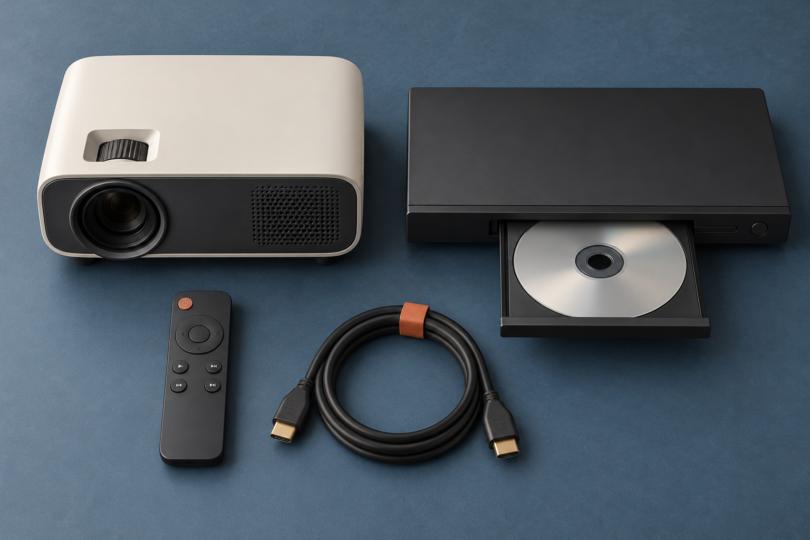

The best DVD projector depends on whether you want the disc player inside the projector. For a simple all-in-one setup, the GPX Movie+ PJD713B is the clearest choice here: it has a built-in DVD/CD drive. For a separate-player arrangement, the HAPPRUN H1 provides a native 1080p picture and an HDMI connection for a DVD player you already own or buy separately.
That distinction matters. A projector advertised as “DVD compatible” often has no disc slot at all. It accepts a picture from another device. The two choices below cover those different needs, with the Sony DVP-SR510H as a specific HDMI DVD-player option for the HAPPRUN setup.
Compare the two DVD-projector setups
| Projector | DVD playback | Native resolution | Best fit | Checked item price |
|---|---|---|---|---|
| GPX Movie+ PJD713B | Built-in DVD/CD player | 1280 × 720 | Playing discs with fewer separate devices | $169.99 |
| HAPPRUN H1, standard model | External player required | 1920 × 1080 | Using an existing HDMI player or changing sources later | $129.99 projector; $194.98 with a $64.99 Sony DVP-SR510H |
These U.S. manufacturer prices were checked on October 17, 2026. Tax, shipping, a screen, and optional accessories are not included. The HAPPRUN and Sony are separate purchases; their combined price is not a packaged bundle. Confirm the current offer and included cables before ordering.
1. GPX Movie+ PJD713B: best for a built-in DVD player
The GPX PJD713B puts the disc mechanism and projector in one box. It is the more straightforward choice if your aim is to watch a shelf of DVDs without setting up a separate player and HDMI connection each time. The GPX page displayed $169.99 and an ‘In stock’ label, but its Add to Cart button was disabled. Confirm current availability with GPX before choosing this option.
Its native resolution is 1280 × 720. The PJD713B instruction manual’s specification page separately lists accepted HDMI input resolutions up to 1080p. Accepting a 1080p signal does not make this a native 1080p projector: the image is displayed on its 720p panel.
GPX specifies 100 ANSI lumens. Plan around a dark room and a sensible image size, rather than buying it for a bright living room or daytime garden screening. Its advertised maximum projection size is not a promise that a picture at that size will suit your room. A smaller image can be the more practical starting point when available brightness is limited.
The manual lists DVD and DVD±R/RW playback, plus CDs, CD-R/RW, and JPEG CDs. That is useful if your collection includes compatible home-recorded discs, but disc condition and recording format still matter. The published formats do not establish Blu-ray support. For imported commercial DVDs, confirm the actual unit’s supported region with the seller before buying; the current GPX material checked here does not establish an all-region player.
- Why choose it: an actual built-in DVD drive, a built-in speaker, and fewer separate components for disc playback.
- Why skip it: you want native 1080p, bright-room viewing, or documented all-region playback.
- What to buy: the PJD713B Movie+ model. Other GPX projectors can have similar descriptions without the same disc mechanism.
HDMI gives you a route to an external source later, while Bluetooth sends sound to a compatible speaker or headphones. It does not carry a phone’s picture to the projector. GPX’s main included-items list names a remote and AC/DC adapter; confirm any extra cable you need instead of assuming a photograph represents the complete box contents.
Keep access to the top-loading disc door when placing the projector. An all-in-one design reduces setup pieces, but also couples two functions: if you later want a different disc player or a higher-resolution projector, the combined design is less flexible than separate components.
2. HAPPRUN H1: best for a separate HDMI DVD player
The HAPPRUN H1 standard projector has no built-in DVD drive. Its role is to display the video supplied by an external player through HDMI. Choose it if you already own a suitable player, or if you want to replace the projector and disc player independently over time.
HAPPRUN specifies a native 1920 × 1080 panel. That is more relevant than a headline saying a projector “supports” a high-resolution input. The additional pixels are particularly useful when the same projector also displays native HD material, menus, or other sources. A standard DVD does not gain newly captured detail simply because a player upscales it to 1080p.
The H1’s HDMI input provides the main connection for a modern DVD player. Its built-in speaker can handle a simple setup, and Bluetooth audio provides an external-speaker option. Bluetooth does not transmit video. HAPPRUN lists an HDMI cable, AV cable, remote, and manual with the projector; a DVD player and streaming stick are separate purchases.
- Why choose it: a native 1080p panel and the flexibility to use a separate HDMI source.
- Why skip it: you want to insert a disc directly into the projector, dislike managing two remotes and power connections, or expect built-in streaming apps.
- What to buy: the standard H1. The maker also presents a separate 510G Google TV model alongside it; do not transfer that model’s software features to the H1.
The direct H1 offer showed $129.99 with an add-to-cart option. Placement remains part of the purchase decision. Start with a dark room, leave space for the projector and player, and check the required image size against the distance available. Avoid treating an advertised maximum screen size as the best viewing size for every room.
A specific external player: Sony DVP-SR510H
If you need a player, the Sony DVP-SR510H supplies an HDMI output and was available directly from Sony at $64.99. Together with the H1, that makes a $194.98 item subtotal. The player supports DVD and CD media, including the recordable formats listed in Sony’s specifications; it does not play Blu-ray discs.
Sony’s U.S. manual specifies NTSC playback and requires commercial DVDs to match the region code printed on the player, or be marked for all regions. It also warns that unfinalized or incompatible recorded discs may not play. Check imported and home-recorded discs before relying on them for an event.
Sony lists an AV cable, remote, and batteries in the box. Its listed accessories do not include an HDMI cable, although the H1’s listed package does. Use the player’s HDMI output, select HDMI on the projector, and keep the player where you can reach its tray and remote sensor.
How to choose a DVD projector that fits your room
Decide where the disc goes
Look for an explicit built-in DVD specification and a visible disc door or tray. “Works with DVD players” describes an input connection. A USB socket also does not establish support for a USB optical drive: projectors may use USB only for supported files or power. If you already own a working HDMI player, include that in your decision before paying for another drive.
Separate panel resolution from accepted input
Native resolution is the pixel grid the projector actually displays. Accepted input describes the signal it can receive and scale. The GPX is native 720p even when it receives 1080p; the H1 is native 1080p. Neither should be bought as a native 4K projector. For DVD-only use, reliable disc compatibility and a workable room can matter more than an input-resolution badge.
Allow for darkness, distance, and sound
Decide where the projector, viewer, and screen will sit before ordering. Close curtains and start with a modest image size. Keep ventilation clear, use a stable surface, and arrange power and signal cables so they do not obstruct walking routes. A built-in speaker is convenient, but room size and listener position can make an external speaker worthwhile. Wireless audio may introduce delay, so check dialogue synchronization with your own speaker.
Check discs and streaming separately
A DVD-capable device does not automatically play Blu-ray, every recorded format, or every region. Likewise, HDMI and Bluetooth do not mean a projector has licensed Netflix or other streaming apps. The standard H1 needs an external source for streaming. A compatible streaming device, its power supply, network access, and any subscription are additional requirements.
Phone mirroring can be limited by the phone, adapter, app, and HDCP copy-protection requirements. HAPPRUN’s current H1 listing explicitly flags those limits. A successful menu or home-screen connection does not guarantee that a protected film will play. Use a supported source and connection, and do not assume that an adapter can bypass an app’s playback restrictions.
Test the complete connection during the return period
For a separate-player setup, try the actual discs, HDMI cable, audio settings, and screen size you intend to use. If video appears but sound does not, consult both manuals and try a supported stereo PCM output setting. GPX’s instructions also recommend PCM stereo for compatible HDMI-source audio problems. This is more useful than judging a projector from a still image alone.
Which DVD-projector setup should you buy?
Choose the GPX PJD713B for a compact, disc-first arrangement with a built-in player. Choose the HAPPRUN H1 if you value native 1080p and the flexibility of a separate HDMI player. If your collection includes Blu-ray or imported DVDs, resolve the player’s disc and region support before choosing the projector around it.
Frequently asked questions
Do all DVD-compatible projectors have a built-in DVD player?
No. Some only accept a signal from a separate player. The GPX PJD713B has a built-in DVD/CD drive. The HAPPRUN H1 needs an external DVD player connected through a suitable input, normally HDMI.
Does 1080p support mean a projector has a native 1080p picture?
No. The GPX PJD713B accepts HDMI input up to 1080p but displays a native 1280 × 720 image. The HAPPRUN H1 has a native 1920 × 1080 panel. Check native resolution separately from supported input resolution.
Can these setups play Blu-ray or DVDs from every region?
Do not assume so. GPX lists DVD and CD formats, and Sony explicitly says the DVP-SR510H does not play Blu-ray. Sony requires matching-region or all-region commercial DVDs. GPX’s checked documentation does not establish all-region support; confirm it with the seller for imported discs.
Can Bluetooth send a movie from my phone to either projector?
No. Bluetooth on these models is for audio, such as sending sound to a compatible speaker or headphones. Video needs a supported input connection. Phone adapters and streaming apps can have additional compatibility and copy-protection limits.
What do I need to connect a separate DVD player?
Use a DVD player with an appropriate video output, a matching cable, power for both devices, and the correct projector input selection. For the H1 and Sony DVP-SR510H example, connect HDMI from the player’s output to the projector’s input. The player is purchased separately.