
For daylight viewing in a living room, the BenQ TK710 and Epson Home Cinema 3800 are useful starting points because their manufacturers publish meaningful brightness and installation specifications. Choose the BenQ if a laser light source and gaming features matter most; compare the Epson if you need more optical placement flexibility.
The important limit is the room. Neither is a promise of a clear movie image on a screen in direct afternoon sun. Curtains, screen placement and image size can matter more than a small difference in advertised lumens. If you cannot keep sunlight off the screen, solve that problem before buying a projector.
Which daylight-viewing situation do you actually have?
- A living room with controllable window light: a bright home projector can be practical, particularly if you can shade the screen wall.
- A room that must stay brightly lit: compare the complete projector-and-screen arrangement, and arrange a demonstration if possible.
- A backyard in full daylight: do not treat an “outdoor projector” label as proof of daylight visibility. Shade or a later start time may be necessary.
BenQ’s daytime outdoor projection guidance emphasizes ambient light, shade and timing alongside brightness. The two models below are home-theater candidates for managed light, not weatherproof outdoor displays.
BenQ TK710: a laser option for movies and gaming
The BenQ TK710 is rated at 3,200 ANSI lumens and produces a 4K UHD image. It uses a laser light source, so it avoids the regular replacement-lamp purchase associated with a lamp-based projector. HDR10 and HLG support are relevant for compatible movies and games, although HDR support does not eliminate the effect of room light on the picture.

BenQ TK710 4K UHD Laser Home Entertainment Projector, Standard Throw, White, One Projector
As an Amazon Associate we earn from qualifying purchases.
Its installation specifications include a 1.15–1.5 throw ratio, 1.3x optical zoom and vertical lens shift. BenQ lists 16.7 ms input lag at 4K/60 Hz, with its lower 4.2 ms figure applying to 1080p/240 Hz. Those are different operating modes; the smaller number should not be presented as 4K gaming latency. See the TK710 specifications.
Choose it when: you want a laser-based projector for a mixed movie-and-gaming room and its placement range fits your space. Check first: the distance from lens to screen, your source’s supported resolution and refresh rate, and your audio connection.
This recommendation is for the standard-throw TK710. The similarly named TK710STi is a separate short-throw model. Do not order a variant simply because the product family name or case looks familiar.
Epson Home Cinema 3800: more flexibility for placement
The Epson Home Cinema 3800, model V11H959020, is rated at 3,000 lumens of white brightness and 3,000 lumens of color brightness. It uses three LCD panels and Epson’s 4K PRO-UHD pixel-shifting system. Its native panels are 1080p; “4K PRO-UHD” should not be read as a claim that each panel has a native 3840-by-2160 pixel grid.
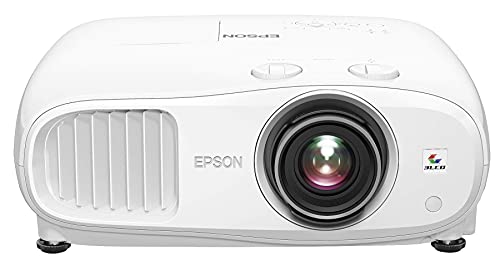
The main reason to shortlist it is the lens arrangement: 1.62x optical zoom, a 1.32–2.15 throw ratio, and both vertical and horizontal lens shift. Epson specifies up to ±60% vertical shift with horizontal shift centered, and ±24% horizontal shift with vertical shift centered. Those maxima should not be assumed to be available simultaneously.
Choose it when: a shelf, ceiling mount or existing room layout makes optical placement adjustment valuable. Check first: the full lens-shift limits in the installation guide and the ongoing cost of its replaceable lamp.
Epson’s technical documentation identifies the conditions behind its brightness rating: high power, Dynamic color mode, wide zoom and auto iris off. Different viewing modes and installation choices can change output. A rated maximum is not a measurement of the picture you will see after choosing your preferred color settings.
Read brightness claims carefully
Use manufacturer specifications with an identified measurement standard as your starting point. BenQ specifies ANSI lumens; Epson identifies ISO-rated white output and IDMS-rated color output. An unexplained “9,500L” label on a budget listing does not establish that it is brighter than either projector here.
Lumens describe light output, while lux describes illumination over an area. A number without its measurement method and conditions is a weak basis for comparison. Likewise, a product that accepts a 4K signal may still display a lower-resolution image. Check light output, imaging system and supported input formats separately.
The 3,200-versus-3,000 figures alone are not a sensible reason to declare one projector the daylight winner. We have not measured these units side by side, and brightness settings, screen choice and ambient light all affect the result. The distinction between laser and lamp, plus the actual placement range, is more useful for narrowing the purchase.
Calculate the throw distance before choosing a screen size
Throw ratio relates lens-to-screen distance to image width. A 100-inch 16:9 image is approximately 87.2 inches wide. Applying the published ratios gives a planning range of roughly 8.4–10.9 feet for the TK710 and 9.6–15.6 feet for the Home Cinema 3800.
These are calculated examples, not installation measurements. Use the manufacturer’s calculator and manual to confirm the exact position, lens offset, mounting clearances and final image size. Allow space for the projector body, cables and ventilation behind the lens position.
Also resist buying the largest screen the wall can hold. Spreading a projector’s light over a larger area reduces illumination on that area. If the picture is too weak in daytime, a smaller image and better light control may be more useful than digital picture adjustments.
Match an ambient-light-rejecting screen to the projector
An ambient-light-rejecting, or ALR, screen can improve a suitable installation, but the label does not make all screen materials interchangeable. BenQ explains that these screens rely on the directions from which projector light and unwanted room light arrive. Ambient light traveling from the same direction as the projector is harder for a directional screen to separate. See its ALR screen explanation.
Both recommendations here project from a conventional distance. Confirm that a proposed screen is compatible with the exact throw ratio and mounting position; do not automatically buy a screen designed for an ultra-short-throw projector sitting below the image. Ask about the viewing cone, seating positions and sample material before committing to a large fixed screen.
A purchase checklist for a bright room
- Look at the screen wall during the hours you will actually watch. Identify direct sunlight and reflections.
- Choose a realistic image size, then measure the available lens-to-screen distance.
- Check the exact projector model, its light-output standard and optical adjustment limits.
- Budget for the screen, mount, streaming source, cables and audio, plus future lamp costs where relevant.
- Read the seller’s return conditions and evaluate the setup promptly with both bright sports footage and darker movie scenes.
The TK710 is the more natural starting point for a laser movie-and-gaming setup; the Home Cinema 3800 deserves attention when lens flexibility is the deciding factor. For either one, make keeping direct sunlight off the screen part of the plan. That is a more reliable approach to daylight viewing than shopping by the largest unqualified brightness number.
Image note: AI-generated editorial illustration; not a photograph of the named product.