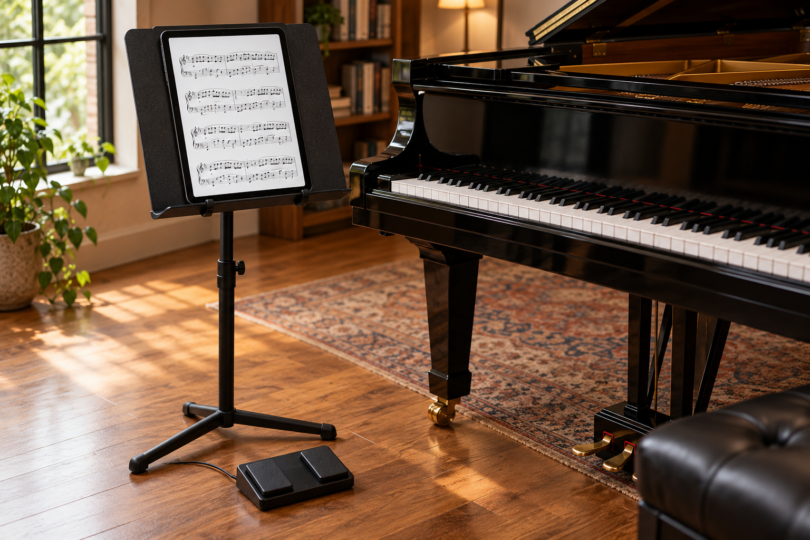

The 13-inch iPad Air (M4) is our first choice for reading full-page sheet music in forScore. The Samsung Galaxy Tab S10 FE+ is a large-screen Android alternative for MobileSheets, while the iPad (A16) suits a smaller setup when you can read your scores comfortably at a reduced size.
Start with the app and a sample of your actual music. A dense piano score, a vocal part and a chord chart place different demands on the screen. These picks are based on documented hardware, software requirements and page-size calculations, not hands-on rehearsal or performance testing.
Three tablets worth comparing
| Tablet and configuration | Best fit | Display | Main tradeoff |
|---|---|---|---|
| iPad Air 13-inch (M4), 128GB Wi-Fi, Space Gray | Full-page scores in forScore | 2732 × 2048; 12.9-inch rectangular diagonal | Large tablet; compatible Apple Pencil costs extra |
| Galaxy Tab S10 FE+, 128GB Wi-Fi, Silver | Android and MobileSheets | 2880 × 1800; 13.1-inch LCD | Narrower portrait page than the Air despite the larger diagonal |
| iPad (A16), 128GB Wi-Fi, Yellow | Portable practice and simpler parts | 2360 × 1640; 10.86-inch rectangular diagonal | Full-page notation appears smaller |
1. iPad Air 13-inch (M4): our full-page iPad pick
Configuration: 128GB, Wi-Fi, Space Gray, Apple part MH5N4LL/A. Choose the 13-inch M4 Air at Apple and confirm all four configuration choices before ordering.
The Air’s relatively broad portrait display is its strongest argument for sheet music. Apple specifies a 2732 × 2048 screen with a fully laminated construction and antireflective coating. Those are useful features to compare, but they do not establish glare-free reading under every stage light. Try the intended screen angle and brightness before relying on it at a performance.
At an ideal full-page fit, a US Letter score occupies roughly 7.7 × 10.0 inches on this display. That is closer to a paper score than either alternative below, although it is still smaller than an actual 8.5 × 11-inch page. For musicians reading multiple staves at a distance, that geometry is a more relevant reason to choose the Air than the M4 processor alone.
It supports Apple Pencil Pro and Apple Pencil (USB-C), purchased separately. Either is a hardware option to check if you want handwritten annotations; an older Pencil is not automatically compatible. You can also navigate and annotate with touch in a suitable app. See Apple’s exact Air specifications and its model-specific user guide.
Choose it if: you want forScore and prioritize a larger portrait score. Consider the smaller iPad if: you mainly read short parts, practice close to the screen or already know that an 11-inch-class tablet is comfortable.
2. Galaxy Tab S10 FE+: the large Android option
Configuration: 13.1-inch FE+, 128GB storage, 8GB memory, Wi-Fi, Silver; retailer model SM-X620NZSNXAR. The FE+ is a different size from the 10.9-inch FE.

Samsung Galaxy Tab S10 FE+, 128GB Wi-Fi, Silver
As an Amazon Associate we earn from qualifying purchases.
The FE+ gives Android users a large LCD and an included S Pen for marking up music in an app that supports stylus annotations. Samsung specifies 2880 × 1800 pixels and a refresh rate up to 90Hz. For a static score, page size and clear notation matter more than a high refresh-rate number.
Its screen is taller and narrower in portrait than the Air’s. A full US Letter page therefore fits at roughly 6.9 × 9.0 inches, even though the diagonal is slightly larger. A4 pages use that taller shape more efficiently, but the full-page display remains smaller than the original sheet. The comparison below makes that tradeoff explicit.
MobileSheets is the app to investigate here. forScore does not run on Android. The FE+’s S Pen does not support Bluetooth Low Energy remote functions, so do not buy it expecting the pen to act as a wireless page-turning remote. A separately verified pedal is the appropriate accessory to consider for hands-free turns. Check Samsung’s FE and FE+ technical guide and the manufacturer’s series overview.
Choose it if: you prefer Android, want a large display and plan to use MobileSheets. Choose an iPad if: your existing library or ensemble workflow specifically depends on forScore.
3. iPad (A16): the smaller, portable choice
Configuration: 128GB, Wi-Fi, Yellow, model MD4D4LL/A.

The standard iPad keeps access to forScore in a smaller format. Apple markets it as 11 inches and specifies a 10.86-inch rectangular diagonal with 2360 × 1640 pixels. That makes it an option for individual parts, lead sheets and close-up practice, provided the music remains readable to you.
A complete Letter page shrinks to approximately 6.2 × 8.0 inches before app controls take space. Cropping blank margins can help, but it cannot make dense notation fit at paper size without losing some of the page or changing the viewing method. Try landscape half-page viewing or the app’s other layout tools if full-page portrait is too small.
For annotation, this iPad supports Apple Pencil (USB-C) and Apple Pencil (1st generation). The first-generation Pencil needs the USB-C to Apple Pencil Adapter for pairing and charging. Apple Pencil Pro is not on this model’s compatibility list. Pens are separate purchases. See Apple’s A16 iPad specifications.
Choose it if: portability and a smaller setup matter, and you have checked your hardest score at this size. Step up to the Air if: you repeatedly zoom in, lose your place or struggle to see multiple staves from your playing position.
How big will a sheet of music actually look?
Diagonal size alone is misleading. A4 measures 210 × 297 mm, while US Letter is 8.5 × 11 inches. The estimates below use each display’s rectangular diagonal and pixel proportions, fit one uncropped portrait page and preserve its shape. Measurements are approximate width × height in inches.
| Tablet | Portrait screen rectangle | Letter page on screen | A4 page on screen |
|---|---|---|---|
| 13-inch iPad Air M4 | 7.7 × 10.3 | 7.7 × 10.0 | 7.3 × 10.3 |
| Galaxy Tab S10 FE+ | 6.9 × 11.1 | 6.9 × 9.0 | 6.9 × 9.8 |
| iPad A16 | 6.2 × 8.9 | 6.2 × 8.0 | 6.2 × 8.8 |
These are calculated upper bounds, not physical measurements. Rounded corners, app toolbars and margins can reduce usable space. Cropping empty PDF margins enlarges the notation; two pages side by side makes each page smaller. Open a representative score at your normal stand distance before deciding.
Choose the score app before the tablet
forScore: the current App Store listing and 15.2 user guide require iPadOS 18 or later. It is a paid up-front app for supported Apple devices, with an optional auto-renewing forScore Pro subscription for additional features. Ordinary PDF reading and page-turner use do not require Pro. Face-gesture turning is a Pro feature and also requires supported device tracking; check the app’s Device Information screen before subscribing. See the current App Store requirements, Pro feature limits and user guide.
MobileSheets: the Android version requires Android 7 or later and supports PDF, image, text and ChordPro files. Its free trial allows eight songs and has additional limits on bookmarks, link points and syncing; use it to test your workflow before buying the paid app. Store and direct-purchase licensing differ, so do not assume one license covers every platform or musician. Consult the developer’s purchase and trial details and Android manual.
A PDF reader organizes and displays files; it does not automatically provide the publisher’s entire score catalog. Obtain the actual music you need, import it, and check every page. A scanned PDF also does not become editable notation merely because the tablet has a pen.
Page turners: check the pedal and app together
The PageFlip Firefly is one documented example: PageFlip lists forScore on iPad and MobileSheets on Android, and both app developers provide relevant pedal guidance. That is stronger evidence than a generic promise that any Bluetooth button will turn pages. See the exact Firefly product, forScore’s PageFlip setup and MobileSheets’ supported-pedal guidance.
Pair the pedal using its revision-specific instructions, select a compatible keyboard mode and map forward/backward actions in the app. forScore specifies Firefly modes 1, 2 or 3; MobileSheets provides configurable pedal actions. A keyboard-style pedal can hide the on-screen typing keyboard, so learn its keyboard toggle too. Rehearse repeats, backward turns, reconnection and battery checks before the first performance. Compatibility documentation is not a claim that we tested this exact setup.
Our verdict
Pick the 13-inch iPad Air M4 for a broader full-page score and forScore, the Galaxy Tab S10 FE+ for a large Android/MobileSheets setup, or the iPad A16 once you know its smaller page is readable. Include the app, suitable stand, optional pen and pedal in your budget. If your existing tablet already runs the app and displays your scores comfortably, test that setup before replacing it.
Frequently asked questions
Which tablet is best for full-page sheet music?
The 13-inch iPad Air M4 is our first choice for full-page scores in forScore because its broad portrait display fits a larger uncropped Letter page than the other picks. It still displays the page below actual paper size, so check a representative score at your playing distance.
Can I run forScore on a Samsung tablet?
No. forScore is available for supported Apple devices, not Android. MobileSheets is an Android alternative for the Galaxy Tab S10 FE+, with its own purchase, trial limits and pedal settings.
Do I need a subscription to read PDFs in forScore?
No. forScore is purchased up front, and the optional forScore Pro subscription is not required for normal PDF reading or ordinary page-turner use. Advanced features such as face-gesture turning have additional subscription and hardware requirements.
Will any Bluetooth pedal turn my sheet music pages?
No. The pedal’s commands must work with the selected app and operating system. PageFlip documents Firefly support for forScore on iPad and MobileSheets on Android; follow the exact pedal revision’s pairing instructions and test its modes and page actions before performing.
Is an 11-inch tablet large enough for music?
It can be, depending on the score and your viewing distance. On the iPad A16, an uncropped Letter page fits at about 6.2 × 8.0 inches before app controls. Try your densest music at that size; a larger tablet or half-page layout may be more comfortable.