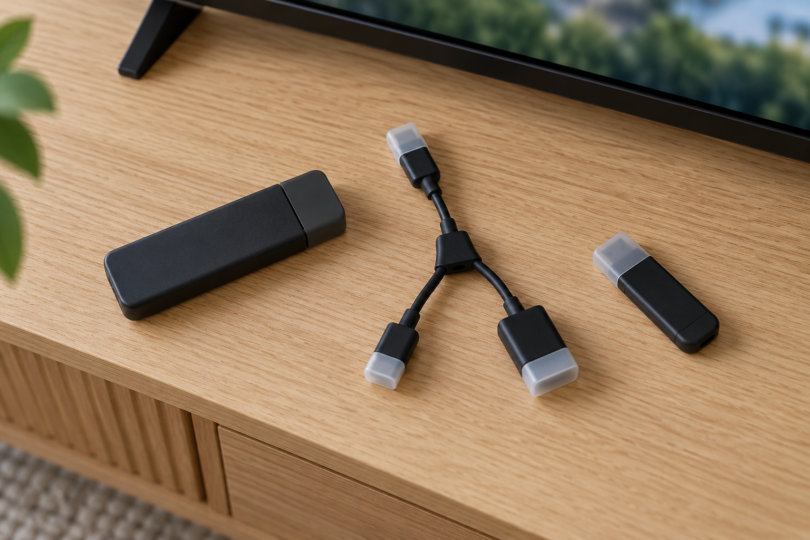

The best OTG cable for a Fire TV Stick 4K depends on the connection you need: AuviPal’s UOC2 is the flexible single-port option, TV xStream’s right-angle adapter is the compact choice, and AreMe’s hub is worth comparing for several peripherals. These are third-party accessories with seller-stated compatibility. Amazon’s own guidance does not establish the app-storage expansion you may be hoping for.
We compared the exact listings, connector layouts and Amazon’s device documentation. We have not tested these accessories with individual Fire TV generations, firmware versions or USB devices. Our choices describe useful layouts, not measured speed, reliability or guaranteed compatibility.
Check your Fire TV generation before buying
Amazon identifies the first-generation Fire TV Stick 4K as AFTMM and the second generation as AFTKM. Its third-generation 4K model, AFTCR001, has USB-C. The micro-USB accessories below are not a direct fit for that USB-C model. Other Fire TV models need their own compatibility check; a listing that simply says “4K” does not establish support for every version. Check Amazon’s exact device specifications.
For both the first- and second-generation Fire TV Stick 4K, Amazon’s identification guide lists no external storage and no supported USB devices. Do not buy an OTG cable on the assumption that it will add app-installation space. Get explicit confirmation for your exact stick and intended peripheral, and choose return terms that let you check the combination.
Three OTG layouts at a glance
| Accessory | Best fit in this comparison | Selected package | Main qualification |
|---|---|---|---|
| AuviPal UOC2 | One USB-A peripheral with flexible positioning | Two cables; 1 USB Port option | Seller requires an OTG-capable host |
| TV xStream 694536357464 | A compact right-angle connection | Two black adapters | Check the pictured plug direction |
| AreMe four-port OTG hub | Several peripherals in one hub | One black hub | Four USB-A ports plus a separate power input |
AuviPal UOC2: our flexible cable choice
The selected UOC2 listing is the two-pack with the “1 USB Port” option. Each short cable gives you a micro-USB plug for the host, a micro-USB power input and a USB-A socket for a peripheral. AuviPal describes a six-inch design. The flexible branches are the reason to prefer it when you need to position a receiver or flash drive away from the stick.
Choose this layout for one accessory once its compatibility is established. It also leaves you the option of choosing a separate hub later, but that creates another connection and another compatibility check. The second cable in the pack is a spare or a second setup, not a second USB port on the first cable.
- Pros: Flexible placement and a distinct power input; the two-pack can cover two independent setups.
- Cons: One peripheral socket per cable. The listing’s general FireStick claim is not a generation-by-generation approval from Amazon, and phone or tablet charging is excluded.
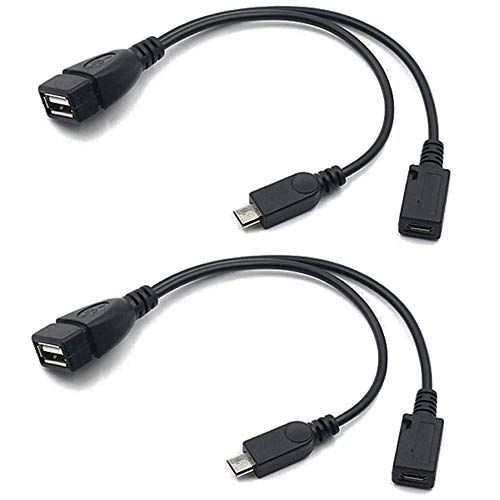
AuviPal UOC2 Micro USB OTG Cable, 1 USB Port, 2 Pack
As an Amazon Associate we earn from qualifying purchases.
TV xStream right-angle adapter: for a compact connection
TV xStream’s model 694536357464 is a rigid right-angle adapter supplied as a black two-pack. The listing specifically tells buyers to check the orientation shown and says a reverse-angle version also exists. This is the option to compare when the correct angle keeps a cable out of the way behind your television.
Check clearance around the actual stick and TV before ordering. A rigid block gives you less freedom to reposition the connection than the AuviPal cable. Support attached leads rather than allowing a heavy accessory to hang from the stick’s socket. These are placement considerations, not a claim that either design is more durable.
- Pros: Compact layout and a separate power connection without a dangling Y-cable.
- Cons: The wrong orientation can defeat the purpose. Its broad “4K” wording does not specify every 4K generation, and it is not sold as a phone-charging adapter.

AreMe hub: for several USB peripherals
The AreMe listing selected here is ASIN B0BKZK4KGH: one black micro-USB OTG hub with four USB-A ports and a separate power input. Its specification table identifies USB 2.0. This is the layout to compare when you need a receiver and another accessory connected together, subject to host and peripheral support.
The seller names Fire Stick 4K but provides no generation-by-generation compatibility matrix. It also does not give a clear total or per-port power budget on the captured page. Ask for the required input supply and supported device load before purchase; adding four sockets does not establish that four power-hungry devices can operate together.
- Pros: Four USB-A data ports and a separate power input in a single accessory.
- Cons: Exact-generation support and the power budget need confirmation. Read the USB 2.0 specification rather than assuming a higher bus speed from the socket color.

What to check before placing an order
Look for both a USB peripheral connection and a separate power input. A power-only lead cannot substitute for the documented OTG function, and a plain USB extension cable does not establish it. Follow the port labels and supplied instructions; do not force a plug into a similar-looking connector.
Treat the cable, hub and peripheral as separate compatibility questions. For a keyboard, check the receiver and the app you want to use; for storage, check whether the goal is media playback or moving apps; for networking, verify the exact adapter and driver support. Seller examples identify possible uses, not an approved list for your Fire TV.
If your goal is simply wired internet, Amazon’s help page explicitly lists its own Ethernet adapter for the first- and second-generation 4K sticks. That is worth comparing with a chain of OTG cable, hub and third-party Ethernet adapter. It does not establish USB-storage support.
Compare the total setup cost, including any required power supply and hub. Check the selected pack count and connector direction, retain the packaging during testing, and review the seller’s return conditions. Neither an attractive photo nor a familiar “Fire Stick” label settles compatibility.
Frequently asked questions
Which is the best choice for one USB accessory?
The AuviPal UOC2 is our starting point for a flexible single-port layout. Confirm your host and peripheral first; the recommendation is about the cable arrangement, not a promise of Fire TV support.
Will an OTG cable expand Fire TV Stick 4K app storage?
Do not assume so. Amazon’s first- and second-generation 4K help entries list no external storage. An accessory seller’s memory-expansion claim does not override that limitation.
Can I use these on the third-generation Fire TV Stick 4K?
These micro-USB plugs are not a direct fit for the third-generation 4K model’s USB-C port. Choose accessories documented for that exact model instead of adding an unverified chain of converters.
Does the AreMe hub work with any phone charger?
The captured listing does not establish that. Confirm the required input supply and combined peripheral load with the seller, and follow your Fire TV’s power instructions. The power port is not a promise of phone or tablet charging.
Will a USB hub make the Fire TV connection faster?
A hub adds connection points; we have no test evidence that these products increase transfer or network speed. Choose one for the ports you need and verified compatibility, not a speed-up promise.
Our recommendation
Shortlist AuviPal UOC2 for flexible placement, TV xStream’s right-angle two-pack when its orientation fits, or AreMe when a hub is necessary. Settle the exact Fire TV generation, power requirements and intended peripheral before buying. For first- and second-generation 4K app-storage expansion, these listings do not overcome Amazon’s published limitation.