
The best tablet for audio depends on what you want to do with it. The Lenovo Tab Plus is our speaker-focused pick for music and podcasts around the house. The Samsung Galaxy Tab A9+ is a straightforward option for wired headphones and a microSD music library. Choose the iPad A16 if recording ideas in GarageBand is the priority. These three choices serve different listening and recording setups.
Best tablets for audio at a glance
| Exact configuration | Best fit | Audio connections and speakers | Storage and main tradeoff |
|---|---|---|---|
| Lenovo Tab Plus ZADX0081US; Luna Grey; 8GB/256GB | Listening through the tablet’s own speakers | Eight JBL speakers; Bluetooth speaker mode; 3.5mm jack; USB-C digital audio | microSD up to 1TB; approximately 650g, so better suited to a stand or desk |
| Galaxy Tab A9+ SM-X210NZAAXAR; graphite; Wi-Fi; 64GB | Wired headphones and stored audio | Quad speakers with Dolby Atmos; Headset jack; Bluetooth | microSD up to 1TB; less internal storage than the other selected configurations |
| iPad A16 MD4E4LL/A; pink; Wi-Fi; 128GB | GarageBand recording and iPad music apps | Landscape stereo speakers; Bluetooth 5.3; USB-C audio and compatible interfaces | 128GB in this selection; 3.5mm headphones need a separate USB-C adapter |
1. Lenovo Tab Plus: best for speaker listening
The Tab Plus makes the most sense when you want the tablet itself to provide the sound. Lenovo documents eight JBL speakers, split between four tweeters and four bass units, and an integrated kickstand. Its Bluetooth speaker mode lets another device, such as a phone, stream audio to the tablet. That is a useful distinction from simply connecting a tablet to Bluetooth headphones.
The selected US model is ZADX0081US in Luna Grey, with 8GB memory and 256GB storage. The 11.5-inch 2000 × 1200 screen gives album artwork and playback controls plenty of room, while microSD support up to 1TB provides an option for additional files. Lenovo also specifies a 3.5mm headphone/microphone socket and USB-C digital audio.
Pros: a dedicated speaker arrangement, built-in kickstand and several ways to connect headphones. Cons: at approximately 650g, it is the desk-friendly choice here rather than a tablet to hold throughout a long listening session. Speaker count alone cannot tell you whether you will like the sound; audition it with familiar music if that is your main buying criterion.

Lenovo Tab Plus ZADX0081US, 8GB/256GB, Luna Grey
As an Amazon Associate we earn from qualifying purchases.
2. Samsung Galaxy Tab A9+: best for a wired music setup
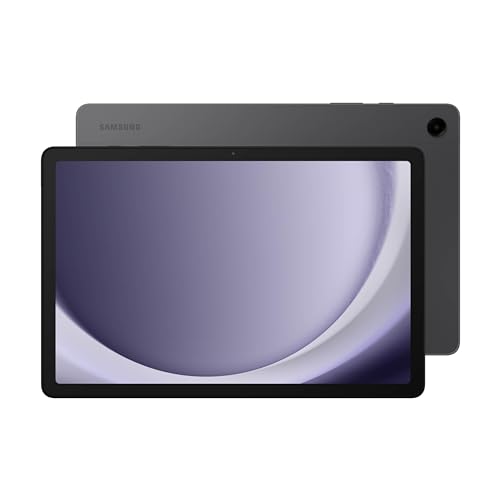
The graphite US Wi-Fi model SM-X210NZAAXAR has 64GB storage, an 11-inch 1920 × 1200 screen and four speakers with Dolby Atmos. A headset jack makes it worth considering if you already have wired headphones and want to keep the USB-C connection available for charging. Bluetooth is another listening option.
Samsung specifies microSD expansion up to 1TB, with the card sold separately. That makes this configuration a candidate for a collection of locally stored audio files. Before buying a card for subscription downloads, check the music app’s current storage options; a tablet’s card slot does not establish what a particular app allows.
Pros: a built-in headphone socket, four speakers and expandable file storage. Cons: the selected 64GB configuration has less internal room than the Lenovo and iPad above, and some storage is occupied by system content. Choose it for a confirmed Android listening app and the connections you need; a headset connector is not proof of compatibility with a multichannel recording interface.
3. Apple iPad A16: best for GarageBand recording
The selected iPad is the pink 128GB Wi-Fi A16 model, MD4E4LL/A. Apple’s GarageBand Audio Recorder guide documents recording through the built-in microphone or an external microphone. This makes it a practical starting point for voice notes, song ideas and recordings that you want to develop inside GarageBand.
Check software before buying around a particular music app. The current GarageBand listing requires iPadOS 26 or later, and Apple lists the iPad A16 as compatible with iPadOS 26. Update the tablet as needed, then verify the requirements of any additional instrument or effects app you intend to use.
Apple specifies landscape stereo speakers, Bluetooth 5.3 and a USB-C port with USB 2.0 data speeds. Its USB-C connection guidance covers audio interfaces, MIDI devices and USB-C headphones. For conventional 3.5mm headphones, budget for a separate compatible USB-C headphone adapter. Check the interface maker’s iPadOS support, cable requirements and power instructions before ordering recording hardware.
Pros: a documented GarageBand recording workflow and support for connected audio equipment. Cons: an adapter or interface adds cost and equipment to carry. GarageBand’s monitor control becomes available with an external microphone or audio device; that does not make every USB accessory compatible.

How to choose the right audio tablet
Start with the main task. For background music from the tablet, compare its speakers and how you will prop it up. For headphone listening, match the actual plug and decide whether an adapter is acceptable. For recording, start with the app and interface manufacturers’ compatibility requirements, then choose the tablet. The Lenovo’s speaker mode, the Samsung’s headphone socket and the iPad’s GarageBand workflow answer different needs.
Compare the complete setup: tablet, case or stand, memory card where appropriate, headphone adapter and any recording interface or powered accessory. Use familiar files to check playback and make a short test recording with your chosen setup while you can still evaluate the purchase. Check monitoring and playback through the output you intend to use, not just whether a cable fits.
Frequently asked questions
Which tablet here has the most built-in speakers?
The Lenovo Tab Plus has eight JBL speakers, compared with four on the Galaxy Tab A9+ and landscape stereo speakers on the iPad A16. That is a hardware comparison, not a measured sound-quality ranking.
Which tablets have a built-in headphone socket?
The Tab Plus has a 3.5mm socket, and Samsung’s US A9+ manual identifies a headset jack. Check that your headphone plug matches the connection. For the iPad A16, use USB-C headphones or a compatible USB-C to 3.5mm adapter. Confirm any headset microphone requirements separately from headphone playback.
Does a USB-C port guarantee that an audio interface works?
No. Check support for the tablet’s operating system and recording app, the required cable or adapter, and the interface’s power supply. Start with the interface maker’s requirements for the exact tablet and app.
Can the Lenovo Tab Plus play music sent from my phone?
Yes. Its documented Bluetooth speaker mode receives audio from a portable device such as a smartphone. This is a reason to choose it if you want the tablet to double as a speaker at a desk.
Which choice should I buy for GarageBand?
Choose the iPad A16 from this shortlist and meet GarageBand’s current iPadOS requirement. Apple documents recording from the iPad microphone and external microphones; verify an external device’s compatibility before building your setup around it.