
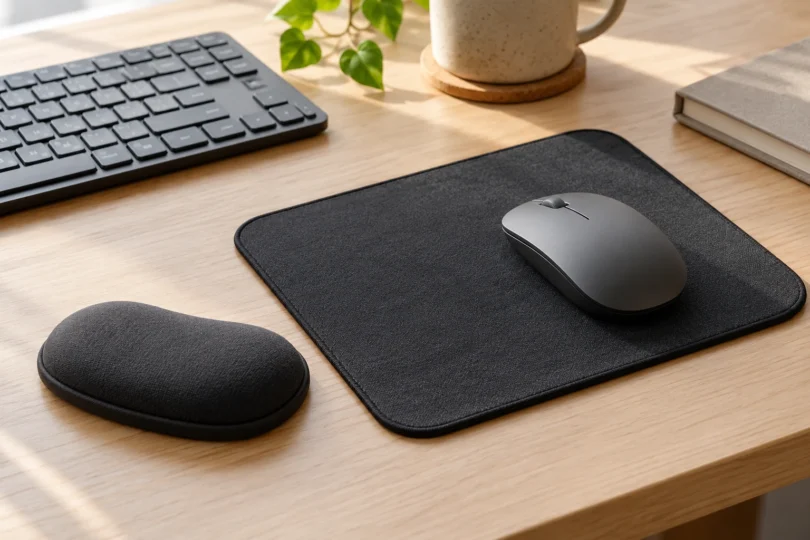

If you’re looking for a mousepad for carpal tunnel, start with the shape and height that fit your desk and mouse. The Logitech Studio Series is a useful flat-pad choice, the Kensington ErgoSoft Slim adds a separate low support, and the Belkin WaveRest combines a mouse surface with a gel rest.
These are choices for workstation comfort and fit. We do not recommend any of them as a treatment or prevention for carpal tunnel syndrome. Persistent or worsening hand pain, tingling, numbness or difficulty gripping deserves clinical assessment; the NHS advises seeking medical advice when symptoms worsen or do not go away.
Our comparison uses product specifications, manufacturer information and actual listing photos. We have not physically tested these pads or measured their effects on symptoms.
Best mousepads and palm rests to compare
| Pick | Best fit | Shape and size | Main limitation |
|---|---|---|---|
| Logitech Mouse Pad, Studio Series, Graphite, 956-000035 | A compact flat surface without an attached cushion | Rounded rectangle; 230 × 200 × 2 mm | No raised support; natural-rubber base contains latex |
| Kensington ErgoSoft Slim Mouse/Trackpad, Black, K52803WW | A slim mouse or trackpad with an independently positioned rest | Curved rest; approximately 160 × 108 × 8 mm | Rest only, with no mouse-tracking area; intended for a mouse under 1 inch high |
| Belkin WaveRest Gel Mouse Pad, Black, F8E262-BLK | A single pad with an integrated gel cushion | Shaped pad with a raised front rest; confirm usable dimensions before buying | Fixed cushion position; published size information is inconsistent |
1. Logitech Studio Series: best for a simple flat pad
The Graphite Studio Series pad is the most straightforward choice here if your existing desk and mouse already let your hand sit naturally. Its 2 mm profile adds little height, and its 230 × 200 mm footprint suits a compact workspace. There is no attached bump to dictate where your palm should sit.
Logitech specifies a recycled-polyester surface and inner layer, stitched edges, and a natural-rubber base. This is a fabric mouse surface rather than a padded palm rest. The modest area may feel restrictive if you make broad mouse movements, and it will not provide the cushioning of the other picks.
For spills, Logitech’s care note says to wipe with a damp cloth within two minutes; its spill resistance was tested under limited conditions. Do not treat the coating as a guarantee against every stain. The maker also warns that natural rubber latex may cause allergic reactions in some people.
Check the Graphite Studio Series mouse pad at Logitech. Select the small mouse pad, not the much larger Studio Series desk mat.
2. Kensington ErgoSoft Slim: best for a separate low-profile rest
The black K52803WW is a separate, curved palm-rest accessory. Its soft TPU exterior surrounds gel cushioning. B&H lists its size at approximately 160 × 108 × 8 mm, and Kensington specifies this model for a mouse less than 1 inch high. That makes it worth comparing for a slim mouse or trackpad; it is not the taller Standard Mouse version.
A separate rest lets you adjust its position or remove it without changing your mouse surface. However, it provides no tracking area of its own, so you still need a suitable desk surface or pad. Its low height may be a poor match for a tall mouse. Check that the combination leaves your wrist in line with your forearm rather than bending it upward or sideways.
The surface is designed to be easy to clean. Follow Kensington’s product-care directions for any cleaning agent, and do not assume the cover is removable or machine washable. This is the single black Slim Mouse/Trackpad rest; the same Amazon family also includes keyboard rests, a Standard Mouse version and multipacks.

Kensington ErgoSoft Slim Mouse/Trackpad Wrist Rest, Black K52803WW, 1 Pack
As an Amazon Associate we earn from qualifying purchases.
3. Belkin WaveRest: best for an integrated gel-rest design
The black F8E262-BLK combines a shaped mouse surface with Belkin’s GelFlex cushion at the front. Choose it if you prefer moving one accessory around the desk instead of aligning a pad and a separate rest. The listing describes a polyurethane surface and nonslip rubber backing.
The trade-off is the fixed relationship between the cushion and tracking area. If the cushion puts pressure directly on your wrist, raises your hand too far, or leaves too little room for your usual mouse movement, this shape is a poor fit regardless of how soft it feels.
Size information needs care: the selected Amazon option is labeled “10.8L × 8.1W inches,” while other retailers publish different figures. Treat that as a listing identifier, not a confirmed measurement of usable tracking space or cushion height. Ask the seller to confirm those dimensions if desk clearance is tight. Belkin’s product page does not provide a clear washing procedure, so check its care guidance before soaking the pad or applying cleaners.
The linked option is one black mouse pad, not the long keyboard rest or six-pack. You can also check the exact F8E262-BLK model and current availability at Belkin.

How to choose the right fit
Check the whole workstation first. A softer pad cannot compensate for a mouse placed too far away or a desk at the wrong height. OSHA’s mouse guidance recommends keeping the mouse near the keyboard, arranging the workstation for a straight wrist, and choosing a device and pointer settings you can control with a light grip.
Support the palm during pauses without pressing on the wrist. OSHA’s wrist/palm-support guidance says that a resting pad should contact the heel or palm of the hand. Hands should remain free to move, and elevated above a rest while typing. Do not plant the soft underside of your wrist on a cushion and pivot around it.
Compare usable space and height, not softness alone. Measure where the accessory will sit beside your keyboard. A fixed rest reduces the portion of the pad available for mouse movement; a separate rest needs its own space. Prefer a return policy that lets you check the fit, because published dimensions cannot tell you which cushion will feel comfortable to your hand.
Choose by the job you need it to do. Start with Logitech for a flat fabric surface, consider Kensington when you need a low separate support, and compare Belkin when you want an integrated gel-rest layout. If an accessory increases discomfort, stop using that setup and reassess it instead of continuing through symptoms.


