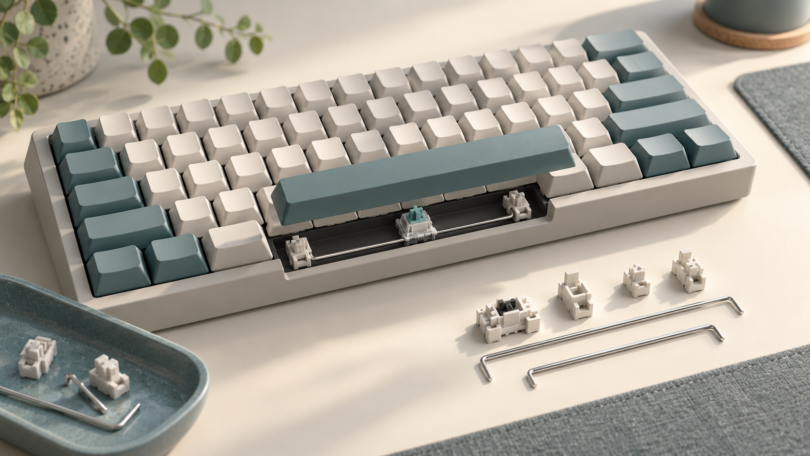

The best mechanical keyboard stabilizers are the ones that fit your keyboard’s mounting points, PCB thickness, switches, and keycaps. Start with those checks before choosing a brand. A carefully fitted stabilizer helps a wide key move evenly; an incompatible one can bind, sit loose, or prevent the key from returning.
Choose the mounting type first
- PCB screw-in: housings attach to the circuit board with screws. Your PCB needs the correct mounting holes, and the plate and case must leave clearance for the housings and hardware.
- PCB clip-in: housings latch into PCB mounting holes without screws. These are different from plate-mounted stabilizers, even though both may be described as “snap-in.”
- Plate-mount: housings clip into cutouts in the switch plate. Match the cutout shape and plate thickness; PCB-mount holes do not make these interchangeable.
Read the keyboard’s build guide rather than inferring support from hot-swappable switches. Case construction can rule out an otherwise plausible replacement: CannonKeys specifies clip-in stabilizers for Bakeneko builds because screw-in hardware interferes with the O-ring.
Check PCB thickness, housing clearance, and switch travel
For PCB-mounted stabilizers, identify whether your exact PCB revision is 1.2mm or 1.6mm thick and choose the corresponding version. Do not confuse PCB thickness with plate thickness. Some manufacturers offer purpose-made shims, but use them only when the stabilizer and keyboard documentation support that combination.
The housing also has to clear the plate opening. A shared screw pattern does not guarantee clearance: Glorious documented third-party stabilizer fit differences between early and revised GMMK PRO metal plates. Check the board and plate revision before ordering.
Finally, match the stabilizer’s intended travel and keycap mounting geometry. A regular-travel, long-pole, low-profile, or proprietary system should not be treated as interchangeable merely because the stems look similar. Gateron, for example, separates regular-travel and shorter-travel versions of its Plate Mounted V2 set. For an unfamiliar switch combination, ask the keyboard or stabilizer maker to confirm compatibility. Keep each model’s wires, stems, and housings together unless the manufacturer explicitly confirms cross-compatibility.
Count assemblies and measure the layout
The “u” notation describes keyboard layout units, with a normal letter key occupying 1u. In common Cherry-style arrangements, a 2u stabilizer can serve 2u, 2.25u, and 2.75u keys; CannonKeys explicitly documents those sizes for its 2u wires. Spacebars commonly need 6.25u or 7u wires, but split and nonstandard layouts require their own checks. Compare the keycap’s stabilizer-stem spacing with the PCB positions.
- Typical ANSI 60% or TKL: four short assemblies for Backspace, Enter, and both Shift keys, plus one spacebar assembly.
- Typical ANSI full-size: seven short assemblies, including the numpad keys, plus one spacebar assembly.
- Compact, ISO, or split layouts: count the actual stabilized keys. Shorter Shift keys and split Backspace can change the total.
One complete assembly needs two housings, two stems, and one wire. Ten housings make five assemblies. A spare 7u wire alongside a 6.25u wire gives a spacebar-size option, not another complete stabilizer. Confirm screws, washers, or clip-in inserts are included where required.
Three stabilizer sets worth considering
Swagkeys Knight Stabilizer v4: PCB screw-in option
Consider the Knight v4 when your build supports screw-in mounting and you want a choice of 1.2mm or 1.6mm fit. The manufacturer lists ten housings and ten stems, plus 6.25u and 7u wires. That limits the kit to five assembled stabilizers. Choose the thickness deliberately, and verify plate clearance. The listing contains conflicting short-wire counts, so confirm the contents if your layout needs anything beyond four short keys and a spacebar.
Wuque Studio WS Stupid Stabilizer: PCB clip-in option
This named model uses clip-in mounting and comes in separate 1.2mm and 1.6mm versions. Its package includes five pairs of housings and stems, four 2u wires, one 6.25u wire, one 7u wire, and clip-in inserts. It suits a compatible five-assembly build; a conventional full-size layout needs additional short assemblies. Wuque describes it as pre-lubed, but check free movement during assembly.
Gateron Plate Mounted V2: regular-travel plate-mount option
The Khaki version belongs to Gateron’s regular-travel group, specified for switches with 4mm total travel. White and Yellow share that category; Silver is specified for 3.4mm travel. Gateron describes both five-assembly and larger packs, so confirm the ordered pack’s count and spacebar size. This is a plate-mount choice, not a replacement for PCB screw-in housings.
Fix fit problems before adding more lubricant
Unplug the keyboard and follow its disassembly instructions. Check that each housing sits flat, the wire is seated as the maker specifies, and the plate does not squeeze the housing. Use the supplied mounting hardware without overtightening.
If a key sticks, test another correctly sized keycap and check switch travel, wire seating, and excess lubricant. If one side ticks, inspect wire straightness and seating before changing parts. Lubricant cannot correct the wrong wire length or mounting type. Test every stabilized key’s return before closing the case or soldering switches.