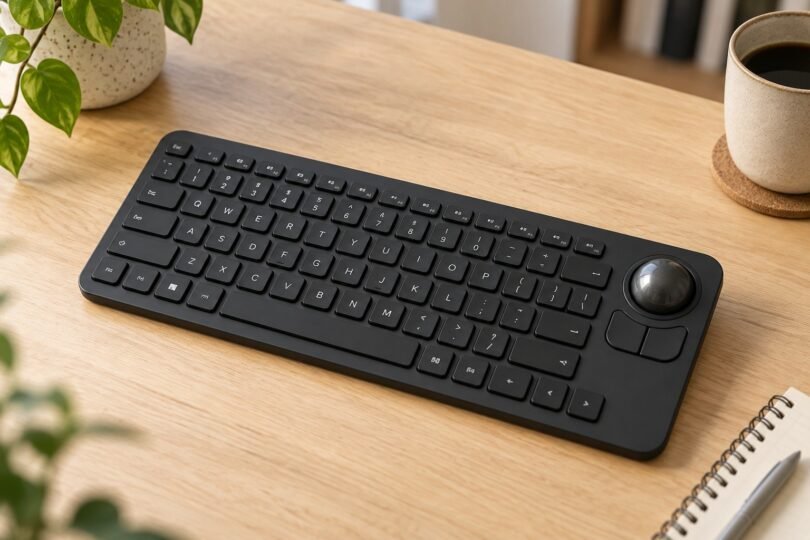

A wireless keyboard with a trackball combines typing, pointing and clicking in one device. It can make sense for a small workstation or a computer connected to a living-room screen, where moving a separate mouse is inconvenient. The important first check is whether the keyboard contains an actual rotating ball: a touchpad, directional pad or ordinary mouse bundled with a keyboard is a different arrangement.
For a straightforward compact layout, start with the Perixx PERIBOARD-706 PLUS. For a split layout and a separate scroll wheel, compare the Adesso WKB-3150UB. The Adesso WKB-3100UB is another compact option, but its older published operating-system requirements deserve extra attention. These are specification-based choices, with the differences and documentation limits explained below.
Three wireless trackball keyboards to compare
| Model | Layout and pointing controls | Connection and power | Main buying check |
|---|---|---|---|
| Perixx PERIBOARD-706 PLUS | 87-key US option; 0.55-inch optical trackball; left/right clicks | 2.4 GHz USB-A receiver; two AAA batteries | Confirm PLUS model, language and host compatibility |
| Adesso WKB-3150UB | 87-key US split layout; 25 mm trackball; mouse buttons and scroll wheel | 2.4 GHz USB receiver; two AAA batteries | Allow room for the deeper palm-rest design |
| Adesso WKB-3100UB | 87-key US layout; embedded number pad; optical trackball and mouse buttons | 2.4 GHz USB receiver; two AA batteries | Verify support for your present operating system |
All three use a receiver plugged into the host. None of the cited specifications describes Bluetooth pairing. A laptop having Bluetooth therefore does not remove the need for the supplied receiver.
Perixx PERIBOARD-706 PLUS: a conventional compact layout
The Perixx product page uses the shorter PERIBOARD-706 name, while its linked manual identifies PERIBOARD-706 PLUS. The US-English option combines a small optical ball with left and right mouse clicks, membrane keys, receiver storage and an on/off switch. The manual gives an 87-key layout and dimensions of 315 × 147 × 27 mm; its twelve media and shortcut functions use Fn plus the function keys.
This is a sensible starting point when you want ordinary compact typing and integrated pointing. Perixx labels Windows 7 or higher fully compatible, while listing macOS Monterey 12.2 or higher and several other systems as functional. That distinction matters: do not assume every media shortcut or pointing function behaves identically on every listed system. A phone or tablet also needs a suitable connection for the USB-A receiver.
The manufacturer page contains conflicting size figures, so use the linked manual’s dimensions when planning, then confirm the exact unit if cabinet clearance is tight. Match the PLUS designation and US layout before ordering.

Perixx PERIBOARD-706 PLUS Wireless Trackball Keyboard, Black, US English Layout
As an Amazon Associate we earn from qualifying purchases.
Adesso WKB-3150UB: split keys with a scroll wheel
The Adesso Tru-Form Media 3150 combines an 87-key US split layout, palm rest and removable optical trackball. The product specifications list a 25 mm ball at 1000 DPI, while the quick guide confirms mouse buttons, a dedicated scroll wheel and seven media hotkeys. It uses two AAA batteries and the included USB wireless receiver.
The split arrangement is worth considering if you prefer angled key groups. Its approximately 350 × 239 mm footprint also takes more front-to-back space than the two rectangular compact choices. An ergonomic label does not establish that the shape will suit your hands or seating position; check the reach from the main keys to the pointer controls.
Adesso’s documented requirements name Windows versions through Windows 10. They do not establish complete Windows 11, macOS or smart-TV functionality. The guide also documents Fn+F12 for toggling Num Lock, useful if embedded number-pad behavior turns intended letters into numbers. Its removable-ball instructions are model-specific; do not apply them to a different keyboard.
Adesso WKB-3100UB: compact keys with an embedded number pad
The WKB-3100UB uses a conventional compact Windows layout. Adesso’s model-specific specification sheet lists 87 US keys, an embedded numeric keypad, an 800 DPI optical trackball, integrated mouse buttons, two AA batteries and a USB receiver. It is a wireless model; the similarly named AKB-310UB is a separate wired product.
Choose this layout only after checking which keys share number-pad functions and where the navigation keys sit. An embedded pad saves space but is less convenient than a separate pad if you enter numbers continuously. The cited documentation does not establish a dedicated scroll wheel, so confirm that control if it is essential.
The current product page and older specification sheet disagree on thickness and weight. The sheet also lists legacy Windows requirements through Windows 7. Treat the general Windows label on the product page as insufficient evidence of every function on a newer system. Ask for confirmation tied to the exact model and operating-system version.
Check typing, pointing and shortcuts separately
Compatibility is more useful as a checklist than a single yes-or-no label. You need text entry, cursor movement, left and right clicks, scrolling and any shortcuts you actually use. A device may recognize the keyboard while an individual app ignores pointer input or media commands. On a TV, check the television’s manual and the intended streaming app before buying.
Some familiar older listings are also historical. IOGEAR’s GKB635W product page identifies that trackball keyboard as end-of-life and no longer sold by the manufacturer. Its documentation limits TV use to televisions supporting keyboard and mouse functions. Seeing a marketplace listing does not establish current manufacturer availability or compatibility with a particular TV.
Check the physical receiver connection too. A USB-C-only computer may need an appropriate USB-A adapter or hub. Keep the supplied receiver with the keyboard and verify replacement or rebinding options before relying on a used unit. A receiver missing from a secondhand package can matter more than a cosmetic mark.
Choose the controls that fit your routine
- Frequent scrolling: prioritize a documented wheel, such as the WKB-3150UB’s, and check that its position suits how you hold the keyboard.
- Compact desk use: compare the full footprint, including palm rests, against the available surface. Leave room for your hands as well as the device.
- Long typing sessions: inspect the layout of Enter, Backspace, arrows and function keys. Compact does not necessarily mean familiar.
- Shared or mobile use: confirm keyboard language, battery type and receiver storage. None of these models should be assumed rechargeable.
- Buying a used keyboard: verify the model label, receiver, battery compartment and all pointer controls, rather than judging it only from a top-view photograph.
The best match is the keyboard whose layout and documented controls suit the host you will actually use. A genuine trackball, a complete receiver package and verified essential functions are more useful buying criteria than a long feature list or an unsupported universal-compatibility claim.