

A good greeting-card printer needs to handle your actual blank: its unfolded size, thickness, coating and printable sides. A machine that prints excellent photographs can still reject a small, stiff card. For a versatile refillable setup, our first pick is the Epson EcoTank Photo ET-8550. Choose the Canon PIXMA PRO-200S for a dedicated photo-and-art printing workflow, or the Canon PIXMA TS9521Ca for occasional cards and other paper crafts.
These recommendations compare manufacturer documentation and media limits; they are not claims of hands-on testing. Confirm your paper against the exact printer guide before ordering a large supply.
Best printers for greeting cards at a glance
| Printer | Best fit | Card-making advantage | Main limitation |
|---|---|---|---|
| Epson EcoTank Photo ET-8550 | Regular card makers who want refillable inks | Six-color ink system; a separate straight-through slot for specified thick sheets | The 0.61–1.3 mm slot does not list 7 × 10-inch card blanks |
| Canon PIXMA PRO-200S | Photo and illustration cards | Documented specialty-media weight and thickness ranges for two feed paths | Heavier manual-feed stock must be at least 8 × 10 inches; no automatic duplex |
| Canon PIXMA TS9521Ca | Occasional greeting cards and 12 × 12-inch crafts | Explicit greeting-card and cardstock settings with a rear tray | No general 300 gsm cardstock rating; load these media one sheet at a time |
1. Epson EcoTank Photo ET-8550: best versatile tank option
The ET-8550 combines print, copy and scan functions with six refillable ink tanks and photo printing up to 13 × 19 inches. It makes sense if cards are part of a broader mix of photographs, illustrations and household printing. Its refillable design is worth considering for regular use, but document-page yields do not tell you the cost of an ink-heavy greeting card. Epson’s ET-8550 specifications identify model C11CJ21201 and its six-color system.
The important feature is the rear paper feed slot, which is separate from the rear paper feeder. Epson specifies one thick sheet at a time, measuring 0.61–1.3 mm, in a defined size list that includes Letter, A4, 11 × 17 and A3+. That is useful when printing larger sheets and cutting them down. It is not blanket approval for every small card: 7 × 10 inches is absent from that thick-sheet list. Check the user guide’s paper-loading and capacity sections before choosing blanks.
Borderless printing also depends on the listed paper type and size. The guide includes 5 × 7, 8 × 10, Letter and larger photo sizes, but the general ability to accept a custom size does not make it borderless. Its two-sided printing function does not extend to the rear feed slot, and borderless and double-sided printing cannot be combined.
- Why buy it: refillable inks, scanning and a documented thick-media route in one machine.
- What to accept: single-sheet handling for thick stock, restricted sizes and desk space for feeding large sheets.
- Best workflow: choose a supported flat sheet, print, then trim and fold as appropriate for that paper.
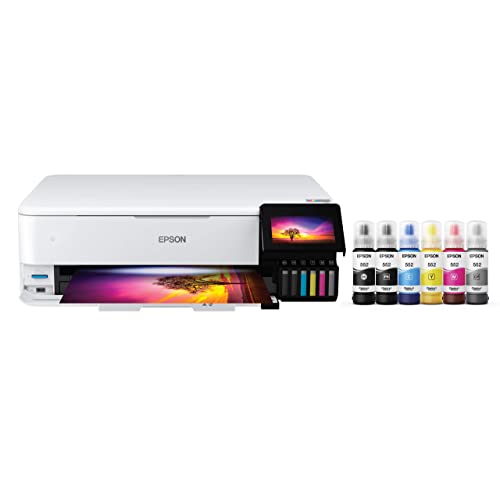
Epson EcoTank Photo ET-8550 Wide-Format All-in-One Printer
As an Amazon Associate we earn from qualifying purchases.
2. Canon PIXMA PRO-200S: best dedicated photo-and-art choice
The PRO-200S is a print-only model with eight dye-based inks, aimed at photo and creative output. It suits buyers who already have scanning covered and want to choose papers carefully for artwork-led cards. This is the PRO-200S, model 6875C002; do not assume a listing for the older PRO-200 is the same purchase.
Canon gives unusually useful limits for third-party specialty media: the top feed accepts up to 300 gsm at 0.1–0.3 mm thickness, while the manual feed accepts up to 350 gsm at 0.1–0.6 mm. A sheet must satisfy both measurements. The exact model’s media guide also sets the manual-feed minimum at 8 × 10 inches. A 7 × 10-inch blank for a folded 5 × 7 card therefore needs to meet the top-feed limits; it cannot borrow the manual tray’s heavier-paper allowance.
Use one sheet at a time for non-Canon specialty paper, as directed in the loading table. For inside-and-out printing, the Windows driver provides manual duplex, which requires reloading the sheet; this is not an automatic card production line. Paper must be printable on both sides, and driver options vary by operating system.
For borderless work, choose an allowed size and media combination in the driver. Canon explains that borderless printing enlarges the image beyond the page, so artwork at the edge can be cropped. Keep lettering away from the trim line.
- Why buy it: a focused photo printer with clear specialty-paper thickness limits and a separate manual tray.
- What to accept: eight ink supplies, no scanner, manual second-side work and the manual tray’s minimum sheet size.
- Best workflow: pair a specific inkjet paper with the correct media setting and make a proof before a batch.

3. Canon PIXMA TS9521Ca: best for occasional cards and crafts
The TS9521Ca adds copying and scanning to a crafting-oriented printer. Its paper choices are especially useful if you alternate between greeting cards and square scrapbook sheets. Canon’s TS9521Ca setup documentation links this model to the TS9500-series manuals; the exact retail model here is 2988C052.
The manual’s loading table specifies one greeting-card sheet in Letter or 7 × 10 inches in the rear tray, or one cardstock sheet in A4, Letter or 12 × 12 inches. Neither media type belongs in the cassette. This is a more useful starting point than the printer’s plain-paper tray capacity.
Be careful with weight claims. Canon’s approximately 300 gsm specification refers to its Photo Paper Pro Platinum PT-101. It is not a universal rating for 300 gsm craft cardstock. The manual lists 64–105 gsm for ordinary plain paper and names greeting card and cardstock separately, without giving a general cardstock thickness limit. If a paper supplier cannot confirm the exact pairing, test a small quantity or select a printer with clearer limits for your stock.
The duplex instructions restrict eligible media and sizes; the greeting-card and cardstock settings do not qualify. Borderless is also conditional: the print-area guide excludes Legal, A5, B5, B4 and envelopes. Use the computer driver for these craft media rather than assuming every control-panel or mobile workflow exposes the same settings.
- Why buy it: explicit card and square-craft formats plus everyday copying and scanning.
- What to accept: single-sheet craft loading, no automatic duplex for cardstock and uncertain compatibility with unspecified thick blanks.
- Best workflow: occasional flat card blanks with confirmed inkjet compatibility.

How to choose a printer for your cards
Start with the unfolded sheet. A finished 5 × 7-inch card commonly starts as a 7 × 10-inch blank. Check that full sheet against the specific feed path. Alternatively, design on a supported larger sheet and trim it. Do not feed folded cards unless the manufacturer explicitly supports that format.
Check thickness as well as gsm. Grams per square meter measures mass per area, not stiffness or thickness. Two papers at the same gsm can feed differently. “110 lb” is also incomplete without the paper category; index and cover weights are different. Ask the paper maker for thickness and printer compatibility instead of converting a marketing weight into a guarantee.
Match coating and printable sides. Choose paper intended for inkjet printing and for the desired finish. A sheet coated on only one side may not work for a printed interior. Let the first side dry according to the paper instructions, prove the reload direction and check for smearing before committing to a batch.
Budget for the whole workflow. Include replacement ink, compatible paper, spoiled proofs, envelopes and any trimming or scoring tools. Keep a small sample that shows fine text, pale colors, a dark area and the fold. Judge that sample on your intended paper. No specification sheet establishes your exact color match or cost per finished card.
Which one should you buy?
Choose the ET-8550 for regular creative printing with refillable inks and flexible larger-sheet work. Choose the PRO-200S when photo and illustration output is the priority and your chosen media fits its detailed feed limits. Choose the TS9521Ca for occasional cards and square crafts after confirming the paper pairing. If your must-have stock falls outside those limits, change the stock or use a print service instead of assuming a heavier-paper specification applies to every tray.
Frequently asked questions
Can all inkjet printers print greeting cards?
No. The printer must support the blank’s unfolded size, media type and thickness through the chosen feed path. Color printing alone does not establish cardstock compatibility.
Is 300 gsm a safe cardstock limit for every printer here?
No. The PRO-200S specifies separate specialty-paper weight and thickness limits. The TS9521Ca’s approximately 300 gsm figure is for Canon PT-101 photo paper, while the ET-8550 gives a thickness range and size list for its thick-media slot.
Can I automatically print both sides of thick greeting cards?
Do not assume so. The ET-8550’s rear feed slot does not support double-sided printing, the PRO-200S uses manual duplex, and the TS9521Ca’s cardstock and greeting-card settings do not qualify for its duplex function.
What size paper makes a folded 5 × 7-inch card?
A 7 × 10-inch blank folded in half makes a 5 × 7-inch card. Check that exact unfolded size: the PRO-200S manual feed starts at 8 × 10 inches, and the ET-8550’s thick-slot size list does not include 7 × 10 inches.
Does borderless printing work on every card size?
No. It depends on the printer, driver, paper type and selected size. Borderless modes can enlarge and crop the artwork, so keep important text away from edges and make a proof before printing a batch.