
The original YI Smart Dash Camera can still be useful if you already own a working unit and can reliably retrieve its recordings. Buying one now requires more caution: the hardware is old, phone-app support is uncertain, and listings often mix it up with other YI cameras or unrelated brands.
The important specification correction is its resolution. The original records 1920 × 1080 at 30 or 60 frames per second. Its 2304 × 1296, 30 fps mode is explicitly described by YI as interpolated. It is not a native 4K camera. Before paying for a used unit, confirm the model, test recording and playback, and decide whether you are comfortable relying on the memory card rather than a phone app.
Identify the original YI Smart Dash Camera
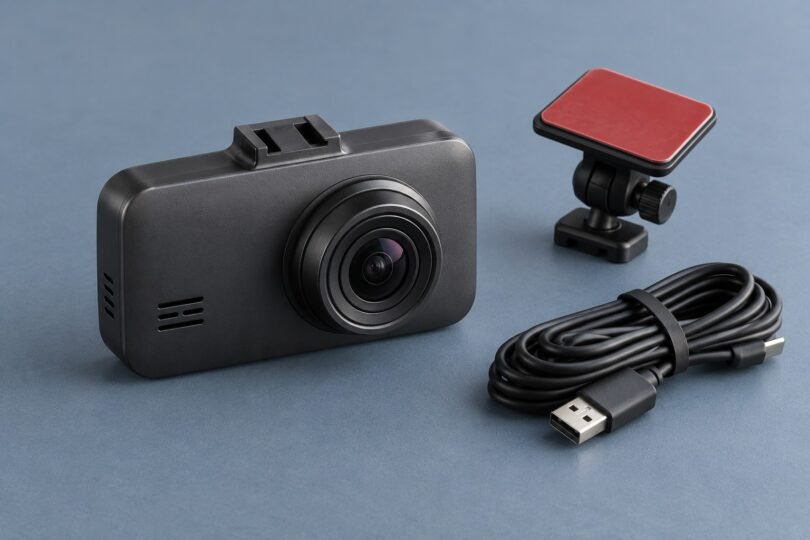
The original specification sheet describes a camera with a 2.7-inch display, an f/1.8 lens, a nominal 165-degree diagonal field of view, Micro-USB power and 2.4 GHz Wi-Fi. Original color options were gray and gold. Use the device label and model-specific documentation to identify a seller’s unit; a stock photograph or a title containing “YI” is not enough.
The YI Ultra Dash Camera is different. YI lists 2688 × 1520 at 30 fps and 16–128 GB storage for that model. Those specifications do not apply to the original Smart Dash Camera. YI Mini, Compact and Mirror cameras are also separate products, even though several appear in the same app’s supported-device list. A 70mai, ROVE or another brand’s camera should be evaluated as a different product, without assuming YI firmware or accessories will work with it.
What the original camera actually offers
- Video: 1080p at 30 or 60 fps; 2304 × 1296 at 30 fps through ISP/codec interpolation.
- Storage: 8–64 GB microSD, Class 10 or higher, with FAT32 formatting.
- Power: a Micro-USB connection; the specified car adapter outputs 5 V/1 A.
- Wireless connection: local 2.4 GHz Wi-Fi, not built-in cellular service.
YI’s feature documentation describes loop recording, collision-triggered emergency recording and adjustable G-sensor sensitivity. It also confirms that the higher-resolution mode uses software processing. A larger recorded frame is not proof that the camera captures more native detail.
For an existing unit, compare short samples from the modes you intend to use. Examine them on a computer, including footage from your normal evening conditions. A frame-rate label does not guarantee readable number plates: lighting, relative motion, glare, lens cleanliness and distance all affect the result. Do not buy on promises that every plate will be legible at night.
The driver-assistance features provide warnings, not vehicle control. They cannot brake or steer for you and should never replace watching the road. A dash camera is a recording aid, not a collision-prevention guarantee.
Does the YI dashcam app still work?
The U.S. App Store listing for YI Smart Dash Camera remains accessible. It identifies Shanghai Xiaoyi Technology Co., Ltd. as the developer, lists iOS 10.0 or later, and shows version 4.4.1 dated November 10, 2021 as its latest release. That listing is evidence that a store page exists; it does not demonstrate successful pairing or video transfer on your particular iPhone and current operating system.
Android is less straightforward. The legacy YI firmware and app page links to an official Google Play package, but that Google Play destination returned a not-found response during verification. The historic international package address did too. Current official Android availability and compatibility could not be verified. Check on the phone and in the store region you intend to use before purchasing.
Do not confuse a third-party “YI Smart Dash Camera Guide” app with YI’s camera-control software. Nor should you assume YI Home, YI Life or YI IoT is a replacement: YI’s current general app-download page does not establish that those apps support this older dash camera. Downloading an unknown APK is not a sensible workaround for a camera you need to depend on.
The original YI user guide says the camera can record independently of the app. That distinction matters. A working camera can still be useful without phone control, provided you can operate its controls and copy playable files from the card.
Memory cards, formatting and protecting important footage
Stay within the original camera’s documented 64 GB maximum. A physically fitting 128 GB or 256 GB card is not proof of compatibility. If replacing a card, choose a reputable microSD intended for repeated recording, in a supported capacity and speed class, and verify it in this camera before relying on it.
Back up anything important before formatting. The camera’s Format command erases the card. Use the camera’s own menu for setup, then make a sample recording and play it back. If errors persist, check that the card is genuine, within the supported range and correctly formatted rather than repeatedly trusting a recording icon.
Loop recording eventually replaces older ordinary footage. An emergency lock is helpful, but it is not a permanent backup. After an incident, stop somewhere safe, let the camera finish saving, power it down and preserve the relevant files. Copy the originals to another device before editing or sharing clips. Include the footage before and after the event when preserving context.
Never remove the card while it is recording. A card reader is a useful fallback when app transfer is unavailable. Test that workflow in advance: discovering that your reader, phone or computer cannot open the files after an incident is avoidable.
What to check before buying a used YI unit
- Identity and condition: request clear pictures of the actual label, lens, screen, connector and mount. Avoid a listing that substitutes photographs of several different cameras.
- A complete power setup: confirm the correct cable, appropriate adapter and secure mount are included. A generic accessory bundle may omit the part that actually attaches to the camera.
- Real files from that unit: ask for an original sample recording. A stock demonstration video says nothing about this camera’s lens, microphone or card slot.
- Startup and saving: test that it starts recording when power arrives and that the final file remains playable after normal shutdown. Check the date and time after a later restart.
- Physical warning signs: skip units with swelling, loose sockets, damaged cables or unexplained shutdowns. A camera that boots once has not demonstrated dependable operation.
- Returns and support: get the seller’s return conditions in writing. Do not assume an old warranty statement applies to a second-hand purchase or that replacement mounts and batteries remain available.
Include the cost of a fresh card and missing accessories when comparing the deal. If the seller cannot demonstrate reliable recording and file recovery, the apparent saving may not be worthwhile.
Installation and firmware: keep the limits clear
Choose a mounting position that preserves your view and follows the rules where you drive. Keep the camera, bracket and cable clear of controls and airbag deployment paths. Garmin’s general dash-camera safety guidance similarly warns against obstructing sightlines, controls or airbags. For cable routing around pillars or trim, use the vehicle manufacturer’s guidance or a qualified installer; do not simply push a cable behind an airbag cover.
Set up the screen, microphone, clock and recording mode while parked. Recording, audio-consent, privacy and windshield-mounting requirements vary by location and use, so check the applicable local rules before recording passengers or publishing footage. There is no universal permission to record everything merely because a camera is inside your car.
YI’s legacy firmware selector asks for the serial-number family and camera status, and warns that its upgrade route is for U.S.-sold cameras. An accessible download page does not establish ongoing maintenance or guarantee support for an imported unit. Do not install another model’s firmware, change regional firmware using an unofficial guide, or assume an old download is an upgrade for your exact device.
Likewise, constant power alone does not establish a supported parking-surveillance mode. Do not buy the original YI on the assumption that a generic hardwire kit gives it reliable overnight monitoring. That requires a suitable camera, power-management arrangement and vehicle-specific installation.
Keep it, buy it used, or replace it?
Keep an existing YI Smart Dash Camera if it records consistently, retains usable settings, saves playable files and meets your coverage needs. A used purchase only makes sense if the actual unit passes those checks and its app limitations are acceptable. If easy phone transfers, rear coverage or parking monitoring are priorities, compare a currently supported camera against those requirements instead of treating every modern dashcam as an interchangeable YI replacement.