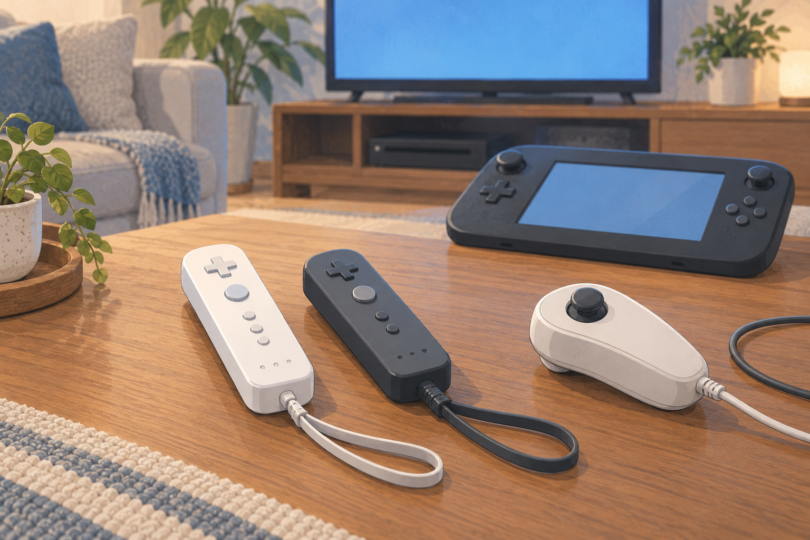

If you need the wand-shaped motion controller for a Wii U, start with a Nintendo Wii Remote Plus. It combines the Wii Remote and Wii MotionPlus functions in one controller. It is a sensible replacement for games that support that controller type, but it does not replace the Wii U GamePad or work as the required controller in every Wii U game.
Before buying, check the controller symbols on your game’s packaging or in its manual. Then confirm whether you need MotionPlus, a Nunchuk, or another accessory. Nintendo confirms that Wii Remotes, Wii Remote Plus controllers and many Wii accessories can be used with Wii U, with support depending on the game.
Which controller are you actually replacing?
| Controller | What it is for | What to check |
|---|---|---|
| Wii Remote Plus | Wand-style motion control with MotionPlus built in | The game must support Wii Remote controls; some modes need another accessory |
| Original Wii Remote | The earlier wand-style controller | Games that require MotionPlus need the separate Wii MotionPlus attachment |
| Wii U Pro Controller | A conventional two-stick controller for compatible Wii U software | It is not a replacement for a Wii Remote in Wii games |
| Wii U GamePad | The larger controller with a screen | A Wii Remote cannot supply its touchscreen or other GamePad-specific functions |
| Nunchuk | A wired stick-and-buttons attachment for the Wii Remote | Buy it when the game requires it; it is not a standalone remote |
Nintendo’s accessory guide explains the Wii Remote Plus, MotionPlus and Nunchuk distinctions. Its Wii U operations manual limits Wii U Pro Controller use to Wii U software that supports it. Similar names are not a substitute for the compatibility information for your game.
Buying shortlist: Nintendo Wii Remote Plus in white or black
These are two color options for the same controller type, rather than separate performance rankings. Choose between them by the actual offer’s condition, included parts, seller and return terms. The listing identity alone does not authenticate every unit offered by a marketplace seller.
Nintendo Wii Remote Plus — White
The white listing, ASIN B0094X227I, identifies the Nintendo Wii Remote Plus for Wii and Wii U. It is a straightforward option if you want a white replacement or prefer a color that is easy to distinguish from darker controllers in your set.
Check before ordering: confirm that the selected offer is for the controller itself, its condition is clearly described, and the battery cover, wrist strap and protective jacket are included if you need them. A catalog photo of retail packaging does not establish what a used or renewed offer contains. Do not assume a Nunchuk or sensor bar comes with the remote.

Nintendo Wii Remote Plus — Black
The black listing, ASIN B0094X28J0, identifies the black Nintendo Wii Remote Plus. It is the corresponding option if you want a darker controller or a contrasting color for another player. Color does not change which control method the game needs.
Check before ordering: compare the actual seller’s description and photos with the selected black variant. Review missing accessories, wear, and the return window rather than treating a familiar product title as proof of condition. Buy a bundle only when its contents are explicitly listed.

How to recognize Wii Remote Plus
According to Nintendo’s identification guide, Wii Remote Plus carries the wording “Wii MotionPlus INSIDE” beneath the Wii logo and uses model number RVL-036. The original Wii Remote is RVL-003. Look for the model marking at the bottom of the controller.
Ask for clear photos of those markings when buying secondhand. They help you identify what is being advertised, but markings alone are not an authenticity guarantee. A seller description that only says “motion controller” or “compatible with Wii U” does not establish built-in MotionPlus.
If you already have a working original Wii Remote and the appropriate Wii MotionPlus attachment, you may not need another remote. Nintendo describes Wii Remote Plus as combining those functions. Check your existing equipment against the game’s requirements before buying duplicates.
Let the game decide which accessories you need
Write down the games and modes you intend to play, then check each manual. This matters even within one game: the Nintendo Land manual lists Wii Remote, Wii Remote Plus and Wii Remote Plus with Nunchuk among its control arrangements. It also explains that a Wii Remote with the MotionPlus attachment can be used where Wii Remote Plus is specified.
- MotionPlus required: use Wii Remote Plus or the original remote with the appropriate MotionPlus accessory, as the game directs.
- Nunchuk required: make sure you have the wired attachment for each player who needs it. A second remote is not automatically a substitute.
- Multiplayer: check the player count and controller mix for the actual mode. The console’s pairing capacity does not tell you how many players a particular game supports.
- GamePad required: keep the GamePad available for any screen, touch or other functions the game needs.
A plastic steering-wheel shell, a charging dock and a Nunchuk serve different purposes. None should be mistaken for a complete replacement remote simply because it appears in a Wii U accessories search.
How to pair a Wii Remote with Wii U
Use the Wii U’s normal pairing process. Nintendo’s Wii Remote pairing instructions give these steps:
- From the Wii U Menu, press the console’s SYNC button to open the controller-pairing screen.
- Press the console’s SYNC button again as needed until the screen shows the controller type you want to pair.
- Press the SYNC button on the Wii Remote.
- Wait for a player light to remain illuminated. That light identifies the assigned player number.
Pairing establishes the controller connection; a visible pointer also depends on the sensor setup. For TV play, check that the sensor bar is connected and positioned correctly. Follow the game’s own directions for any calibration it requests.
Check these things before replacing a remote that seems broken
A missing pointer is not enough to diagnose a failed controller. Nintendo’s Wii U troubleshooting guide recommends checking power, the sensor bar and interference.
- Power: try a fresh set of suitable batteries. Nintendo specifies two AA batteries for Wii Remote Plus and recommends alkaline batteries for this troubleshooting check.
- Sensor bar: verify its connection and make sure the console’s above-TV or below-TV setting matches its placement.
- Position: Nintendo recommends using the remote approximately 3–10 feet in front of the TV for the TV sensor-bar setup.
- Obstructions and light: check that the remote’s pointer window is unobstructed and that strong sunlight or other infrared sources are not interfering.
- Comparison: if another remote is available, try it with the same setup. That helps distinguish a problem with one controller from a shared setup problem.
If there is visible damage or battery leakage, stop using that unit and seek appropriate support or a replacement. Avoid buying a charging accessory just to work around an undiagnosed fault.
Questions to check before you buy
Can I reuse the remote from my original Wii?
Yes, Nintendo lists Wii Remote and Wii Remote Plus among the accessories supported by Wii U. You still need the controller and attachments required by the particular game, and you must pair the remote with the Wii U.
Does the Wii U GamePad replace a remote for Wii discs?
For Wii discs played in Wii Mode, plan on the required Wii controllers. Nintendo’s Wii Mode FAQ explains that the GamePad can serve as a display, but its screen and buttons do not control Wii Mode. Nintendo separately describes GamePad control support for certain downloadable Wii releases. Check the manual for the exact release rather than applying the disc rule to every version.
Should I buy a third-party multipack?
Only after verifying what each controller includes and whether the seller specifically supports your games and accessories. Look for an explicit MotionPlus statement, clear model identification and useful return terms. An inexpensive two-pack is poor value if it lacks the feature you need. The shortlist here stays with identifiable Nintendo Wii Remote Plus listings; it does not establish that every third-party controller is unsuitable.
What should I check on arrival?
During the return window, confirm the color and advertised model, inspect the condition and included parts, pair it, and try the buttons, pointer and motion controls in the games you actually own. If you need a Nunchuk, check that connection too. Use the wrist strap and follow Nintendo’s play-space precautions.
For a new-to-you motion remote, Nintendo Wii Remote Plus is the clearest starting point. The final buying decision should turn on game compatibility, the exact unit’s condition and the accessories you still need.