The best replacement car stereo microphone is the one specified for your exact head unit. Start with the original replacement part if you can identify it. For a Kenwood receiver that explicitly supports it, the KCA-MC10 is a documented option. The FingerLakes FL-101 and FL202 are aftermarket alternatives for compatible 3.5 mm and 2.5 mm microphone inputs, respectively.
These are wired microphones for a stereo’s hands-free calling system. The word “Bluetooth” in their listings describes the system they work with; it does not mean the microphone connects wirelessly. A matching plug diameter is only the first fit check.
This guide is based on manufacturer documentation and product-listing checks completed in October 2026. We have not conducted comparative call-quality or vehicle-installation tests.
Car stereo microphones at a glance
| Microphone | Connection and cable | Best reason to consider it | Important limitation |
|---|---|---|---|
| Kenwood KCA-MC10 | 3.5 mm mono mini-jack; 3 m cable | A named Kenwood accessory for a receiver whose documentation lists it | Not a blanket recommendation for every Kenwood stereo |
| FingerLakes FL-101 | 3.5 mm plug; advertised 3 m cable | A simple aftermarket assembly with visor and dash mounting options | Confirm the receiver’s electrical and connector requirements |
| FingerLakes FL202 | 2.5 mm plug; advertised 3 m cable | An aftermarket option aimed at compatible Pioneer microphone inputs | Not an official Pioneer replacement; broad listing claims need a model-specific check |
All three entries refer to one microphone assembly. Three meters is approximately 9.8 feet; measure the actual concealed cable route before ordering. Listings and accessories can change, so check the selected model, supplied mounting parts, seller, and return terms.
1. Kenwood KCA-MC10: for receivers that list this accessory
The KCA-MC10 is the most straightforward starting point here when your receiver’s documentation names it. Kenwood specifies a 3 m cable and mono mini-jack connection, and its UK product page identifies the jack as 3.5 mm. The benefit is the documented accessory identity, rather than an unverified promise of superior sound.
Compatibility still matters. For example, the KDC-BT32U/BT42U manual identifies KCA-MC10 as an optional microphone for the KDC-BT42U and explains how to select the external microphone. That example does not establish support for a different Kenwood model, and its menu instructions should not be copied to an unrelated receiver.
Choose it if: your receiver manual or Kenwood parts support confirms KCA-MC10. Check first: exact head-unit model and region, connector, cable reach, and mounting hardware. A current listing is not proof of current manufacturer production or universal fit.

Kenwood KCA-MC10, 3.5 mm Mono Car Microphone with 3 m Cable, One Microphone
As an Amazon Associate we earn from qualifying purchases.
2. FingerLakes FL-101: an aftermarket 3.5 mm option
The FL-101 listing identifies an electret-condenser microphone with a 3.5 mm plug and 3 m cable. Its described package includes a visor clip, dash mount, and foam filter. Those mounting choices are useful if you need to try a position closer to the driver before securing the cable permanently.
This is a third-party replacement. The listing’s broad compatibility statement is not a substitute for your stereo’s accessory specification. Ask the receiver manufacturer or seller to confirm the exact head-unit model, particularly if you are replacing a factory-integrated microphone or a unit with a special connector.
Choose it if: you have verified support for this type of 3.5 mm external microphone and want both visor and dash mounting options. Limitation: there is no comparative call-quality evidence here that establishes an improvement over your original microphone. We do not treat the listing’s noise-reduction language as a measured performance result.
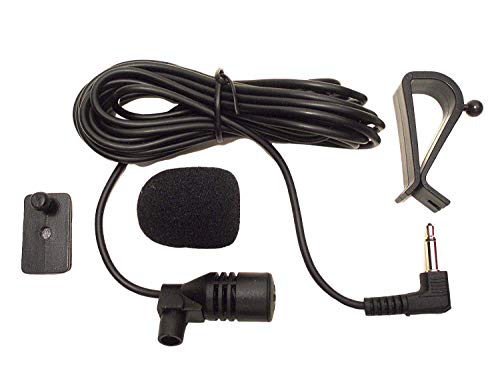
3. FingerLakes FL202: for a verified 2.5 mm microphone input
The FL202 is the 2.5 mm option in this shortlist. Its product description lists a 3 m cable, electret-condenser capsule, foam filter, dash mount, and visor clip. It is marketed for compatible Pioneer radios; the listing names several older AVH, AVIC, and DEH models.
Select it by the full FL202 model and 2.5 mm variant. It should not be confused with the FL-101 above or a 3.5 mm product supplied with a size adapter. Ask for confirmation against your receiver’s exact model instead of assuming that any Pioneer radio accepts the same microphone.
Choose it if: the original microphone is missing or damaged, and you have confirmed this aftermarket assembly suits the receiver. Limitation: the seller’s electrical and noise specifications have not been independently measured for this guide. They do not show how intelligible calls will be in your particular cabin.

Check compatibility before buying
- Find the exact receiver model. Use its label, settings screen, or paperwork. The vehicle’s year and trim alone are insufficient if someone installed an aftermarket stereo.
- Identify the microphone socket. Read the connection diagram. A socket labeled MIC is not interchangeable with AUX audio, steering-wheel remote input, or a headphone socket just because a plug fits.
- Match more than diameter. Confirm the required microphone part, plug/contact arrangement, and electrical requirements. A 2.5-to-3.5 mm adapter changes physical size; it does not independently establish compatible wiring or microphone power.
- Measure cable reach. Follow the intended route around trim with enough slack for strain relief. Avoid a taut cable or a loose loop near driving controls. Do not assume an extension cable is supported.
- Confirm what is in the box. A replacement capsule, bare cable assembly, and microphone with mounting clips are different purchases. Verify the contents before removing existing trim.
If the stereo manufacturer specifies another microphone, use that part instead of selecting from this list. For example, Sony documents its XA-MC10 with a 4 m cable for compatible Sony Bluetooth car audio. That is useful identification information for an appropriate Sony system, not evidence that it fits other brands.
Placement and setup can matter as much as the replacement
Follow the receiver’s installation instructions and the vehicle manufacturer’s trim and airbag guidance. Pioneer’s installation guidance stresses positioning the microphone to capture the driver’s voice and securing its lead so it cannot obstruct driving. It also notes that lowering a visor-mounted microphone with the visor can reduce voice recognition.
- Try an approved mounting position with an unobstructed path toward the driver. Keep the capsule clear of direct ventilation airflow and objects that can rub against it.
- Keep wiring away from moving controls, pedals, and seat mechanisms. Do not place it across an airbag cover or deployment path. Use a qualified installer if the safe trim route is unclear.
- Clean the approved mounting surface before applying the supplied adhesive. Secure the cable without crushing it or putting tension on the plug.
- Test while parked before replacing trim. Make a normal call, check that the car system is the selected call-audio route, and ask the other person whether your voice is clear.
For installation precautions, see Sony’s vehicle-installation guidance. The exact mounting location and procedure depend on the receiver and vehicle.
Troubleshoot before replacing the microphone
No voice at all: check the call’s mute setting, selected audio route, correct MIC socket, fully inserted plug, and any internal/external microphone selection in the receiver manual. Inspect the accessible cable for damage. A new microphone will not repair a damaged input socket.
Quiet, distorted, or echoing calls: check placement and the receiver’s hands-free settings. Some receivers provide separate microphone gain and echo-cancellation controls; Kenwood documents these for the KDC-BT73DAB/BT53U/5057SD family. Use the instructions for your model and change one setting at a time while parked. More gain is not automatically better.
Voice works in one mode but not another: compare an ordinary hands-free call with the affected voice-assistant or phone-projection function. Note which mode fails before replacing hardware. The phone, app, connection, or stereo settings may be involved.
Frequently asked questions
Will any 3.5 mm microphone work with a car stereo?
No. Confirm the exact microphone specification and compatible replacement part. Physical fit alone is not a complete compatibility check, and a phone headset microphone should not be assumed to match a car receiver’s input.
Can I keep the factory microphone after replacing the radio?
Only if the new receiver and a suitable vehicle-specific interface support that arrangement. Ask the interface supplier or installer to confirm your vehicle and receiver combination. Do not cut and splice a factory microphone based only on connector appearance.
Does an external microphone add Bluetooth to an older radio?
No. These wired assemblies depend on a compatible receiver or hands-free module. They do not provide a Bluetooth receiver, phone pairing, or call-processing system by themselves.
Which one should I buy?
Use the original specified part where possible. Among these choices, shortlist KCA-MC10 only for documented compatible Kenwood receivers, FL-101 for a verified 3.5 mm aftermarket match, and FL202 for a verified 2.5 mm match. If you cannot confirm compatibility, resolve that question before ordering.
Image note: Relevant existing category illustration retained.