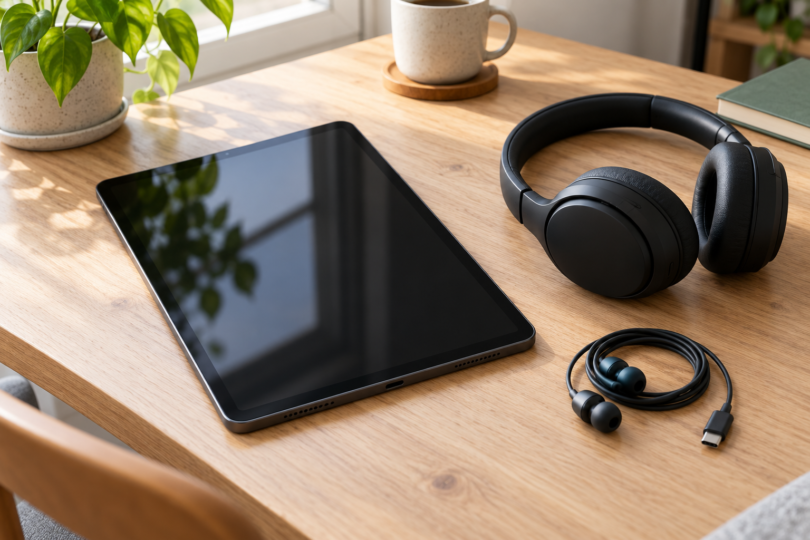

The best headphones for a Samsung tablet depend first on its audio connection. Our shortlist pairs the Sony WH-CH520 with Bluetooth listening, Samsung Type-C Earphones with compatible USB-C Galaxy tablets, and the Sony MDR-ZX110 with a 3.5 mm headphone socket. Each solves a different connection problem, so start with your exact tablet model.
These are feature-based recommendations, not results from hands-on listening tests. Sound preference, fit and call quality still need a personal trial. Check the tablet’s specifications and the seller’s exact model before ordering; sharing the Samsung name or the shape of a plug does not establish every feature’s compatibility.
Best headphones for Samsung tablets at a glance
| Exact choice | Best fit | Useful feature | Main tradeoff |
|---|---|---|---|
| Sony WH-CH520, black | Wireless listening on a tablet with Bluetooth audio support | Multipoint connection and a built-in microphone | Needs charging; no wired audio input |
| Samsung Type-C Earphones, EO-IC100BBEGEU, black | A compatible Galaxy tablet without a 3.5 mm jack, such as the Tab S6 named by Samsung | Built-in DAC, microphone and three-button controls | Occupies the USB-C port; this is a regional manufacturer reference, not a verified US purchase offer |
| Sony MDR-ZX110, black, standard version | Simple listening through a 3.5 mm headphone socket | Swiveling earcups and a 3.94-foot cord | No microphone or inline remote; a USB-C-only tablet needs a compatible DAC adapter |
1. Sony WH-CH520: best for wireless everyday listening
Choose the WH-CH520 when you want to leave the tablet’s physical ports free. It supports Bluetooth audio and has a built-in microphone. Its multipoint feature lets it stay paired with two Bluetooth devices, making it a useful option when you also listen on a phone or computer.
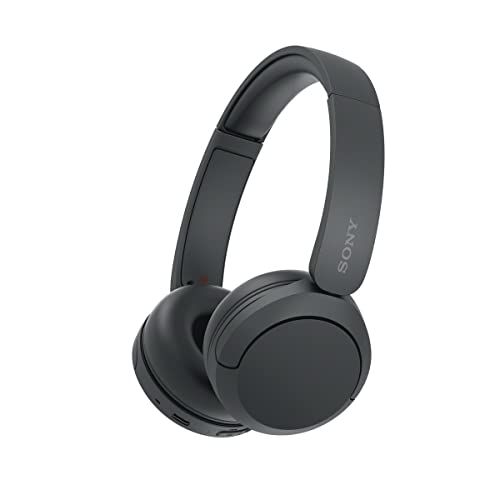
Sony WH-CH520 Wireless On-Ear Headphones, Black
As an Amazon Associate we earn from qualifying purchases.
Pros: wireless listening, physical playback and volume buttons, and two-device pairing. Sony lists A2DP for music and HFP/HSP for calls. Confirm the matching capabilities of your tablet and calling app; the presence of Bluetooth alone is not a promise that every call or control feature will work identically.
Sony’s help guide rates music playback at up to 50 hours with AAC or 45 hours with SBC. These are manufacturer figures, and Sony says settings and usage affect the result; equalizer and DSEE use can shorten runtime. Treat those figures as planning guidance rather than a measured result from this comparison.
Cons: there is no wired audio input or passive listening mode. The USB-C socket is for charging, and Sony says the headphones cannot turn on while charging. If you need a cable fallback when the battery is empty, choose a different design.
2. Samsung Type-C Earphones: best for a compatible USB-C Galaxy tablet
The black Samsung Type-C Earphones, EO-IC100BBEGEU, are worth considering if you prefer wired earbuds. Samsung’s Ireland page specifies a built-in digital-to-analog converter, or DAC, and explicitly names the Galaxy Tab S6 among compatible devices without a 3.5 mm jack. Confirm your own tablet model with Samsung if it is not named.
Pros: the earphones combine USB-C audio, a microphone and three-button controls in one cable, with small, medium and large ear tips listed in the package. They suit a buyer who wants a compact wired option without a separate 3.5 mm adapter. Samsung lists no active noise cancellation.
Cons: the cable uses the tablet’s USB-C port, and an in-ear tip may not suit everyone. The linked specification is for the regional EO-IC100BBEGEU model; it does not establish US stock, warranty coverage or the contents of another regional package. Confirm the exact model, seller and return terms before buying.
3. Sony MDR-ZX110: best for a tablet with a headphone jack
The standard black MDR-ZX110 is a straightforward choice for listening through a 3.5 mm socket. Sony specifies an L-shaped stereo mini plug and a 3.94-foot cord, while its swiveling earcups make the headphones easier to pack. There is no Bluetooth pairing step for this wired connection.

Pros: a direct analog connection and earcups that swivel for storage. Cons: the standard MDR-ZX110 has no microphone or inline remote. Sony’s model comparison reserves those features for the separate MDR-ZX110AP, so do not rely on a retailer’s generic remote-control field.
For a USB-C-only Galaxy tablet, include a compatible USB-C-to-3.5 mm adapter with a built-in DAC in your shopping plan. Samsung’s adapter guidance specifically calls for DAC compatibility. Confirm support for your exact tablet rather than choosing a passive adapter solely because its connectors fit.
How to match headphones to your Galaxy tablet
Look up the exact model’s audio specifications before picking a connection. For example, Samsung lists both a 3.5 mm stereo jack and A2DP Bluetooth audio on the Galaxy Tab A9 Wi-Fi, SM-X110NZAEEUA. That documented example supports either the wired Sony or Bluetooth route; it should not be generalized to every Tab A or Tab S model.
Decide whether you only need to listen or also need a headset microphone. The WH-CH520 and Samsung Type-C Earphones include microphones; the standard MDR-ZX110 does not. For meetings, verify that the intended app actually selects the headset’s input and output during a test call before relying on the setup.
Match the practical tradeoff to your routine. Bluetooth leaves the tablet’s port free but adds a headphone battery to manage. USB-C earphones avoid Bluetooth pairing but occupy that port. A 3.5 mm set is simplest when the tablet has the matching jack; adding an adapter changes the cost and the compatibility checks.
Frequently asked questions
Will these work with every Samsung tablet?
No universal match is established here. Check for a 3.5 mm jack, compatible USB-C digital audio or the relevant Bluetooth profiles on your exact tablet. Samsung explicitly names the Tab S6 for the Type-C earphones, while its Tab A9 Wi-Fi specifications document a headphone jack and A2DP.
Does a USB-C socket always mean USB-C audio?
No. The WH-CH520 is a useful counterexample: its USB-C port charges the headphones, and Sony lists no wired audio input. A USB-C-to-3.5 mm adapter for a Galaxy device also needs the appropriate DAC support. Read the audio specification, not just the connector label.
Can I keep using my 3.5 mm headphones?
Yes, if your tablet has a working 3.5 mm headphone socket. On a USB-C-only model, look for a DAC-equipped adapter explicitly compatible with that tablet. A microphone or inline remote, if your headphones have one, introduces an additional feature to verify.
Which choice is better for video calls?
Start with the WH-CH520 or the compatible Samsung Type-C Earphones because both include microphones. Then check the tablet and app combination with a test call. The standard MDR-ZX110 is a listening choice; it does not supply a headset microphone.
Can I charge the WH-CH520 while listening?
Sony says the WH-CH520 cannot turn on while its battery is charging. Disconnect the USB-C cable before using it. Its charging port is not a wired-audio fallback.