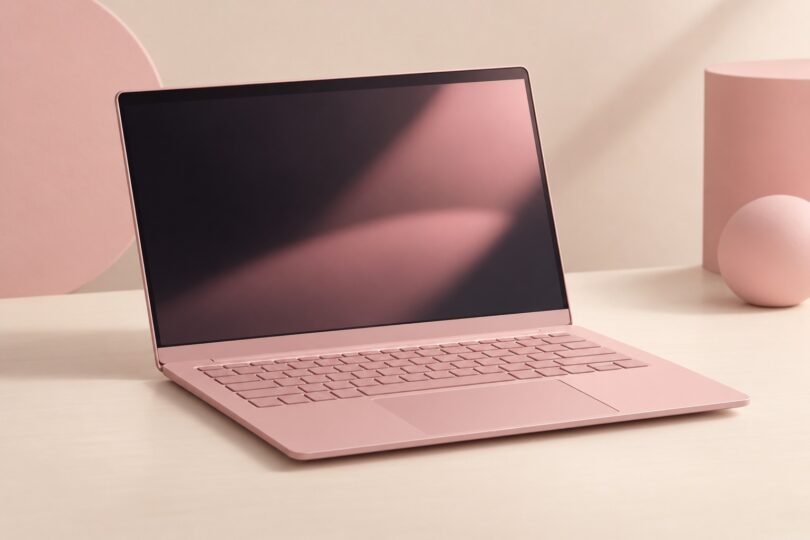

A pink laptop should meet your software and storage needs as well as your color preference. Three useful starting points are the Apple MacBook Neo in Blush, HP OmniBook 5 in Peony pink and HP OmniBook 7 in Powder Pink. Their operating systems, memory and displays differ enough that the finish should be the final filter, rather than the first decision.
Start by choosing macOS or Windows, then compare the exact configuration. A product-family name alone does not tell you the processor, installed storage, screen or shade you will receive.
Pink laptop models at a glance
| Model and finish | Configuration to identify | Main buying consideration |
|---|---|---|
| Apple MacBook Neo, Blush | MHFH4LL/A: A18 Pro, 8GB memory, 256GB SSD, macOS | A compact Mac; the separate 512GB configuration adds Touch ID |
| HP OmniBook 5 Laptop AI 14-mh0588nr, Peony pink | E72VXUA#ABA: Core 5 320, 8GB memory, 512GB SSD, Windows 11 Home | 14-inch OLED touchscreen; check whether 8GB memory fits your workload |
| HP OmniBook 7 Laptop Next Gen AI 14t-hg000, Powder Pink | C85ZGAV_1 configurable family: the linked preset has Core Ultra 5 325, 16GB memory, 1TB SSD and Windows 11 Pro | More memory in this configuration; review every selected option before ordering |
These identifiers refer to US configurations. Regional keyboard layouts, part numbers and available options can differ. Prices, delivery dates and seller inventory need checking at the destination.
1. Apple MacBook Neo in Blush
The MacBook Neo is a factory-finished pink option for buyers who want macOS. Apple specifies an A18 Pro chip, 8GB unified memory and a 13-inch 2408 × 1506 display. The Blush 256GB model is MHFH4LL/A; the Blush 512GB model with Touch ID is MHFJ4LL/A. Those are distinct configurations, not just two descriptions of the same laptop. See Apple’s technical specifications and official US part-number list.
Check storage needs before choosing the 256GB version, and confirm your required software supports macOS. Apple lists one external display up to 4K at 60Hz, which matters if you want a multi-monitor desk. Its two USB-C ports also have different capabilities: one supports USB 3 and display output, while the other supports USB 2. Match your dock to those specifications.

Apple MacBook Neo 13-inch, A18 Pro, 8GB RAM, 256GB SSD, macOS, Blush, single laptop
As an Amazon Associate we earn from qualifying purchases.
The linked Amazon configuration is the 256GB Blush laptop without an AppleCare+ bundle. Recheck the selected color and storage after following the link. You can also compare configurations directly at Apple.
2. HP OmniBook 5 14-mh0588nr in Peony pink
For a pink Windows laptop with a touchscreen, the exact model to check is HP OmniBook 5 Laptop AI 14-mh0588nr, product E72VXUA#ABA. HP specifies an Intel Core 5 320 processor, 8GB onboard LPDDR5 memory, a 512GB PCIe NVMe SSD and Windows 11 Home. Its 14-inch OLED touchscreen has a 1920 × 1200 resolution. The finish is Peony pink aluminum, with a darker pink backlit keyboard. These details appear in HP’s exact product listing.
The memory is the important trade-off. Choose this configuration only if 8GB meets the requirements of your apps and your usual multitasking. Do not assume you can add memory later: HP identifies it as onboard. For heavier workloads, compare a model that already has the memory you need.
Check the complete product number when browsing other sellers. Another OmniBook 5 with a similar name may have a different processor, screen, capacity or finish.
3. HP OmniBook 7 14t-hg000 in Powder Pink
The OmniBook 7 is a configurable route to a pink Windows machine with more memory. In the linked HP preset, the selected hardware is an Intel Core Ultra 5 325, 16GB onboard memory and a 1TB PCIe Gen5 NVMe SSD, with Windows 11 Pro and a Powder Pink finish. The selected display is a 14-inch 1920 × 1200 IPS panel.
C85ZGAV_1 identifies the configurable family; the link contains preset C85ZGAV_261713. This is not a fixed specification for every 14t-hg000. HP also shows alternative processor, memory and display options, so review the final configuration summary rather than relying on the family name.
In particular, do not assume an OLED screen is included because one appears among the upgrades. The linked selection uses IPS. Compare the total for the actual configuration you want, including any optional software or support plan.
Pink, rose gold and pink accessories are different purchases
Use the manufacturer’s color name when matching a listing. “Blush,” “Peony pink” and “Powder Pink” identify the finishes above. Rose gold is another category: a warm metallic finish can look pink in one photograph and more gold in another.
For example, ASUS describes an E410 finish as Rose Gold. That older product-family page is useful for identifying the color, but it is not enough to establish the hardware or support status of a particular E410 offered by a reseller. Get the full model number before considering one.
- Factory finish: the manufacturer specifies the color of the laptop itself. Check whether that includes the lid, keyboard deck and base.
- Skin: an adhesive covering changes the appearance of an existing laptop. It does not change the computer’s model or specifications.
- Case or sleeve: a pink accessory is not a pink laptop. Check the listing category and what is included.
If the right computer is available only in another color, a compatible pink accessory can widen your options. Verify the exact model fit and keep ventilation openings clear.
Check these details before buying
Match the processor, memory and local storage
Compare the complete CPU model, installed RAM, internal drive capacity and drive type. “Intel processor” or “large storage” is not specific enough. If a title combines internal storage with a cloud-storage offer, separate them: cloud capacity is not space on the laptop’s internal drive, and an included subscription may expire.
For a seller-upgraded laptop, ask for both the original manufacturer part number and the seller’s final configuration. Confirm who performed the upgrade, which parts changed, who supports those parts and what return terms apply. A seller’s memory or SSD upgrade should not be presented as the manufacturer’s original SKU.
Check software before choosing the operating system
Make a short list of essential apps, games, peripherals and school or workplace requirements. Check those vendors’ current system requirements for the operating system, processor architecture, memory and graphics. A familiar app name does not prove every version or feature works on every platform.
If a Windows listing says “S mode,” note that Microsoft restricts app installation to the Microsoft Store while that mode is enabled. Switching out is a one-way change. Check whether you need it before choosing that configuration.
Look past the color in the return policy
Check new versus refurbished condition, keyboard layout, included charger, warranty provider and return deadline. For a used laptop, ask about battery condition and whether all previous account or organization management has been removed. Inspect the display, ports and charging behavior promptly while the return window is open.
Security support matters, especially for older pink laptops
Windows 10’s standard support ended on October 14, 2025. Extended Security Updates are a separate, time-limited program with eligibility and enrollment requirements. Do not buy an old Windows 10 machine assuming it automatically receives them or can officially upgrade to Windows 11.
Even “Windows 11” needs a version check. Microsoft publishes separate support dates for Windows 11 releases. After setup, install the updates offered for the device and verify that its installed release is still serviced.
For an older Mac, check the exact model against Apple’s operating-system compatibility information and security-release list. The MacBook Neo appears on Apple’s macOS Tahoe compatibility list; that should not be generalized to an older rose-gold MacBook with a similar appearance.
What about a pink Chromebook?
Before buying a pink or rose-gold Chromebook, find its full model number in Google’s Auto Update policy table. The update clock is tied to the platform’s release, not the day you purchase the device. A sealed older Chromebook does not receive a fresh ten-year period when you open the box.
Also check whether its listed end date has an asterisk. Some older models require opting into extended updates. Google’s extended-update guidance explains that, for affected older devices, opting in removes the Play Store and Android-app support. A model’s support date and your required apps both need checking before purchase.
Choose the computer that meets your software, memory and support needs first. Then use the exact finish and part number to make sure the pink laptop arriving at your door is the one you intended to buy.