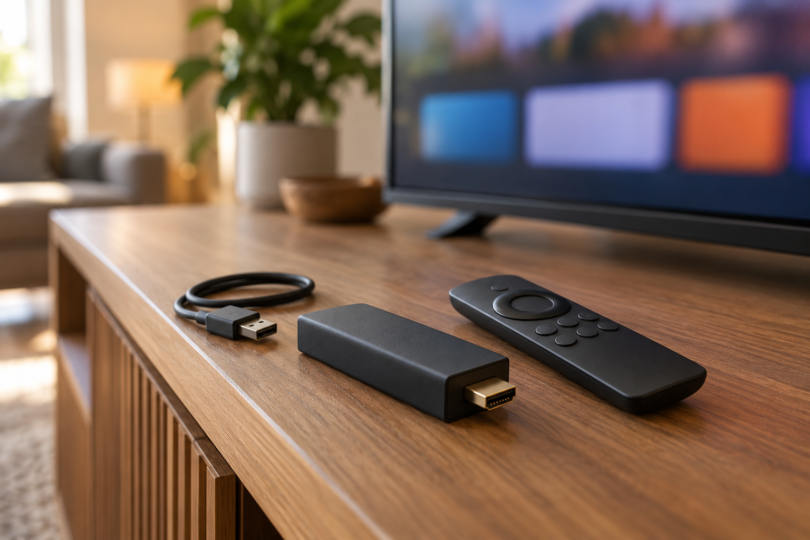

For most shoppers building a capable Fire TV setup, the Fire TV Stick 4K Max, second generation is our first pick: it combines Dolby Vision support, 16GB storage and Wi-Fi 6E. Choose the 4K Plus if you want Dolby Vision with less storage, the 4K, third generation for a compact USB-powered setup, or the USB-C Fire TV Stick HD for a television limited to Full HD.
Read the exact model name before checkout. These sticks do not all use the same operating system, remote or power connector. The comparison covers the linked U.S. configurations and documented features; it is not a hands-on speed test or a promise that every streaming app works in every country.
Which Fire TV Stick should you buy?
| Model | Picture support | Storage and Wi-Fi | System and power connection | Best fit |
|---|---|---|---|---|
| Fire TV Stick 4K Max, 2nd generation | 4K; Dolby Vision, HDR10+, HDR10 and HLG | 16GB; Wi-Fi 6E | Fire OS 8; micro-USB; adapter included | More app storage and a Dolby Vision setup |
| Fire TV Stick 4K Plus | 4K; Dolby Vision, HDR10+, HDR10 and HLG | 8GB; Wi-Fi 6 | Fire OS 8; micro-USB; adapter included | Dolby Vision when 8GB is enough |
| Fire TV Stick 4K, 3rd generation | 4K; HDR10+, HDR10 and HLG | 8GB; Wi-Fi 6 | Vega OS 2.0; USB-C; Direct Power | Simple 4K streaming from a TV USB port |
| Fire TV Stick HD, USB-C model | 1080p Full HD; HDR10+, HDR10 and HLG | 8GB; Wi-Fi 6 | Vega OS 1.1; USB-C; Direct Power | An HD television or secondary screen |
Storage figures are advertised capacities, not a promise of free space after system software and apps. HDR needs compatible content and a compatible display. The new 4K and HD models list Dolby-encoded audio passthrough; do not assume they offer the same audio processing or home-theater features as Max and Plus.
1. Fire TV Stick 4K Max: best for storage and a fuller home-theater setup
The second-generation Max is the pick to prioritize when you want more room for apps. Its 16GB capacity is double the 8GB listed for the other three sticks here. It also supports Dolby Vision and Dolby Atmos, subject to your content, app and connected equipment, and includes the Alexa Voice Remote Enhanced with dedicated channel controls.
Pros: more storage, Dolby Vision and Wi-Fi 6E. Cons: getting the 6GHz Wi-Fi benefit requires a suitable router, and this model uses micro-USB power rather than the newer USB-C Direct Power design. If your current stick already runs your apps well, those features may not justify replacing it.
The linked offer is one second-generation 4K Max, with Alexa Voice Remote Enhanced, power cable and adapter, HDMI extender, two AAA batteries and quick-start guide. It is the standard device configuration, not a controller or Ethernet bundle.

Amazon Fire TV Stick 4K Max, 2nd Generation, 16GB
As an Amazon Associate we earn from qualifying purchases.
2. Fire TV Stick 4K Plus: best if Dolby Vision matters more than extra storage
The 4K Plus keeps Dolby Vision and Dolby Atmos support with 8GB storage and Wi-Fi 6. It makes sense if those picture and sound formats matter to your setup and you do not need Max’s extra storage. Compare the actual checkout prices before deciding whether the saving is worthwhile.
Pros: Dolby Vision, Wi-Fi 6 and an included Alexa Voice Remote with TV power and volume controls. Cons: half the Max’s advertised storage and no Wi-Fi 6E. Remote control of a television or soundbar depends on equipment compatibility; do not assume every button will control every device.
The linked standard package contains one 4K Plus, Alexa Voice Remote, power cable and adapter, HDMI extender, two AAA batteries and quick-start guide. Like Max, it has a micro-USB connection. The 4K Plus name should not be confused with the third-generation 4K below.

3. Fire TV Stick 4K, third generation: best for Direct Power in 4K
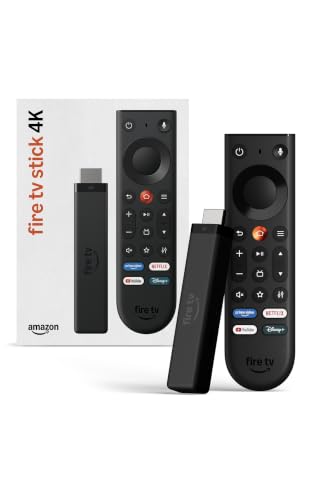
This model pairs 4K HDR10+ streaming with Wi-Fi 6 and the redesigned Fire TV Remote. Direct Power lets it run from the TV’s USB port using the included cable. That can simplify a portable or wall-mounted setup, provided the cable reaches and the TV supplies enough power.
Pros: USB-C power, 4K resolution and a remote with TV power and volume controls. Cons: Dolby Vision is not listed among its supported HDR formats, storage is 8GB, and its Vega OS app support must be checked separately from older Fire OS devices. If Dolby Vision is a priority, compare Plus or Max first.
The linked third-generation model is one stick with the Fire TV Remote, USB power cable and AAA batteries. Amazon’s setup guide treats an HDMI extender as optional. If the supplied cable cannot reach or the TV reports insufficient power, the guide recommends a suitable USB-C cable and 5V 1A USB wall adapter; budget for those separately if needed.
4. Fire TV Stick HD: best for a Full HD screen
Choose the USB-C HD model if 1080p is all your television can display and you want Direct Power and Wi-Fi 6. The selected offer includes an Alexa Voice Remote with TV power and volume buttons and a USB-C power cable. Check for the USB-C model specifically, because the Fire TV Stick HD name has been used for different hardware.
Pros: a straightforward fit for Full HD and a TV-powered installation. Cons: it does not deliver 4K output, its storage is 8GB and it runs Vega OS. If a 4K television upgrade is likely soon, compare the third-generation 4K before buying.

Check apps, connections and ongoing costs
Fire OS and Vega OS require a separate app check
Amazon’s device documentation identifies Max and Plus as Fire OS 8 devices, while the third-generation 4K and USB-C HD use Vega OS. Amazon provides a separate migration process for Fire OS apps to Vega. Check your essential streaming, local-media or accessibility app on the exact device and in your country; support on another Fire TV model is not enough.
Amazon lists major services such as Prime Video, Netflix, YouTube and Disney+ on the newer sticks, but apps, languages, catalogs and service availability can change or differ by region. These are U.S. product links. If buying for another country, verify the local model, app availability and power arrangement rather than assuming a U.S. offer is interchangeable.
Your TV and internet connection still matter
For 4K protected content on Max or Plus, Amazon specifies a compatible 4K HDMI input with HDCP 2.2. A faster Wi-Fi standard alone does not establish better playback in your room. Check signal quality at the television, your internet service and the streaming provider’s requirements. Choose any Ethernet or power accessory for the exact connector and model; USB-C and micro-USB accessories are not interchangeable.
Free content and paid services are different purchases
The hardware purchase does not include every subscription, rental or channel shown in the interface. Free ad-supported content is available, while services and premium content may charge separately. Check the provider’s current plan, region, advertised video quality and renewal terms before subscribing, and include your internet costs when comparing the total setup.
Frequently asked questions
Which Fire TV Stick is the best all-round choice?
We favor the second-generation 4K Max for its 16GB storage, Dolby Vision and Wi-Fi 6E. The best choice for you still depends on required apps, your television and the price difference at checkout.
Can every Fire TV Stick run from the television’s USB port?
Do not assume so. The third-generation 4K and USB-C HD models advertise Direct Power. Max and Plus come with their own power adapters. Even with Direct Power, follow the exact model’s setup instructions if the television reports insufficient power.
Will a Fire TV Stick make paid channels free?
No. It gives you access to supported apps, including free ad-supported services, but paid subscriptions, rentals and purchases remain separate. Check that the service carries the shows or live channels you want before paying.