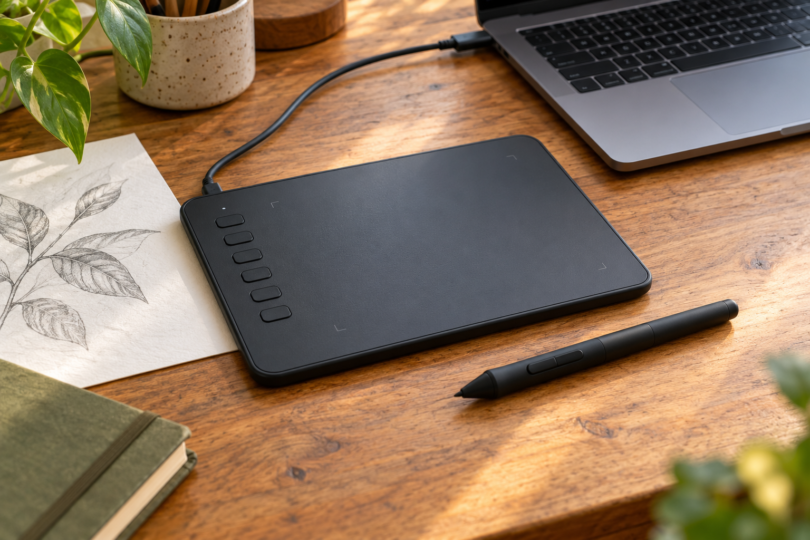

The best cheap drawing tablet is usually a small pen tablet that uses the computer you already own. Our shortlist is the Huion Inspiroy H640P for shortcut buttons, One by Wacom Small for a simple setup, and XPPen Star G640 for a compact drawing surface. These are screenless input devices: you draw on the pad while looking at your computer’s display.
This comparison focuses on basic, wired pen tablets for a limited budget. It does not set a live price ceiling or call any model the cheapest. Compare the exact offer plus any adapter and software costs before choosing; an inexpensive pad makes less sense if you also need to buy a computer.
Best cheap drawing tablets at a glance
| Pick and model | Active drawing area | Why choose it | Main buying check |
|---|---|---|---|
| Huion Inspiroy H640P | 160 × 100 mm, about 6.3 × 3.9 in | Six programmable tablet keys; battery-free PW100 pen | Micro-USB connection; check host and driver support |
| One by Wacom Small, CTL-472 / CTL472K1A | 152 × 95 mm, about 6.0 × 3.7 in | Simple USB-connected pad with included pressure-sensitive pen | Small drawing area; choose Small rather than Medium |
| XPPen Star G640, black | 6 × 4 in | Compact screenless pad with battery-free pen | G640 is distinct from G640S; verify revision and supplied accessories |
Active area is the part that reads the pen, not the pad’s outside dimensions. For example, the One by Wacom Small has a roughly 6.0 × 3.7-inch drawing area even though its body is about 8.3 × 5.7 inches. If you prefer broad arm movements, consider whether a larger pad is worth the extra space and cost.
1. Huion Inspiroy H640P: best for shortcut buttons
The Huion Inspiroy H640P is our first pick if you want frequently used commands on the tablet. Its six programmable keys can be assigned to your workflow, and a side switch disables them when you prefer. The 160 × 100 mm working area and battery-free PW100 pen suit a small desk without adding a pen-charging routine.
Huion lists 8,192 pressure levels, a Micro-USB port and a PH03 pen holder with a nib extractor. Those are documented features, not proof that it draws smoother than another tablet. The manufacturer lists tilt support as unavailable, despite a tilt claim in the retailer listing; do not choose this model for tilt-controlled brushes.
The linked black H640P offer is for one tablet, with a digital pen, USB cable, pen holder containing eight replacement nibs, cleaning cloth and quick-start guide listed in the box. Check that package before ordering. Huion lists Windows, macOS, Android and Linux support, but verify the exact device, operating-system version, connection and drawing app with Huion before buying for anything beyond your established computer workflow.

Huion Inspiroy H640P Drawing Tablet, Black, with PW100 Pen
As an Amazon Associate we earn from qualifying purchases.
2. One by Wacom Small: best for a simple computer setup
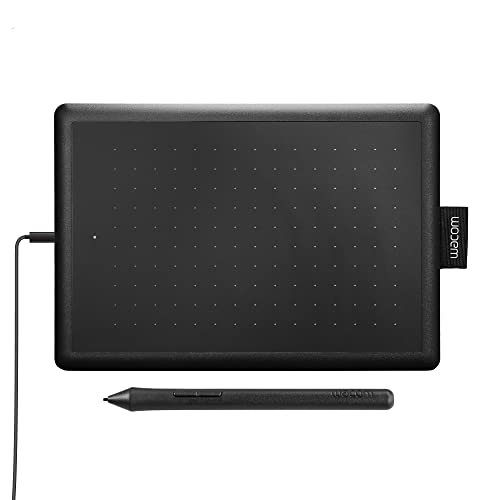
The One by Wacom Small keeps the hardware straightforward: a pen surface, USB connection, status light and fabric pen holder. We would choose it for a beginner who wants to focus on drawing and is comfortable using the computer keyboard for commands. Look for CTL-472; the linked U.S. retail model is CTL472K1A in black and red.
The Small’s active area is 152 × 95 mm, and its pen has 2,048 pressure levels. The Medium CTL-672 is a different size. Do not confuse One by Wacom with the similarly named Wacom One range, and do not read the retailer’s 8.3 × 5.7-inch body measurement as usable drawing space.
Wacom’s documentation lists the tablet, pen, USB cable, extra nibs and a nib-removal tool among the standard contents. The selected one-item retail listing confirms the pen and cable. Treat promotional software separately: check eligibility, registration requirements and whether an offer is a trial before assigning it value.
3. XPPen Star G640: best for a compact drawing surface
The XPPen Star G640 is a useful compact option if you want a 6 × 4-inch active area and a battery-free pen. XPPen lists 8,192 pressure levels. Its small format makes it worth comparing with the Wacom for a portable computer setup, while the Huion is the more obvious choice here if tablet shortcut keys matter to you.
Check the exact G640 offer, rather than assuming a G640S or a special edition has the same features. XPPen’s own store identifies a Rev B option, while the linked black G640 Amazon page does not establish a hardware revision. The maker and retailer also use different pen labels. For that reason, this recommendation promises neither a particular revision nor a specific pen model code.
Use the G640 driver page to check your actual operating system. Its current Mac driver section says macOS 10.13 or newer, with older downloads listed separately; the Windows section lists Windows 7, 8, 10 and 11, and Linux downloads identify supported distributions. That is more useful than assuming an older product-page minimum proves support for every current computer.
The selected offer is for one black G640 and lists a battery-free pen, USB cable and quick-start guide. Its generic contents field also says “Power Cord”; that does not establish a separate wall charger. Verify spare nibs and any adapter in the actual package instead of assuming the maker’s advertised nib quantity or a pictured accessory applies to every listing.

How to choose without overspending
Start with the host computer and drawing program. A matching connector alone does not establish that a driver or app supports pressure input. Check the maker’s current driver page for your exact operating system, confirm the app’s tablet support, and allow for a suitable USB adapter if your computer lacks the required port.
Do not rank these pads by pressure-level count alone. Wacom lists 2,048 levels, while Huion and XPPen list 8,192, but those specifications do not measure the complete drawing experience. We would put compatible software, comfortable working area, useful shortcuts and an affordable replacement pen ahead of the larger number.
Set a total budget for the tablet, necessary cable or adapter, software and replacement nibs. Choose the exact model and one-tablet package you intended, then check the seller, return terms and delivered total. A pen-only listing, an accessory pack or a bundle with paid extras is a different purchase.
Frequently asked questions
Can these drawing tablets work on their own?
They are input tablets, so plan to use a compatible host device and drawing app. They do not provide a built-in screen on which to open a drawing program. If you need an all-in-one drawing device, compare standalone tablets as a separate purchase.
Which is the best cheap drawing tablet for a beginner?
Our starting choice is the H640P if you want tablet shortcuts, or the One by Wacom Small if you prefer simple hardware and keyboard commands. The G640 is another compact option. Choose after checking your computer, software, working area and total cost; there is no single cheapest option that suits every setup.
Are more pressure levels always better?
A pressure specification describes a feature, not a comparative test result. A supported app and a setup you find comfortable matter more than choosing solely between 2,048 and 8,192 advertised levels.