
For room-to-room conversation at home, start by deciding whether you want short push-to-talk messages or a hands-free conversation. That choice matters more than the longest advertised range. A good home intercom also needs enough stations, a reliable power arrangement and controls that everyone in the house can use.
The two systems below cover those different approaches without requiring a household Wi-Fi network. They are specification-based options, not the result of an in-house range test. Neither is an emergency-response service, a replacement for a smoke alarm, or an outdoor video-doorbell kit.
Two home intercom systems to compare
Wuloo WL666: for straightforward push-to-talk messages
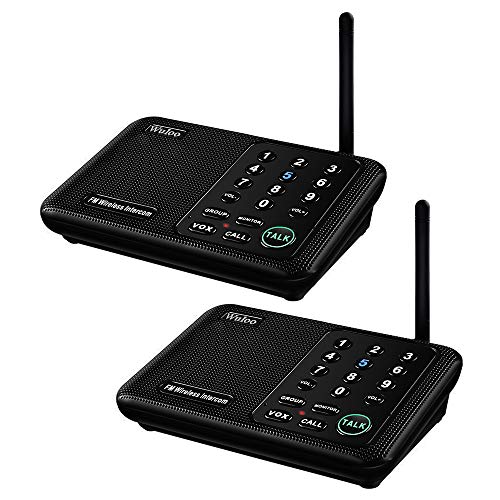
Wuloo WL666 Wireless Home Intercom, Black, 2-Station Pack
As an Amazon Associate we earn from qualifying purchases.
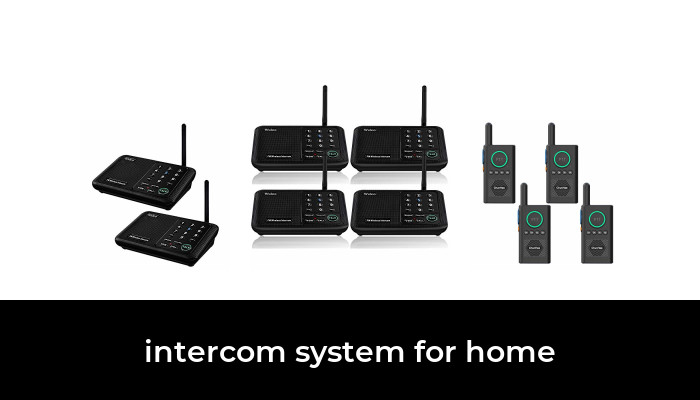
The manufacturer’s black two-station WL666 package provides 10 channels and three selectable codes, with Talk, Call, Group, Monitor and VOX functions. Its large numbered buttons suit a fixed location such as a kitchen counter, office desk or upstairs landing.
The key limitation is conversation style: this is a take-turns system. Hold the Talk control to speak, then release it to hear a response. VOX is voice activation, not proof that two people can talk over each other. The WL666 manual explains its single-way operation and channel setup.
Choose it for: calling someone down for dinner, checking whether a room is occupied, or sending brief household messages. Check first: whether each person can comfortably use the controls and whether two stations cover the rooms you need. The units use 5V/1A external power; Wuloo also supports a suitable USB power bank. They are not self-contained battery walkie-talkies.
Hosmart HY-616B: for hands-free two-way conversation

The HY-616B is a better design to investigate when you want a normal back-and-forth conversation without holding a transmit button throughout each sentence. The selected listing is a pair of black stations. Its linked Hosmart HY-616B manual identifies full-duplex communication, individual calling, monitoring and a broadcast function.
Do not confuse a broadcast or group-call feature with a multi-person conference. The manual says that when someone answers a group call, the conversation is between those two intercoms. It also warns against assigning one channel to multiple units during pairing.
Choose it for: conversations between two fixed rooms where hands-free operation is useful. Check first: exact model compatibility before adding stations. The selected listing explicitly warns that it is incompatible with a previous version. Its manual specifies 5V/1A power and says the stations must be kept dry. Do not buy it on the assumption that “portable” means waterproof or that it can be left outdoors.
What kind of intercom do you actually need?
A tabletop radio intercom is a relatively simple answer to a narrow problem: talking between places within the property’s working signal range. Think through the conversation before shopping. “Dinner is ready” needs different controls from a ten-minute conversation with someone upstairs.
- Short announcements: prioritize a clear call button, audible alert and easy push-to-talk operation.
- Longer conversations: compare full-duplex systems and how an incoming call is answered and ended.
- Front-door visitors: look for a dedicated door station and the required weather protection, camera or entry-control features. An indoor desktop unit is not a substitute.
- Existing wall intercom: identify the installed brand, wiring and power supply before replacing one station. A generic wireless pair cannot simply be attached to the old terminals.
- Personal assistance: test the controls with the person who will actually use them. If a missed call would create a safety risk, arrange an appropriate backup rather than relying on one consumer intercom.
Range claims need a room-by-room check
Neither a “one mile” claim nor a large number on a box predicts how the system will behave through your walls and floors. The Hosmart manual describes its distance in an open area; its Amazon title uses a different distance figure. Those numbers are not directly comparable with a conversation between a basement and an upstairs bedroom. Avoid turning them into a promise of whole-house coverage.
Before deciding how many stations to buy, list the exact positions you need: kitchen, bedroom, garage or outbuilding. Include closed doors, the normal furniture arrangement and any distance between buildings. Ask whether the seller’s return conditions leave enough time to check those locations, and keep the packaging while evaluating the system.
Try every important route in both directions. Speak at the distance you would normally sit from the microphone, with ordinary background noise present. A signal that works beside an open window may not be useful in the place where you want the unit to stay. If performance is inconsistent, reposition the stations before deciding that more units will solve it.
Power and placement are part of the purchase
Count outlets as well as rooms. A two-station pack needs power at both ends, and an extension lead across a walkway is a poor long-term arrangement. Check the supplied adapters, cable lengths and the power specification of the exact package. A product photo showing a cordless-looking device does not establish that a battery is built in.
If you need operation during a power cut, verify the complete backup arrangement rather than assuming a USB connector solves it. Confirm that the proposed backup source keeps each required station powered and that it resumes normally after an interruption. Keep a separate way to contact help if losing the link would matter.
Position stations where their controls are reachable and their alert can be heard. Keep them away from spills and damp locations. A sheltered porch can still expose an indoor intercom to moisture; use equipment specifically intended for the environment instead.
Privacy, monitoring and household expectations
Selectable channel codes help organize communications; they are not a reason to assume a conversation is confidential. The Wuloo manual notes that other units with matching settings can receive messages and discusses interference from neighboring systems. Do not use a “private code” label as evidence of encryption.
Agree with everyone in the home before enabling monitoring. Explain which room can be heard, who can listen and how to stop it. A device can be useful without being left in a listening mode all day. For a bedroom or work room, an ordinary call-and-answer arrangement may be more appropriate.
Arrival-day checks before keeping the system
- Confirm the exact model, color and station count against the order.
- Set up both stations close together using the included instructions, then move them to their intended positions.
- Test calling, speaking, listening, volume and ending a call with each household user.
- Check what happens after disconnecting and restoring power, including any settings that must be re-entered.
- Try the least favorable normal route, such as a closed garage door or an upstairs room, while the return window is still open.
Which is the better starting point?
Compare the Wuloo WL666 pair if you mainly need simple announcements and can use push-to-talk controls. Compare the Hosmart HY-616B pair if hands-free conversation matters more. For either, buy according to real room coverage, power and usability checks. Add stations only after confirming the exact model family and the behavior you need.
Image note: Relevant existing topic illustration retained; not a representation of exact current card contents.