
Archive note: This article covers Pinterest’s May 6, 2020 announcement. The launch details below describe that period; they are not a promise that every feature remains available in the same form today.
Pinterest introduced board notes, project dates and suggested sections on May 6, 2020. The update aimed to help people turn saved ideas into organized plans, including recipes, home projects and virtual events during the early COVID-19 pandemic.
What Pinterest announced in May 2020
In its original announcement, Pinterest described four additions:
- Board notes: a place for project details, shopping ingredients or a to-do list, with the option to include Pins.
- Dates: a way to associate a board with a project timeline and help make recommendations timely.
- Suggested grouping: recommendations for organizing saved Pins into themed sections.
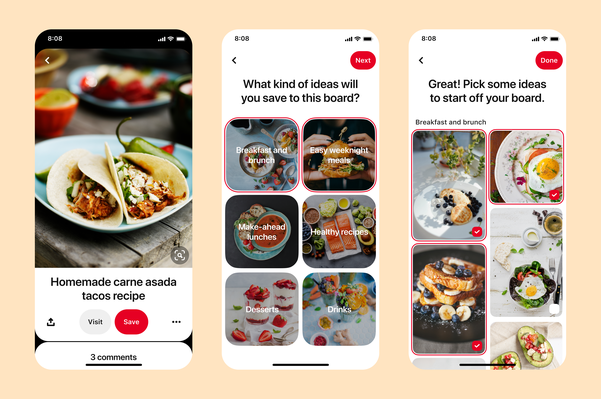
- Section templates: suggested categories and ideas when beginning a new board.
The company said the rollout would begin globally that day on the web, iOS and Android. For example, a broad activity board could be split into more focused sections, making a large collection easier to use.
Why board organization mattered then
Pinterest’s first-quarter 2020 shareholder letter described users adapting the service to new circumstances. It also discussed returning interest in future travel and event planning, alongside more immediate needs. The company presented board dates and automatic organization as ways to make existing collections more useful.
The letter connected automatic grouping with computer vision and machine learning. Its example was a fashion board divided into categories such as shoes and dresses. That was an explanation of the organizing technology, not a guarantee that every suggested grouping would suit an individual board.
As an editorial reading of the update, its practical value was the connection between inspiration and a next step: a saved image could sit alongside a checklist, a project timeline or a manageable group of related ideas. The announcement did not turn Pinterest into a full calendar or task-management service.
Using boards now: consult the current help pages
If you arrived here looking for instructions, use Pinterest’s current documentation rather than following a 2020 screenshot. As checked in October 2026, the help center documents creating board sections: open a board, add a section, give it a name, then choose or move the relevant Pins. The exact controls vary between desktop and mobile.
For example, someone gathering ideas for a room could make separate sections for lighting, storage and paint. Choose names that help you find the saved material again; you do not have to treat a suggested category as the only sensible arrangement.
When a project ends, archiving and deleting have different effects. Pinterest says an archived board is removed from the public profile, cannot receive new Pins while archived and can be unarchived. Deleting a board also deletes its Pins; the help page describes a limited seven-day recovery window with platform restrictions. Read the current instructions before deleting something you may want later.
The historical takeaway is straightforward: the May 2020 release added planning context and organization to boards. For present-day availability of notes, dates or recommendation tools, check your app and Pinterest’s current help center rather than assuming the original launch applies unchanged.
Image note: Relevant existing category illustration retained.