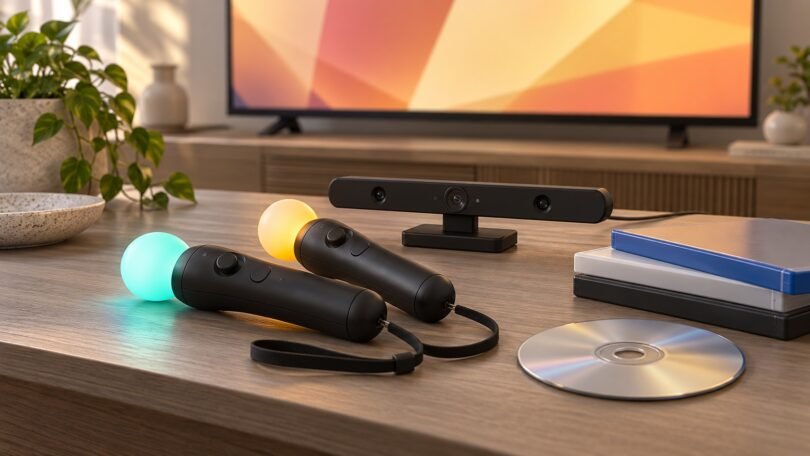

The right PlayStation Move game depends on the hardware you already own. Sports Champions is a practical starting point for a PS3 with a PlayStation Eye camera. Marvel’s Iron Man VR suits an original PlayStation VR setup with two Move controllers, while Blood & Truth also offers a DUALSHOCK 4 control option. These are different systems, so buying a disc with “Move” or “VR” on the cover is only the first compatibility check.
This guide focuses on games released on physical discs, with controller requirements and edition differences that matter when shopping secondhand. Ratings below are North American ESRB ratings. Check the actual case and disc for platform, language and regional details, especially when a marketplace combines imported, used and bundled copies under one listing.
Match the game to your PlayStation setup first
PS3: Move controllers and PlayStation Eye
For PS3 motion-control games, you need a compatible Move motion controller and the PlayStation Eye camera. The PS3 games below play on your television without a VR headset. Some also need analog-stick input from a Navigation controller or DUALSHOCK 3.
Check the controller’s model label before buying. Sony’s CECH-ZCM1E manual covers the PS3 model, whereas the later CECH-ZCM2U manual explicitly excludes PS3 compatibility. A seller calling every glowing wand a “PS3/PS4 controller” is not enough evidence.
PS4: check whether original PlayStation VR is required
The two PS4 games featured here require the original PlayStation VR headset and PlayStation Camera. The headset system includes its processor unit and connecting cables. A pair of Move controllers alone will not make either game playable. “PS Move optional” describes the input method; it does not mean the headset is optional. Follow Sony’s PS VR setup guide for your headset model.
PS5: compatible PS4 games still need older accessories
Supported PS4 PS VR games can run on PS5 using the original headset, PS4 PlayStation Camera and PlayStation Camera adaptor, plus the game’s supported controllers. The PS5 HD Camera cannot replace that camera. Sony recommends DUALSHOCK 4 for the best original PS VR experience; check each game’s requirements rather than assuming DualSense replaces every accessory.
Sony’s important notice says the Camera adaptor became unavailable from November 26th 2024, or when supplies ran out. Do not plan a purchase around receiving a free adaptor from Sony. Verify that your setup already has a working one.
Sony’s backward-compatibility guidance also makes two distinctions clear: PS5 does not support PS3 discs, and playing supported PS4 discs requires a PS5 with a disc drive. The disc must remain inserted to play. A disc purchase does not automatically give you a digital copy.
PS VR2 and Sense controllers are a separate system
Sony confirms that PS VR2 cannot play original PS VR content and does not support Move controllers. PS VR2 Sense controllers work with PS VR2, not the original headset. A newer headset therefore does not replace the older equipment needed by these PS4 disc editions.
Physical PlayStation Move games worth considering
1. Sports Champions: a varied PS3 starting point
Setup: PS3, PlayStation Eye and one compatible Move controller for solo play; certain events support two. No VR headset. ESRB: Everyone 10+, Violence.
The original Sports Champions combines disc golf, gladiator duel, beach volleyball, archery, table tennis and bocce. Choose it when you want several activities on one disc rather than a story-led adventure. Its mix also gives you a reason to try both careful aiming and larger arm movements.
Sony’s controller guide confirms that solo players can use one or two motion controllers. Simultaneous opponents need their own controllers, so decide which events and player arrangement you want before ordering extra hardware. The ESRB entry explains the combat-related content behind its rating.

2. PlayStation Move Heroes: character-based challenges on PS3
Setup: PS3, PlayStation Eye, one Move motion controller and analog-stick control using a Navigation controller or DUALSHOCK 3; add another Move for the second player’s Team Play role. No VR headset. ESRB: Everyone 10+, Fantasy Violence.
This crossover uses Ratchet, Clank, Jak, Daxter, Sly and Bentley in challenges built around discs, shooting, melee attacks, bowling-style balls and whips. The official game manual is useful before buying: it shows the movement controls and explains how a second player supports the main player with attacks and abilities.
That makes it a more specific choice than simply buying a familiar character’s usual adventure. Read the Team Play section if cooperative play is your priority, and check the content rating separately from the colorful cover art.

3. Resident Evil 5 Gold Edition: optional Move aiming on PS3
Setup for Move: PS3, PlayStation Eye, one Move motion controller, plus a Navigation controller or DUALSHOCK 3 for movement. No VR headset. ESRB: Mature 17+, Blood and Gore, Intense Violence, Strong Language.
The important words are PS3 Gold Edition. Sony’s edition-specific explanation says the original Resident Evil 5 release did not receive Move support. Early Gold Edition copies needed the enabling update; later pressings were announced with support on the disc. Confirm the copy you are buying rather than assuming every similar cover is equivalent.
Move is an alternative control scheme for aiming, with analog-stick character movement. Capcom’s update announcement documents the PS3 patch. This is a horror-action choice for an appropriately aged player; the ESRB description makes its violent content clear. Do not transfer these Move requirements to another platform’s edition.
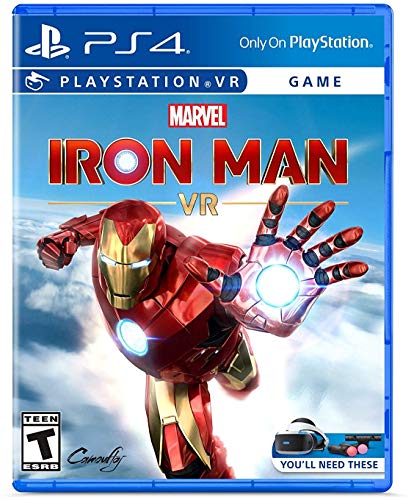
4. Marvel’s Iron Man VR: two-controller flight and combat
Setup: PS4, original PS VR and PlayStation Camera, with two Move motion controllers required. For supported PS5 play, add the compatibility requirements above. ESRB: Teen, Mild Language, Violence.
Choose the PS4 disc edition if the appeal is controlling Iron Man’s flight and repulsor attacks with both hands. Sony’s official game page specifies two controllers and lists the game as single-player. One wand is not a complete setup, and a standard gamepad is not listed as an alternative.
Buy the standalone game only if the headset, camera and controllers are already covered. If considering a used hardware bundle instead, ask the seller to identify every included component and whether the game is a disc or voucher. The Teen rating includes violence; a superhero license does not make it suitable for every child.
5. Blood & Truth: a PS VR action game with a gamepad alternative
Setup: PS4, original PS VR and PlayStation Camera; use two Move controllers or a DUALSHOCK 4. Apply the PS5 accessory requirements above when using that console. ESRB: Mature 17+, Blood, Strong Language, Use of Tobacco, Violence.
This London-set action game is the shortlist’s clearest example of optional Move support. Its official listing explicitly supports two Move controllers or DUALSHOCK 4 while still requiring VR and the camera. That offers flexibility if you already own the headset but have not bought motion controllers.
The game was released on physical disc, but the linked PlayStation Store page is a digital listing for checking requirements. Look for the PS4 disc edition when shopping secondhand. Its Mature rating is an important distinction from the sports and cartoon-style selections above.
A final checklist before buying a used disc
- Inspect the actual item. Ask for readable front-cover, back-cover and disc-label photos. Confirm the platform and edition rather than relying on a stock image.
- Count the controllers. A Navigation controller is not a second Move wand. Check solo and multiplayer requirements separately.
- Separate discs from codes. A used voucher may already be redeemed or expired. Do not value a bundle as a complete physical-game collection without checking its contents.
- Check language and extras. Verify imported editions, regional voucher restrictions and required updates before paying. An old launch announcement is not proof that every download or online feature still operates.
- Check the equipment. Confirm charging, pairing, camera detection and the condition of cables and wrist straps during the seller’s return window.
Clear the play area and wear the wrist straps. For original PS VR, Sony says the headset is not for children under 12; the game’s own age rating may be higher. Start with a game that matches your complete setup, then add hardware only for the particular controls or multiplayer mode you want.