The best ink for sublimation is the ink made for your exact printer and the transfer process you already use. For an Epson SureColor F170 or F570, start with genuine Epson T49M bottles. For a Sawgrass SG500 or SG1000 already running SubliJet UHD, buy the matching SubliJet UHD cartridges. For a Brother SP-1, choose Brother SP01 sublimation cartridges.
These are three practical buying choices, rather than interchangeable alternatives. The shortlist compares manufacturer documentation, cartridge and bottle formats, substrate requirements and handling instructions. It does not rely on hands-on print testing or a promise that one ink produces better color in every setup.
Best sublimation inks at a glance
| Ink choice | Choose it for | What to buy | Main limitation |
|---|---|---|---|
| Epson T49M | SureColor F170 and F570 owners | 140 mL bottles: T49M120 black, T49M220 cyan, T49M320 magenta, T49M420 yellow | A refill bottle for specified SureColor printers, not a general EcoTank conversion recommendation |
| Sawgrass SubliJet UHD | SG500 or SG1000 printers already dedicated to SubliJet UHD | Standard 31 mL CMYK cartridges; the linked Amazon item is one black cartridge | Different Sawgrass ink systems and printer generations are not interchangeable |
| Brother SP01 | Brother SP-1 owners | 47 mL SP01BKS, SP01CS, SP01MS and SP01YS cartridges | Made for the SP-1 system; not a refill for Epson or Sawgrass |
For traditional sublimation, plan around white or light polyester fabric and hard blanks specifically coated for sublimation. A plain ceramic mug, a cotton shirt and a polymer-coated sublimation mug are different jobs. Ink alone cannot make an unsuitable blank compatible.
1. Epson T49M: best match for SureColor F170 and F570 owners
Epson T49M is the straightforward refill choice when you own one of the compatible SureColor dye-sublimation printers. Epson lists 140 mL bottles in black, cyan, magenta and yellow, with separate part numbers for each color. Its U.S. compatibility list includes the F170, F570 and F570 Pro; check the exact machine and regional ink code before ordering.
The bottle format is useful when you want to replenish one color without buying an entire set. On the F170, the documented filling process uses the correct color port and stops the flow at the tank’s upper line. Follow the current manual’s preparation and refill steps rather than treating it as a generic pour-in tank.
Why choose it: clear manufacturer compatibility, individually replaceable colors and a purpose-built bottle-and-tank workflow. What to weigh: keeping bottles and tanks within the manual’s storage and use limits matters, and maintenance consumes ink. A 140 mL bottle does not establish a fixed number of mugs or shirts.
Do not substitute another genuine Epson ink just because the bottle looks similar. The F170 manual specifically excludes warranty coverage for damage caused by ink other than the specified formulation, including Epson ink intended for a different printer. T49M is not a blanket recommendation for converting an EcoTank.
Choose the correct Epson T49M color and part number. See also the F170 support-linked user guide, especially ink codes and refilling instructions.
2. Sawgrass SubliJet UHD: best match for an existing UHD setup
Choose SubliJet UHD when your SG500 or SG1000 is already configured for this ink system and your work is mainly polyester apparel or polymer-coated hard goods. Sawgrass supplies standard 31 mL replacement cartridges for both printers. Extended 70 mL Sublijet cartridges are for the SG1000, so SG500 owners should not select the larger cartridge merely to reduce replacement frequency.
Why choose it: a matched ink, printer and software workflow, with individual CMYK replacements and a clearly identified cartridge family. What to weigh: ink is also used in maintenance, cartridges have use-by dates, and choosing a larger capacity only makes sense if your model accepts it and you can use it in time.
The card below is one black 31 mL SubliJet UHD cartridge, model 609101. It is not a four-color kit or a 70 mL cartridge. Order cyan, magenta and yellow separately when needed, or select the explicitly labeled four-cartridge option through Sawgrass.
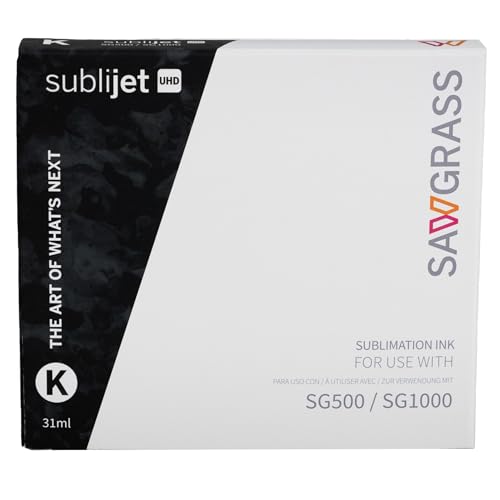
Sawgrass SubliJet UHD Black Ink Cartridge, 31 mL, SG500/SG1000 (609101)
As an Amazon Associate we earn from qualifying purchases.
SubliJet UHD is not SubliJet HD for the older SG400/SG800 generation. It is also a different system from EasySubli, ChromaBlast and VersiFlex. Sawgrass advises against switching ink types unless it directs you to do so; mixing formulations in the lines can cause printhead problems. An SG500 model name by itself does not establish which replacement ink you need.
View Sawgrass’s 31 mL color and set options, and check its ink-system and cartridge compatibility guide before changing anything.
3. Brother SP01: best match for the Brother SP-1
Brother’s SP01 family is the correct place to start for the SP-1 sublimation printer. The U.S. replacement listings identify SP01BKS black, SP01CS cyan, SP01MS magenta and SP01YS yellow, each holding 47 mL. The manual uses the corresponding base identifiers SP01BK, SP01C, SP01M and SP01Y.
Why choose it: four separate cartridges with manufacturer-documented SP-1 compatibility. What to weigh: these are dedicated sublimation supplies, so ordinary Brother office-printer cartridges and other brands’ refill bottles are not substitutes. Initial charging and maintenance use some ink; capacity alone is not a reliable cost-per-project comparison with the other systems here.
Buy the color you need, checking the complete listing title and quantity. The single black listing is not a CMYK set even though the page also discusses the four cartridges included with a printer. For a full restock, confirm that all four colors are expressly included in the bundle.
View Brother SP01BKS black ink or compare the SP01 colors and bundles. The SP-1 user guide covers replacement supplies and the transfer workflow.
How to choose before you buy
Match the installed ink, not just the printer brand. Read the printer’s model label and the ink label already installed. Confirm the exact color, cartridge generation, capacity and number of items in the offer. A listing that says “compatible with Epson” is not evidence that it is supported for every Epson printer.
Choose the substrate and process together. Traditional dye sublimation transfers the design from sublimation paper using heat. For the most predictable starting point, use a white polyester blank or a purpose-made coated hard blank. On blends, the polyester content affects the result. Dark garments and ordinary cotton need a suitable alternative transfer system, not an assumption that standard CMYK sublimation ink supplies an opaque white layer.
For example, Sawgrass identifies EasySubli as an option for its matching printable heat-transfer vinyl, which can then be applied to cotton or dark fabric. That is a distinct media-and-ink workflow. ChromaBlast and VersiFlex have their own requirements as well. Check the manufacturer guidance for the complete system instead of mixing a paper from one process with ink from another.
Treat conversions as a separate purchase decision. This shortlist recommends documented ink-and-printer combinations. A third-party supplier’s EcoTank conversion claim does not establish Epson support for sublimation in that model. Epson says non-genuine ink may cause damage outside its limited warranty. If you already use a converted printer, verify the supplier’s exact model support, formulation, color profile and handling sheet before replacing the ink; do not casually mix brands or flush a working system based on a generic tutorial.
Compare complete operating costs. Include transfer paper, the right blanks, maintenance supplies, a suitable heat press and spoiled test pieces. Compare replacement costs within a compatible system. Bottle volume, cartridge volume or a marketplace page-yield number cannot tell you how many finished products a different printer will produce.
Check the transfer setup before blaming the ink. Use the correct media setting and manufacturer-recommended color workflow, check nozzles, and test on a spare blank. Follow the blank and heat-press instructions for temperature, time and pressure. Brother’s heat-press guide explicitly says its settings are starting points that depend on the material and equipment.
Handling and storage matter
Read the safety sheet for the exact ink and color. “Water-based” or “non-regulated for transport” does not mean suitable for skin contact or food use. Epson’s T49M safety sheets warn of allergic skin reactions. Brother’s SP-1 safety guide warns about black ink and calls for protective gloves when handling black cartridges. Sawgrass’s SubliJet UHD safety sheets also specify handling precautions.
Keep ink in its labeled container, away from children and food preparation. Follow the label’s glove and eye-protection requirements, avoid spills and skin contact, and store supplies within the specified conditions and use-by dates. Do not dismantle or refill sealed cartridges unless the manufacturer expressly supports that procedure.
Use a heat press in a well-ventilated area and follow its hot-surface precautions. A mug blank’s coating does not establish that every printed area is suitable for food contact: Brother instructs users to avoid decorating areas that touch the mouth or lips and to use decorated plates as artwork rather than serving dishes.
Primary references: Epson F170 safety data sheets, Sawgrass manuals and safety sheets, and Brother SP-1 product safety guide.
Which sublimation ink should you buy?
For an existing F170 or F570, choose the correct Epson T49M color. For an SG500 or SG1000 already running UHD, choose the right size SubliJet UHD cartridge. For the SP-1, choose Brother SP01. If you have not bought a printer yet, choose the complete supported printer, ink, media and blank workflow first. That compatibility decision is more useful than ranking unrelated bottles by price.
Frequently asked questions
Can I use any sublimation ink in any printer?
No. Match the exact printer model, ink family, regional part number and installed formulation. Epson T49M, Sawgrass SubliJet UHD and Brother SP01 are different systems and are not interchangeable.
Can ordinary inkjet ink be used for sublimation?
Ordinary document or photo ink is not a substitute for the specified sublimation ink. Use a supported sublimation printer-and-ink combination with the appropriate transfer paper, blank and heat press.
Will standard sublimation ink work directly on cotton or black shirts?
Traditional sublimation is intended for suitable polyester and polymer-coated blanks, usually white or light colored. Cotton and dark garments require an appropriate alternative workflow, such as compatible printable heat-transfer vinyl; changing the ink alone does not make the fabric suitable.
Can I switch a Sawgrass printer from one ink system to another?
Do not switch casually. Sawgrass advises using the same ink type for the printer’s life unless it specifically directs a change. SubliJet UHD, EasySubli, ChromaBlast and VersiFlex have different requirements, and mixing inks can cause printhead problems.
How should I handle sublimation ink safely?
Follow the exact ink’s label and safety data sheet, including specified gloves and eye protection. Avoid skin contact, keep ink away from children and food, and use the heat press in a well-ventilated area. Follow the manufacturer’s storage, expiry and disposal instructions.