
For a general-purpose tablet over 10 inches, start with the Apple iPad (A16) or Samsung Galaxy Tab A11+. Both give you a useful step up from a phone without the bulk of a 13-inch device. Choose the Galaxy Tab S10 FE+ for a large writing surface with an included S Pen, or the 13-inch iPad Air (M4) for a bigger iPad workspace. The Fire HD 10 is a narrower choice for Amazon-centered entertainment.
Every tablet below has a display larger than 10 inches. The shortlist covers five distinct needs, with exact configurations identified so you can compare the correct storage, connectivity and generation. This is a research-based buying guide; we have not performed hands-on performance or battery testing.
Compare the best tablets over 10 inches
| Tablet | Screen and resolution | Linked version | Best for | Main compromise |
|---|---|---|---|---|
| Apple iPad (A16) | 11-inch class; 2360 × 1640 | 128GB Wi-Fi, Silver | Everyday apps, study and video calls | Pen and keyboard cost extra |
| Samsung Galaxy Tab A11+ | 11-inch; 1920 × 1200, up to 90Hz | 6GB RAM/128GB Wi-Fi, Gray | Budget Android entertainment | No S Pen support |
| Samsung Galaxy Tab S10 FE+ | 13.1-inch; 2880 × 1800, up to 90Hz | 128GB Wi-Fi, Gray, US version | Large-screen notes and PDFs | 664g before a case; no HDMI output |
| Apple iPad Air 13-inch (M4) | 13-inch class; 2732 × 2048 | 256GB Wi-Fi, Space Gray | Creative apps and a larger iPad workspace | Higher overall setup cost |
| Amazon Fire HD 10 (2023) | 10.1-inch; 1920 × 1200 | 32GB Wi-Fi, Black, lockscreen ads | Simple entertainment with Amazon services | Google Play unsupported; limited internal storage |
Apple’s nominal 11-inch iPad measures 10.86 inches diagonally as a rectangle; its 13-inch Air measures 12.9 inches. Both meet the “over 10 inches” requirement. All five linked configurations are Wi-Fi models.
1. Apple iPad (A16): the everyday starting point

Apple iPad A16, 11-Inch, 128GB Wi-Fi, Silver, 1 Tablet
As an Amazon Associate we earn from qualifying purchases.
The iPad (A16) is a sensible choice for readers who want a familiar tablet for browsing, schoolwork, streaming and video calls. Its 128GB starting capacity leaves substantially more room for apps than the smallest Fire configuration. The landscape-positioned 12MP Center Stage front camera is also a useful feature when the tablet is on a desk in a keyboard case.
Why it stands out: The 2360 × 1640 screen and iPadOS app ecosystem suit a broad mix of reading, entertainment and light creative tasks. You do not have to pay for an Air simply to get a screen larger than ten inches.
Limits: A keyboard and Apple Pencil are separate purchases. This model supports Apple Pencil (USB-C) and the first-generation Pencil with the required adapter; it does not support Pencil Pro. Storage cannot be expanded with a microSD card, so consider downloads before choosing capacity.
The linked tablet is Silver, 128GB, Wi-Fi. Check Apple’s A16 iPad specifications when matching accessories; older iPad names and generations can look deceptively similar.
2. Samsung Galaxy Tab A11+: the budget Android option

The Galaxy Tab A11+ fits someone who wants mainstream Android apps, a reasonably sized entertainment screen and expandable storage. Its 11-inch LCD has an up-to-90Hz refresh rate, while four speakers and a 3.5mm headphone jack make it adaptable for shared viewing or quiet listening.
Why it stands out: The linked configuration pairs 6GB RAM with 128GB storage. Samsung supports microSD cards up to 2TB for compatible files, which is useful if you regularly download media rather than stream everything. Its desktop-style DeX interface can also help organize light work on the tablet.
Limits: Samsung explicitly lists no S Pen support. Choose the FE+ instead if pressure-sensitive handwriting is a core requirement. The A11+ also uses a 1920 × 1200 LCD, so do not confuse it with an OLED-equipped premium Galaxy Tab.
The linked Gray Wi-Fi model is SM-X230NZANXAR. Samsung’s US A11+ announcement and specification table confirm the key hardware. A compatible 25W charger is sold separately.
3. Samsung Galaxy Tab S10 FE+: best for a large pen-friendly screen

The S10 FE+ makes the strongest case when “over ten inches” really means enough room for a document and notes together. Its 13.1-inch, 2880 × 1800 LCD provides a much larger working area than an 11-inch tablet, and the included S Pen avoids a separate stylus purchase.
Why it stands out: Handwritten notes, annotated PDFs, diagrams and larger text are natural uses for this format. The 128GB configuration has 8GB RAM, and microSD expansion offers another place for supported documents and media. Samsung’s US product specifications also list security support through April 30, 2032.
Limits: At 664g without accessories, this is better suited to a table or supported lap than extended one-handed reading. It is an LCD model. Crucially, Samsung’s FE-series support guidance says the S10 FE and FE+ do not support HDMI output or Wireless DeX. Do not buy a USB-C dock expecting an external-monitor workstation.
The linked product is the Gray, 128GB, US Wi-Fi FE+, not the smaller 10.9-inch FE.
4. Apple iPad Air 13-inch (M4): best larger iPad workspace
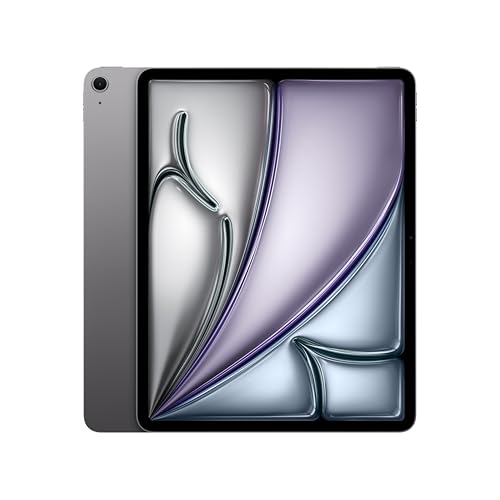
The 13-inch iPad Air is the option to investigate when a larger canvas and demanding creative apps matter more than keeping cost and size down. The M4 chip, 12GB of unified memory and 256GB configuration linked here provide a substantial setup for compatible illustration, photo, music and video applications.
Why it stands out: Its laminated, antireflective display supports Apple Pencil Pro and Pencil (USB-C). The larger screen gives you more space to place reference material beside your work. Apple also specifies external-display support, making it more relevant than the FE+ for an iPad-based desk setup.
Limits: Pencil and keyboard accessories are extra, and the tablet weighs 616g before a case. Confirm that the iPad version of your essential software has the functions you need; an M4 chip does not make it run desktop macOS applications.
The linked model is M4, 256GB, Wi-Fi, Space Gray. Use Apple’s 13-inch M4 Air specifications to distinguish it from M2/M3 models and from the separate iPad Pro range.
5. Amazon Fire HD 10: a focused entertainment choice
The Fire HD 10 qualifies with its 10.1-inch screen, but its appeal is specific: an uncomplicated place for supported streaming apps, Kindle books and casual browsing. The 2023, 13th-generation model has a 1920 × 1200 display, 3GB RAM and expandable storage, as documented in Amazon’s device specifications.
Why choose it: It can make sense as a secondary screen when the checkout price is substantially below the broader-purpose alternatives and you already use Amazon’s services.
Limits: Amazon’s listing states that Google Play is unsupported. Check your exact apps before buying; do not base a purchase on unofficial installation workarounds. The linked Black, 32GB Wi-Fi configuration includes lockscreen ads. Space available to you is lower than the advertised capacity, and some apps require internal storage even with a microSD card.
This is an entertainment-first recommendation, not our first choice for intensive multitasking or a primary work device.
How to choose the right size and setup
Start with your apps and documents
List the software you must use, including school or employer requirements. Confirm its tablet features before comparing processors. For PDFs, consider whether you read one page at a time or need side-by-side annotations. The latter is a stronger reason to carry a 13-inch device.
If portability matters more than page area, compare the smaller Samsung tablet options before committing to a larger screen.
Budget for the finished setup
Include a protective case, stand, keyboard, compatible pen and suitable charger where needed. The FE+ includes its pen; the iPads do not. Check exact-generation accessory compatibility and the seller’s return policy rather than assuming an “11-inch” case fits every 11-inch tablet.
Check updates, storage and connectivity
Samsung maintains a current security-update list; both Samsung models here were covered at our check. For a Fire tablet, consult Amazon’s security-support policy, which distinguishes purchases sold new by Amazon from other sellers and refurbished devices. Manufacturer support and a marketplace seller’s warranty are separate questions.
Choose internal storage around your apps and offline files, not just what fits today. If you need internet away from Wi-Fi, budget for a hotspot or investigate a separate cellular configuration and its carrier requirements.
Frequently asked questions
Is a 10.1-inch tablet larger than ten inches?
Yes. The Fire HD 10 qualifies, although its diagonal increase is small. An 11-inch model is a more noticeable step, while a 13-inch screen is better for larger pages and side-by-side work.
Which should I buy for handwritten notes?
Choose the S10 FE+ for its included S Pen and large screen. Choose an iPad with a compatible Apple Pencil if your preferred note-taking or drawing app is on iPadOS. The A11+ lacks S Pen support.
Can one replace a laptop?
Possibly for a defined set of tasks. Check file handling, required applications, keyboard shortcuts and monitor support first. A bigger screen alone does not supply missing desktop software or ports.
Our recommendation
Start with the iPad A16 for a versatile everyday tablet or the Galaxy Tab A11+ for budget Android use. Move to the S10 FE+ or 13-inch iPad Air M4 when the larger workspace will genuinely help. Choose the Fire HD 10 only after confirming its app selection fits your needs. Recheck the selected configuration and current seller terms before ordering.