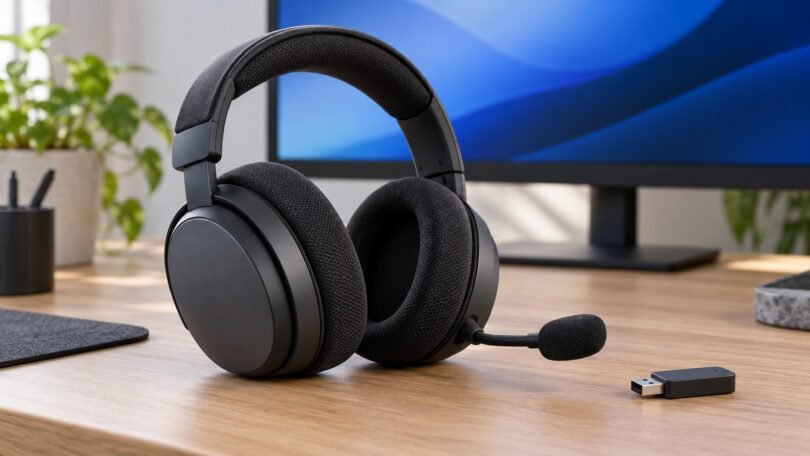

The current Sony PULSE Elite wireless headset is the CFI-ZWH2 model, with planar magnetic drivers, PlayStation Link, Bluetooth, and a retractable microphone. It is a different product from the older PS3-era PULSE Elite Wireless Stereo Headset, model CECHYA-0086. Check that model number before buying a used headset, replacement adapter, charging accessory, or ear pads.
For a PS5 or PlayStation Portal setup, the current PULSE Elite is the relevant model to consider. Its main practical advantage is the ability to hear PlayStation Link audio and a Bluetooth device at the same time. Your decision should also account for the required adapter, the limits of wired use, and what is included in the particular package.
Which PULSE Elite headset do you mean?
| Product | Model identification | Connection system | Buying implication |
|---|---|---|---|
| Current PULSE Elite wireless headset | CFI-ZWH2 | PlayStation Link; Bluetooth; compatible 3.5 mm wired devices | The model discussed in the main buying guide below |
| Older PULSE Elite Wireless Stereo Headset | CECHYA-0086 | Legacy 2.4 GHz wireless adapter and analog audio cable | Check its own manual and legacy accessories; it is not a PlayStation Link headset |
| PULSE 3D wireless headset | CFI-ZWH1 headset; CFI-ZWD1 adapter | Its own wireless adapter | A separate headset, not another name for PULSE Elite |
| PULSE Explore wireless earbuds | A separate earbud product family | PlayStation Link and Bluetooth | Its ear tips and charging case are not PULSE Elite headset accessories |
Sony’s headset compatibility list separates these model families. It lists the older CECHYA-0086 under PS4 compatibility, while the current CFI-ZWH2 appears under PS5. Do not read a legacy listing’s “PS4 compatible” claim as confirmation that it describes the current headset.
Current PULSE Elite: what you are buying
The current headset’s feature list includes planar magnetic drivers, a flexible retractable boom microphone, volume and mic-mute controls, and PlayStation Link wireless audio. Sony describes PlayStation Link as a low-latency, lossless connection. That description applies to the Link connection, not a promise that every Bluetooth or analog source has the same characteristics.
The advertised AI-enhanced noise rejection processes the microphone’s outgoing voice capture. Do not interpret it as a promise of active noise cancellation for everything you hear through the earcups.
Sony rates battery life at up to 30 hours and quick charging at up to two hours of use from a 10-minute charge. Treat those as manufacturer figures, not a guarantee for your volume, settings, or battery condition. A used unit’s remaining battery capacity also deserves attention.

PlayStation PULSE Elite Wireless Headset, White
As an Amazon Associate we earn from qualifying purchases.
Compatibility: which connection should you use?
| Device or use | Connection to plan for | What to check |
|---|---|---|
| PS5 | PlayStation Link USB adapter | The included adapter is pre-paired; use a compatible USB port |
| PlayStation Portal | Direct PlayStation Link pairing | No USB adapter is inserted into the Portal |
| Compatible Windows PC or Mac | PlayStation Link USB adapter | USB audio output support and the selected audio device |
| Compatible phone or tablet | Bluetooth | Pair the mobile device separately |
| Game audio plus phone audio | One PlayStation Link connection plus Bluetooth | This is different from listening to two Link adapters at once |
| Compatible device with a 3.5 mm jack | Separate 3.5 mm audio cable | Headset must be on; four conductors are needed for its microphone |
| PS4 or another console | Check the exact device and intended connection before buying | Do not assume the current headset has the legacy model’s wireless compatibility |
PS5: use the PlayStation Link adapter
Sony’s PS5 setup instructions use the included PlayStation Link USB adapter. Insert it into the console, then turn on the headset with its PS Link button. The supplied pair is already paired. Follow any console prompts and device-software updates.
Bluetooth on the headset is useful for a compatible mobile device; it does not replace this documented PS5 connection. When comparing packages, check that the adapter is included, especially on an open-box or used listing.
PC, Mac, and multiple adapters
For compatible computers, Sony specifies the Link adapter and USB audio output. Select “PlayStation Link Adapter” as the audio device if needed. A separately purchased Link adapter can be paired for another computer or console; that can save moving one adapter between devices.
Sony’s other-device instructions distinguish pairing from active playback: the headset can remember multiple Link adapters but plays audio from only one Link adapter at a time. Current support also distinguishes the older CFI-ZWA2 adapter from the CFI-ZWA3 with a removable connector. Check the adapter actually supplied with your purchase rather than assuming every package contains the latest standalone version.
PlayStation Portal and a Bluetooth phone
PlayStation Portal connects directly over PlayStation Link. Pair the headset with Portal using Sony’s accessories support instructions. This is useful if you want wireless audio on Portal without routing it through another device.
The headset can also play audio from a Link device and a Bluetooth mobile device simultaneously. For example, that can keep game audio available while you hear a call or music from your phone. It is not a promise of simultaneous audio from your PS5 and PC through two Link adapters.
Wired audio has different limits
For a compatible 3.5 mm device, Sony specifies a separate audio cable and says to turn the headset on. A four-conductor cable is required to use its microphone; a three-conductor cable is for listening only. The cable is not included in the standard current package.
While connected this way, the headset does not function with its PlayStation Link or Bluetooth wireless connections. Control wired volume from the connected device. USB charging and the analog audio cable have different jobs; Sony’s documented wired-audio route is the 3.5 mm input.
Check the package before choosing a color or seller
Sony lists the following in the standard white headset package: the headset, a PlayStation Link USB adapter, a PULSE Elite charging hanger, its mounting plate, a USB cable, and a user manual. Additional mounting hardware such as screws is not included.
The Midnight Black package is listed separately. Check its exact contents and seller listing rather than transferring the white version’s ASIN to a different color, limited edition, or bundle. An extra adapter, carrying case, analog cable, or replacement ear pads should not be assumed to come with either standard headset package.
Sony’s CFI-ZWH2 safety guide also identifies CFI-ZWA2 and CFI-ZPH2 accessories. Match the charging hanger and other replacement parts to the current headset. For wall mounting, follow the supplied mounting instructions and choose the appropriate hardware for the wall.
Buying the older CECHYA-0086 headset used
The old headset’s Sony instruction manual describes BassImpact, virtual surround controls, a 2.4 GHz wireless adapter, and an included analog audio cable. These are legacy features and accessories, not specifications for the current PULSE Elite.
The manual specifies PS3 system software 4.20 or later, and Sony’s current compatibility page also lists CECHYA-0086 for PS4. Its original computer support is qualified: not every Windows or Mac computer is guaranteed to work. It is not listed in Sony’s current PS5 compatibility table, so do not buy it expecting documented PS5 wireless support.
Before paying for a used example, request a photo of the model label and confirm that the correct legacy adapter is present. Ask the seller to demonstrate charging, audio, microphone operation, and the condition of the headband and pads. Its charging connection is mini-USB, with the Type-A-to-mini-B charging cable sold separately in the original manual. Current Link adapters and the modern charging hanger are not substitutes for that package.
Is the current PULSE Elite a sensible choice?
It is worth considering when you use PS5 or Portal and specifically want PlayStation Link plus simultaneous phone audio. It is less straightforward if your priority is one wireless headset across several console families, if you need passive wired operation with a flat battery, or if your purchase is missing its adapter.
Before ordering, confirm the platform connection you will actually use, the return policy for fit and comfort, and the exact included accessories. Planar drivers and battery specifications do not tell you whether the earcups will suit your head or glasses. This guide compares documented features and compatibility; it does not assign a listening score or claim a hands-on test.
Frequently asked questions
Is PULSE Elite the same as PULSE 3D?
No. They have different model numbers and wireless accessories. A PULSE 3D listing is not a PULSE Elite listing, even if both mention PS5 3D audio.
Does the current PULSE Elite work without its USB adapter?
It can connect directly to PlayStation Portal over Link, to a compatible mobile device over Bluetooth, or to a compatible 3.5 mm device using a separate cable. Sony’s documented PS5 and computer Link setups use a USB adapter.
Can I use it on PS4?
First check the generation. Sony lists the older CECHYA-0086 for PS4 wireless use. The current CFI-ZWH2 is absent from that PS4 wireless compatibility table. Verify any proposed wired arrangement against the device and cable instructions.
Does it cancel room noise?
Sony’s AI-enhanced noise-rejection claim refers to the microphone capturing your voice. It should not be read as a promise of active noise cancellation in the earcups.
What should I do if it will not connect?
Check that you have the correct headset and adapter, charge the headset, and follow Sony’s PULSE Elite troubleshooting steps for software updates and re-pairing. Use the instructions for your generation; legacy reset combinations and current PS Link procedures differ.