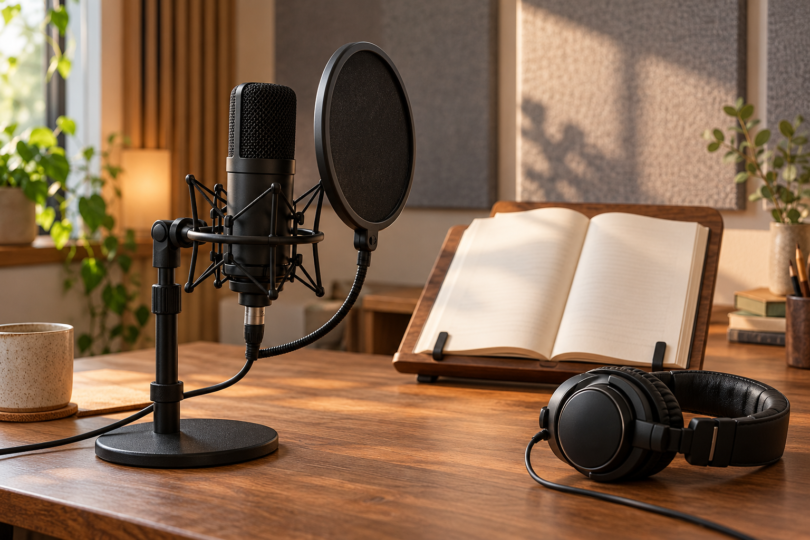

The Audio-Technica AT2020USB-X is our straightforward USB pick for audiobook narration. The RØDE NT1 Signature Series is the option for a narrator building an XLR recording setup, while the Shure MV7+ suits someone who wants USB convenience and the option to use an XLR interface later. Choose around your recording space, voice and existing equipment rather than expecting one microphone to suit every narrator.
We compared manufacturer documentation, connection requirements, monitoring controls and exact product versions. We have not recorded voice samples or measured these microphones against one another. The recommendations describe useful setup choices, not a listening-test ranking or a guarantee that your files will pass a distributor’s checks.
Three audiobook microphones compared
| Microphone and selected version | Best fit in this comparison | Extra setup or limitation |
|---|---|---|
| Audio-Technica AT2020USB-X, black | Direct USB recording with headphone monitoring | No separate interface needed for USB; room noise and placement still matter |
| RØDE NT1 Signature Series, black | A dedicated XLR narration setup | Needs an audio interface with 48V phantom power and a suitable stand |
| Shure MV7+, black desktop-stand bundle | Close-mic narration with USB and XLR connection choices | USB processing controls do not apply to its analog XLR output |
Audio-Technica AT2020USB-X: best for a straightforward USB setup
The AT2020USB-X is a cardioid condenser microphone that connects directly to a compatible computer over USB. It includes a desk stand, a USB-C-to-USB-A cable and a USB-A-to-USB-C adapter. That makes it a practical starting point when you want to record at a computer without choosing a separate audio interface.
Its headphone socket lets you hear the microphone directly, and the mix control blends that signal with computer playback. The headphone-volume dial controls what you hear; it does not set the microphone’s recording level. Check input level in the recording setup and make a trial recording before a long chapter.
Audio-Technica lists recording support up to 24-bit/96kHz, but that specification does not tell you whether the microphone suits your voice or room. Experiment with placement, listen for reflected sound and breath noise, and use a pop filter when needed. The manual advises using the supplied cable without a USB hub or extension cable and does not guarantee operation with every computer.

Audio-Technica AT2020USB-X USB Microphone, Black
As an Amazon Associate we earn from qualifying purchases.
RØDE NT1 Signature Series: best for an XLR recording setup
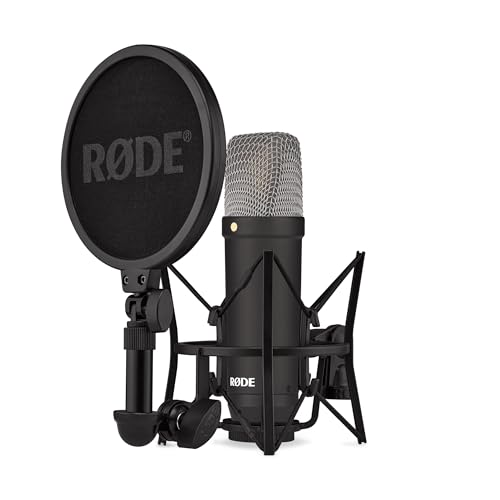
The NT1 Signature Series is a large-diaphragm cardioid condenser microphone with an analog XLR connection. RØDE includes an SM6 shock mount, pop filter and XLR cable. It is a useful choice if you already own an appropriate interface or want to choose the interface, preamp controls and monitoring arrangement separately.
Budget for a suitable stand and an audio interface that supplies 48V phantom power. RØDE’s computer-connection guide explains that an XLR cable alone cannot connect this microphone to a computer: the interface provides amplification, analog-to-digital conversion and power. The Signature Series is the XLR-only model; do not buy it expecting the USB features of another NT1 version.
Speak toward the side marked by the gold dot, with the pop filter between you and the microphone. Follow RØDE’s mounting instructions and turn the interface input down before connecting the cable. The supplied accessories help with physical setup, but they do not establish that your room is quiet enough for narration.
Shure MV7+: best for USB and XLR flexibility
The MV7+ is a dynamic cardioid microphone designed for close-mic use. It has USB-C and XLR outputs plus a headphone output for direct monitoring. Our selected buying link is the black MV7+-K-BNDL package with a desktop stand; check that bundle name when comparing it with microphone-only listings.
Over USB, Shure’s MOTIV software offers Auto Level, a real-time denoiser and Digital Popper Stopper processing. Manual mode lets you control gain, compression and limiting. Those are options to evaluate on your actual voice, not proof that a noisy room or every plosive will disappear. Shure explicitly states that its XLR audio is unaffected by software settings.
For audiobook work, start with a consistent position and listen to a dry recording before adding processing. We would leave reverb off for ordinary narration and compare a short processed sample with an unprocessed one before committing to settings for a book. This is a workflow recommendation, not a tested claim that one processing preset sounds best.

What matters more than the microphone name
Start with the room
Record a short passage and a few seconds of quiet, then listen on headphones for traffic, ventilation, computer fans, reflections and handling noise. ACX’s home-studio guide puts the recording space and outside noise alongside equipment choice. Move to a quieter position or improve the space before assuming another microphone will solve the problem.
All three picks use a cardioid pickup pattern. That gives you a front-facing recording orientation, but it is not a promise of silence from other directions. A dynamic microphone is not automatically the right choice for every untreated room, and a condenser is not automatically the best match for every voice. Make a representative recording in the position you can maintain comfortably.
Compare the complete recording chain
A USB microphone handles the connection to the computer directly. The XLR-only RØDE requires an interface, while the Shure offers either route. Include a stable stand, appropriate cables, headphones and recording/editing software in your plan. An accessory bundle is useful only if it fits your working position and the equipment you actually have.
Keep technique and settings consistent
Mark a comfortable microphone and reading position, avoid bumping the stand, and check playback before recording a long section. Listen for breath blasts, mouth noise, clipping and changing tone as you move. A pop filter, shock mount or processing switch can help with particular problems, but none replaces listening to the recorded file.
Check the finished audiobook files
Recording specifications and delivery specifications are different. The AT2020USB-X supports several recording sample rates, and Shure’s MV7+ USB table lists 24-bit/48kHz, with 16-bit/44.1kHz marked for iOS only. If the destination calls for a different export format, use your recording software’s export or conversion workflow and verify the finished file.
For ACX, the current submission requirements specify 192kbps-or-higher constant-bit-rate MP3 at 44.1kHz, with consistent mono or stereo across files. Average level must fall between −23 and −18dB RMS, peaks must be no higher than −3dB, and the noise floor must be no higher than −60dB RMS.
ACX currently recommends 1–5 seconds of room tone at the beginning and end of each file, with a maximum of 5 seconds. It also requires consistent sound and removal of unwanted noises and outtakes. Recheck the current requirements for your distributor and assess the complete exported files; no microphone purchase establishes compliance on its own.
Questions about audiobook microphones
Which microphone should a beginner choose?
The AT2020USB-X is our simple computer-recording choice because it combines USB connection, direct headphone monitoring and an included desk stand. Choose the NT1 Signature if an XLR interface is part of your plan, or the MV7+ if you want both connection options. Your room and a sample of your own voice should guide the final decision.
Do I need an audio interface?
You need one to connect the NT1 Signature Series to a computer, and it must provide 48V phantom power. You do not need a separate interface for the USB connection on the AT2020USB-X or MV7+. Using the MV7+ through XLR requires a suitable recording input, such as an interface.
Will a dynamic microphone remove background noise?
Do not assume that. The MV7+ combines directional pickup with optional USB processing, but you should still reduce noise in the space and listen to a test recording. Its XLR output does not carry the software processing.
Must I record at the same sample rate as the final delivery?
Match the recording and export workflow deliberately. ACX’s specified delivery rate is 44.1kHz; a microphone that records at 48kHz can require conversion when exporting. Verify the finished file rather than judging delivery compatibility from a headline microphone specification.
Were these microphones tested with audiobook narrators?
No. This is a documentation-led comparison of exact product versions and setup requirements. We do not claim measured sound quality, a universally better voice match or guaranteed audiobook acceptance.