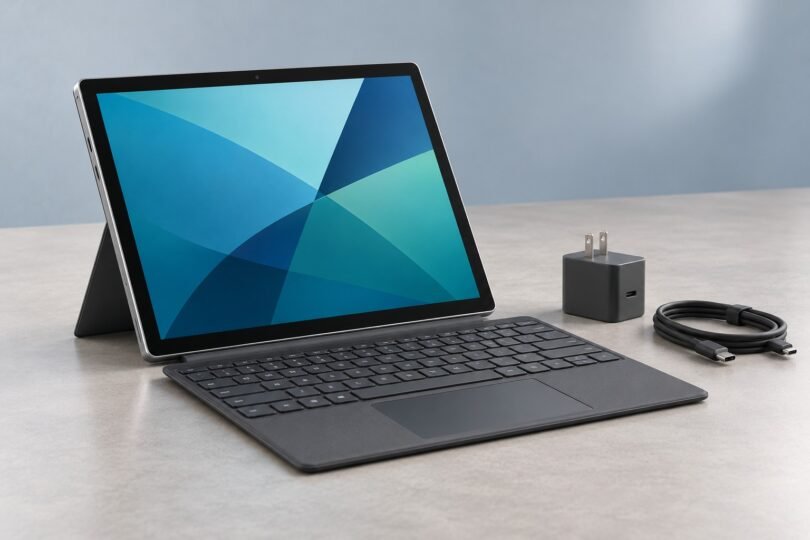

A useful Windows tablet under $500 needs more than a low sticker price. It needs a supported Windows installation, enough memory for your apps, and a keyboard-and-charger bundle that stays within budget. The most practical starting points are carefully selected refurbished Surface models; new budget tablets need particularly close checks on availability and accessories.
For light work and a smaller bag, consider a renewed Surface Go 3 with Core i3, 8GB RAM and 128GB SSD. For a larger screen and more storage, a renewed Surface Pro 7+ with Core i5, 8GB RAM and 256GB SSD is worth comparing, but its approaching firmware-support deadline matters. The recommendations below come from manufacturer specifications, support documentation and identified product listings.
Quick comparison: what actually fits the budget?
These are the offer prices displayed in listings retrieved on October 7, 2026, in US dollars. Amazon figures are starting prices across renewed offers, not a guaranteed price for every seller or condition. Tax, accessories and delivery to your address must be checked separately.
| Exact configuration | Condition and displayed price | Main buying consideration |
|---|---|---|
| Surface Go 3, Core i3, 8GB/128GB, Wi-Fi, Platinum | Renewed offers from $264.94; free shipping displayed | Compact 10.5-inch screen; keyboard extra |
| Surface Pro 7+, Core i5, 8GB/256GB, Platinum Silver | Renewed offers from $330; free shipping displayed | 12.3-inch screen; firmware servicing ends January 15, 2027 |
| CHUWI Hi10 Max N150, 12GB/512GB | Official store: $431 tablet or $465 with keyboard; both sold out | A restock candidate, not an available purchase recommendation |
Surface Go 3: the compact refurbished option
The configuration to look for is the Core i3 model with 8GB RAM and a 128GB SSD. Microsoft documents a 10.5-inch, 1920 × 1280 display with a 3:2 shape. That shape is useful for reading documents in portrait orientation, while the small footprint suits travel and occasional desk work. Its dual-core i3-10100Y is still an entry-level processor: buy it for email, documents and modest browsing, rather than demanding creative workloads.
The identified Amazon variant is Wi-Fi, Platinum, renewed, and advertised with Windows 11 Pro. The listing specifies one tablet and names a USB-C power adapter in its included-components field, while a separate bullet says accessories are sold separately. Confirm the charger with the selected seller; the Type Cover is extra. Do not confuse this detachable tablet with the Surface Laptop Go, whose keyboard is attached.

Microsoft Surface Go 3 Core i3, 8GB RAM, 128GB SSD, Wi-Fi, Platinum (Renewed)
As an Amazon Associate we earn from qualifying purchases.
Our buying preference is the 8GB/128GB configuration over the 4GB/64GB entry model, because it leaves more room for applications and updates. Microsoft’s Surface Go 3 specifications explain the available processors and storage choices. Treat a refurbished unit’s battery condition as a separate question from its original specifications.
Surface Pro 7+: more workspace, with a short support horizon
The renewed Core i5-1135G7, 8GB RAM, 256GB SSD version offers a larger 12.3-inch, 2736 × 1824 display. Its USB-A and USB-C ports are useful if you have older peripherals. The screen is the main reason to choose it over the Go for spreadsheets, side-by-side documents or longer typing sessions. Microsoft confirms the Pro 7+ can run Windows 11.
The specific renewed listing below is Platinum Silver and identifies a 65W USB-C adapter. A keyboard is not listed among its included components, so budget for one unless the selected offer explicitly includes it. Confirm the seller, cosmetic condition and return terms rather than assuming every renewed offer has the same package.
The important drawback is longevity. Microsoft’s driver and firmware lifecycle table lists January 15, 2027 for the Pro 7+, and October 5, 2027 for the Go 3. These dates concern new device firmware and drivers; Windows operating-system updates follow their own lifecycle. A cheap Pro 7+ may suit a short-term need, but spending nearly the entire $500 budget on one is difficult to justify.
What about a new Windows tablet?
The CHUWI Hi10 Max N150 has a 12.96-inch, 2880 × 1920 screen, 12GB RAM and a 512GB SSD. The official global store displayed $431 for the tablet and $465 for the keyboard bundle, with both marked sold out. Shipping and taxes are calculated at checkout. At $465, just $35 remains below the ceiling before those charges; do not assume the bundle is an under-$500 delivered purchase.
If stock returns, match the processor as well as the model name. The N150 version is different from the more expensive Core Ultra 5 Hi10 Max. Pen bundles are also separate. The older Hi10 X1 N150 has 8GB RAM, a 256GB SSD and a lower-resolution 1280 × 800 display, but we did not establish a current orderable US offer. Old sale pages are insufficient proof of availability.
Likewise, the Fusion5 FWIN232 PRO N5 12GB/256GB product page showed $529.99. It is outside this budget before tax, even though a separate store tile showed a lower price. Use the exact product page and checkout total, not a promotional thumbnail.
Windows 11 support: check the whole device
Windows 10’s ordinary support ended on October 14, 2025. Extended Security Updates are a separate, limited program; a seller simply saying “Windows 10 installed” does not establish enrollment or long-term support.
Windows 11 requires a compatible processor, TPM 2.0 and Secure Boot-capable UEFI, alongside memory, storage, graphics and display requirements. A familiar “Intel Core i5” label is not enough: the exact CPU generation and full device configuration matter. Check Microsoft’s system requirements and ask for PC Health Check results when buying older hardware.
Microsoft explicitly excludes the first Surface Go, Surface Pro 3, Surface Pro 4 and Surface Pro fifth generation from its eligible upgrade list. Avoid buying one on the strength of a Windows 11 screenshot. Microsoft warns that unsupported installations are not guaranteed updates, including security updates.
Build a real $500 total
Add together the tablet, compatible keyboard, missing charger, any essential adapter, shipping and tax. Include a pen only if your workflow needs one, and confirm the exact pen protocol. A touchscreen alone does not guarantee support for pressure-sensitive handwriting.
For example, a $330 tablet plus a hypothetical $60 keyboard allowance totals $390 before tax. At an illustrative 8% tax rate, that becomes $421.20, assuming no additional charges. The $60 is a planning allowance, not a verified keyboard offer. A $465 tablet-and-keyboard package would already reach $502.20 under the same assumptions.
Keyboard compatibility deserves its own check. A Surface Go cover is not a Pro cover; Microsoft specifies the compatible Type Covers for the Pro 7+. Also distinguish a magnetic Bluetooth keyboard from a cover that communicates through the tablet’s connector. Bluetooth models may need separate charging.
Checks to make before keeping a refurbished tablet
- Match the order: verify the model, CPU, RAM, SSD, color, condition and included charger against the selected offer.
- Check ownership and activation: finish setup, verify Windows activation, and make sure the tablet does not demand a previous organization’s sign-in.
- Inspect the hardware: test touch across the screen, cameras, microphone, ports, Wi-Fi, keyboard connector and kickstand.
- Check the battery: compare full-charge capacity with design capacity in a Windows battery report, then assess runtime with your own apps. Original launch claims cannot establish an aged battery’s performance.
- Keep the return window in view: save the seller’s stated terms and test promptly. “Renewed” does not mean a brand-new battery or a manufacturer-refurbished device.
Frequently asked questions
Is 8GB RAM enough?
It is a reasonable budget target for lighter Windows use. Heavy multitasking, large creative projects and virtual machines need more headroom. Buy for the applications you actually use, and do not assume a tablet’s RAM can be upgraded later.
Does Windows 11 Pro make a tablet faster?
No. Choose the edition for its features and your work requirements. CPU, memory, storage, cooling and workload determine whether the hardware meets your needs.
Can I install regular desktop applications?
These Intel-based models run Windows desktop software, subject to each application’s requirements. If another listing ships Windows 11 Home in S mode, Microsoft says switching out is free and one-way. Check your required software before buying.
Which should you choose?
Start with the renewed Go 3 8GB/128GB for compact, light-duty use. Compare the Pro 7+ when screen space matters and its limited remaining firmware-servicing period fits your plans. If you require new hardware, wait for a verifiable, available bundle rather than stretching the budget around an expired deal. In every case, make the final decision from the exact configuration and delivered total.