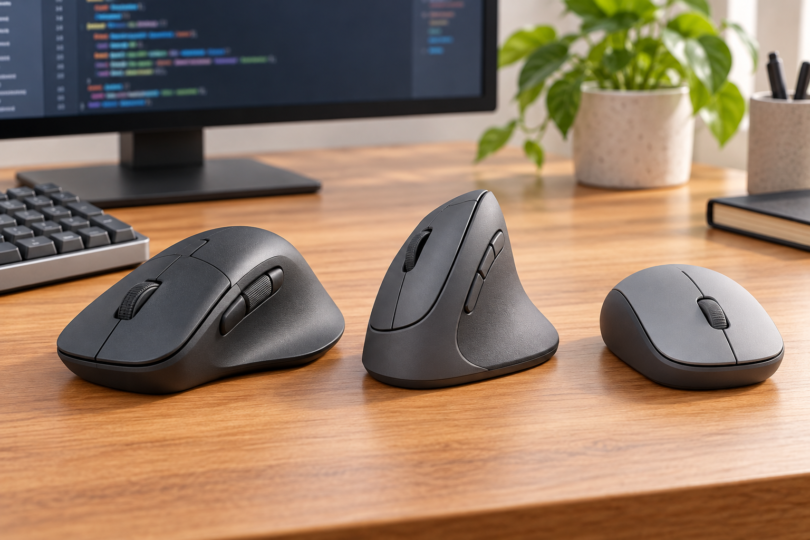

The best mouse for coding depends on which jobs you want to move away from the keyboard. Our shortlist is the Logitech MX Master 3S for a dedicated thumb wheel, Logitech Lift for a smaller vertical shape, and Logitech G305 for a compact mouse with programmable buttons. The useful differences are fit, scrolling, connection type and customization software.
These recommendations compare documented features and exact product versions. We have not tested these mice for comfort, coding speed or battery life; the “best for” labels describe buying priorities rather than measured winners.
Best mice for coding at a glance
| Mouse and selected version | Best fit for this shortlist | Manufacturer-listed dimensions and weight | Connection and power |
|---|---|---|---|
| Logitech MX Master 3S, Graphite, Standard Edition | Dedicated thumb wheel and app-specific shortcuts | 124.9 × 84.3 × 51 mm; 141 g | Bluetooth or Logi Bolt; rechargeable battery |
| Logitech Lift, Graphite, right-handed | Small-to-medium hands that prefer a vertical shape | 108 × 70 × 71 mm; 125 g | Bluetooth or Logi Bolt; one replaceable AA |
| Logitech G305 LIGHTSPEED, Black | Compact conventional shape and programmable controls | 116.6 × 62.15 × 38.2 mm; 99 g with an AA battery | LIGHTSPEED USB receiver; one replaceable AA |
Dimensions above describe the mouse itself, not its retail box. Logitech labels the axes differently across its pages, so use the measurements and shape together when comparing desk space and hand fit.
Logitech MX Master 3S: best for a dedicated thumb wheel
The MX Master 3S is our first choice here if you want a separate thumb wheel alongside the main scroll wheel. Its seven customizable buttons and gesture button offer several places to put actions you use often. Logitech’s consumer specifications list both wheels, while its product page describes app-specific button customization through Logi Options+.
For programming, think of tasks such as moving through a wide spreadsheet, switching applications or assigning a frequently used shortcut. Those are reasons to consider the controls, not a promise that every editor supports the same behavior. Check your editor, operating system and workplace software policy before relying on a custom action.
The tradeoff is size: at 141 g and 84.3 mm wide, it is the widest and heaviest mouse in this comparison. If you mainly want a smaller conventional mouse and a couple of shortcuts, the G305 is the more compact option. Neither weight nor a sculpted shell establishes which will feel better in your hand.
Check the edition before ordering. Logitech distinguishes the Standard Edition, which lists a Logi Bolt receiver and USB-A-to-USB-C charging cable, from the Bluetooth Edition, which lists the mouse and documentation. The linked Graphite listing identifies part 910-006557 and calls it Standard Edition, but its bullets conflict about receiver inclusion. Confirm the selected seller’s box contents if you need the receiver.

Logitech MX Master 3S Mouse, Graphite
As an Amazon Associate we earn from qualifying purchases.
Logitech Lift: best for a smaller vertical shape
Consider Lift if you have a small-to-medium hand and want to try a vertical mouse. Logitech positions this model for that hand-size range and specifies a 57-degree body angle. This comparison links the right-handed Graphite version, part 910-006466; Lift Left is a separate choice. A vertical shape is a fit preference, not a guarantee of pain relief or injury prevention.
Lift combines a SmartWheel with Bluetooth or Logi Bolt connectivity and a replaceable AA battery. Its consumer specifications list a Bolt receiver and AA battery in the box. At 108 × 70 × 71 mm, the body is shorter but taller than the MX Master 3S when oriented for use.
Choose it for the grip shape before choosing it for extra functions. If a separate side wheel is central to your workflow, the MX Master 3S is the clearer option. If you prefer to replace a battery rather than recharge the mouse, Lift or G305 may suit that routine better. Try the shape and button reach if you can, and check the return terms before buying.

Logitech G305: best for a compact conventional mouse
The G305 is our compact conventional pick. Logitech lists six programmable buttons, one onboard memory profile and a 99 g weight with an AA battery. The exact Black version here is part 910-005280. Those documented features make it worth considering if you want a smaller mouse with configurable controls.
Its connection is LIGHTSPEED through the supplied USB receiver. It is not a Bluetooth alternative to the other two choices. Logitech’s G305 specifications also list no left/right wheel tilt, so do not buy it expecting a dedicated horizontal-scrolling control.
Advanced button settings require G HUB, which is a different application from Options+. Logitech provides G HUB downloads for Windows and macOS. Check current OS support and whether the settings you need can be stored in the single onboard profile; a programmable-button count alone does not prove that a complex macro will work on another computer.
The replaceable AA is a practical distinction from the rechargeable MX Master 3S. Logitech quotes up to 250 hours in Performance mode, with an explicit warning that usage, battery discharge and computing conditions affect runtime. Treat that as a manufacturer estimate, not a result from this comparison.

What to check before choosing
- Check software first. MX Master 3S uses Options+ for its advanced customization, while G305 uses G HUB. Current download requirements can be stricter than the operating systems listed when the mouse launched.
- Separate Linux connectivity from customization. Logitech lists Linux in the MX Master 3S and Lift platform specifications. That alone does not establish support for every Options+ feature on Linux; verify the controls your workflow depends on.
- Match the shape to your hand. Compare the dimensions, handed version and reachable controls. Do not assume that a taller, heavier or “ergonomic” mouse will be the right fit without trying it.
- Check the connection and box contents. G305 needs its USB receiver. For MX Master 3S, distinguish Standard Edition from Bluetooth Edition; for Lift, check right-handed versus left-handed before comparing offers.
Frequently asked questions
Do I need a gaming mouse for coding?
No special gaming designation is required for this shortlist. The G305 earns a place for its compact size and programmable controls; the MX Master 3S offers a thumb wheel, and Lift offers a different grip shape. Pick the controls and fit you will use.
Which option is worth considering for Linux?
MX Master 3S and Lift both list Linux among their supported platforms, but check advanced customization separately. If your purchase depends on a particular gesture, macro or application profile, verify that exact function on your distribution before choosing.
Will a vertical mouse solve wrist discomfort?
This comparison does not establish that. Lift offers a 57-degree shape and is designed for small-to-medium hands, but we have not evaluated medical outcomes or your individual fit. Choose it because you want to try that shape, not because this article promises symptom relief.