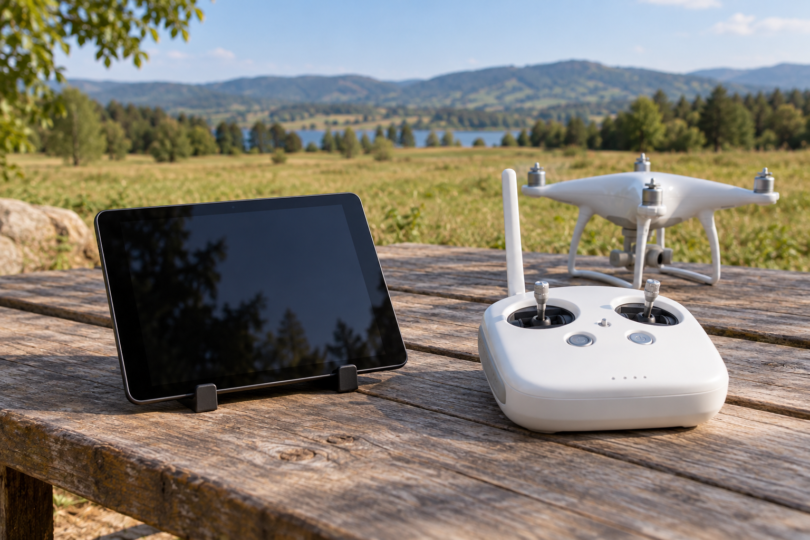

The iPad mini 4 Wi-Fi 128GB is the compact legacy tablet we would investigate first for a DJI Phantom 3 Standard. The iPad Air 2 Wi-Fi 64GB is the larger-screen alternative. DJI names both model families in its original DJI GO compatibility information, but that historical listing is only a starting point: buy either only after confirming that the app can be installed and works with your own aircraft, controller and operating-system version.
Before spending money, consider that DJI lists the Phantom 3 Standard in its service and support suspension notice. The notice ends product inquiries, technical support and maintenance for the listed products. That is a material limitation when buying equipment to keep this aircraft in use; it does not, by itself, establish that DJI GO has stopped working.
This is a specification-based comparison of two conditional used-device candidates. We have not installed DJI GO on these tablets, flown them with a Phantom 3 Standard or measured battery life, video delay or heat. If you already own a device that works reliably with your setup, verify it before spending money on a replacement.
Check the app and connection before choosing a tablet
The Phantom 3 Standard uses the original DJI GO app. DJI’s app guide assigns the Phantom 3 series to DJI GO and the Phantom 4 series to DJI GO 4. DJI Fly is another app. Advice written for DJI GO 4 or a newer controller should not be treated as a compatibility list for this aircraft.
The tablet connects to the Standard controller’s Wi-Fi network. In the Phantom 3 Standard manual, the connection sequence is to power the controller and aircraft, select the PHANTOM3_XXXXXX network in the mobile device’s Wi-Fi settings, then open DJI GO and enter Camera View. The controller’s Micro USB port is identified as a charging port; buying an OTG or Lightning data cable does not create the documented display connection.
The DJI GO listing in the US App Store remains accessible and lists iOS 10.0 or later and iPadOS 10.0 or later. DJI’s own legacy download information still says iOS 8.0 or later. Use the requirements shown by the actual store on your device when checking installation. A web listing and a supported OS minimum do not prove that a particular tablet, account and aircraft combination will work.
The App Store also lists many newer eligible iPads. That is not the same as DJI validating each of them with the Phantom 3 Standard. We would not buy a modern tablet solely for this aircraft on the strength of the store’s device list or a faster processor. First establish the full app, operating system and aircraft connection on the exact device.
Two documented legacy choices at a glance
The configurations below are precise comparison targets: one tablet in each case. Color is not a compatibility criterion, and a used seller’s package may differ from Apple’s original box. Neither choice is a promise of present-day DJI GO operation.
| Exact comparison choice | Screen and chip | Wi-Fi model size and weight | Why consider it; main limit |
|---|---|---|---|
| iPad mini 4 Wi-Fi, 128GB; A1538 | 7.9 in, 2048 × 1536; A8 | 203.2 × 134.8 × 6.1 mm; 298.8 g | Compact first candidate; smaller view and used-device condition require checking |
| iPad Air 2 Wi-Fi, 64GB; A1566 | 9.7 in, 2048 × 1536; A8X | 240 × 169.5 × 6.1 mm; 437 g | Larger display; more size and weight to support |
Use Apple’s model-identification guide to distinguish A1538 from the cellular mini 4 A1550, and A1566 from the cellular Air 2 A1567. Those model numbers identify the hardware variant; they do not establish its storage capacity or condition. Confirm storage separately in the device settings and on the seller’s invoice.
1. iPad mini 4 Wi-Fi 128GB: compact first candidate
The iPad mini 4 has a 7.9-inch, 2048 × 1536 display and an A8 chip. Apple lists the Wi-Fi model at 298.8 grams and 203.2 × 134.8 × 6.1 mm. We select the 128GB configuration as a specific shopping target, not as a DJI GO storage requirement or a performance upgrade over another mini 4 capacity.
Its advantage in this comparison is the smaller and lighter body. That may suit a compact controller setup, provided the actual holder supports the tablet and its case securely. Its smaller display gives you less physical viewing area than the Air 2, so check that you can read the interface comfortably in your intended conditions. Neither display specification establishes outdoor readability in every situation.
The limitation is the complete legacy setup, not just the screen size. A seller’s statement that the tablet powers on is insufficient. Verify the original DJI GO installation, access to the app and a stable camera view and telemetry connection with your Phantom 3 Standard during an agreed return or inspection period. Treat an unverified unit as a purchase to pass on.
2. iPad Air 2 Wi-Fi 64GB: larger-screen alternative
The iPad Air 2 offers a 9.7-inch, 2048 × 1536 display and an A8X chip. The Wi-Fi version weighs 437 grams and measures 240 × 169.5 × 6.1 mm. The 64GB version is the exact configuration compared here; a listing that switches to 16GB, a cellular model or the first-generation iPad Air needs a fresh check.
Choose it over the mini 4 only if the larger physical display is useful enough to justify its bulk. The two tablets have the same published pixel dimensions, so the Air 2’s size does not mean a higher-resolution live feed. We have no measured basis to promise smoother DJI GO operation from its A8X chip.
The larger body makes mounting a particularly important part of this purchase. Establish the holder’s fit and stability on your actual Standard controller before ordering; do not assume a mount advertised for Phantom 4 or another controller will fit. The same app-installation, connection and return-period requirements apply as for the mini 4.
Wi-Fi or cellular: separate the connection from location features
Both shortlisted devices are Wi-Fi-only variants, which matches the documented wireless video connection. Apple lists assisted GPS and GLONASS on the Wi-Fi + Cellular versions of these tablets, rather than the Wi-Fi-only models. Cellular hardware is therefore a separate buying decision if you need tablet location features; it is not a substitute for the controller’s Wi-Fi link.
Do not interpret “cellular” as a blanket guarantee for every DJI GO location-dependent feature. Establish which feature you need and check the documentation for the exact aircraft and app version, then verify the feature on your setup. This shortlist does not validate Follow Me, mobile-device home-point behavior or a cellular data plan.
What about Samsung and other Android tablets?
DJI’s original DJI GO download page provides an Android download route and still states Android 4.1.2 or later. Its device list names Samsung Galaxy Tab S2 as a family. That does not identify every Tab S2 model, region or hardware revision, and the old minimum is not a guarantee that a current Android release or a generic tablet will run the app.
We have not established a specific Android tablet and operating-system combination that we can recommend buying for current use here. If you already own a Tab S2, start with DJI’s official download route and verify installation and the complete connection on that exact unit. Do not infer support for a Galaxy Tab A7 Lite, an Amazon Fire tablet or a newer Samsung model from the Tab S2 name.
Download and installation are separate checks. We verified the official download information and its Android landing page, but did not install an APK or complete an App Store download. Avoid treating old Google Play instructions, a third-party APK mirror or a seller’s preloaded app as proof that you can reinstall and use DJI GO yourself.
Check the holder and used condition before paying
DJI’s support specification says the holder is for tablets and smartphones, while the Standard manual describes the foldable smartphone holder and warns against forcing an oversized device into it. Those descriptions do not establish a universal tablet fit. Check the exact holder, mounting hardware, tablet dimensions and case together; an attractive product photograph is not a fit test.
- Prove the app path: use your own account to confirm you can obtain and open the original DJI GO app on the exact tablet and OS version. Do this before accepting a nonreturnable purchase.
- Check Activation Lock: Apple advises checking that a used iPad is erased and unlinked from its previous owner. Complete setup without needing the previous owner’s Apple Account credentials before accepting it.
- Check the real connection: with propellers removed and motors kept off, follow the Standard manual’s Wi-Fi connection procedure and inspect camera view and telemetry. Repeat long enough to reveal an obvious dropout, app crash or overheating problem. This is an editorial buying check, not a flightworthiness test.
- Inspect the hardware: check touch response, display damage, charging, Wi-Fi stability and battery condition. Reject a swollen battery or a device that shuts down unexpectedly. Do not apply Apple’s original battery-life figure to an aged used unit.
- Confirm the exact sale: record model, storage, Wi-Fi or cellular version, condition, included charger and return terms. Agree on enough time to test your setup; the comparison is for one tablet, not an accessory bundle.
Frequently asked questions
Which tablet should I check first?
Start with a mini 4 Wi-Fi 128GB A1538 if compact size matters, or an Air 2 Wi-Fi 64GB A1566 if you prefer a larger display. Both are conditional legacy choices. Confirm the app, device condition and connection before buying.
Does the Phantom 3 Standard use DJI GO 4?
No. DJI assigns the Phantom 3 series to the original DJI GO app. DJI GO 4 is a separate app associated with other aircraft, including the Phantom 4 series.
Do I need a USB cable between the controller and tablet?
The Standard manual documents a Wi-Fi connection to the mobile device. Its controller Micro USB port is for charging. Do not buy a controller-to-tablet data cable as the solution for this model’s camera-view connection.
Will any tablet meeting the minimum OS requirement work?
No such guarantee follows from the minimum alone. DJI’s legacy device list, the store’s current installation requirements and actual operation on your device are separate checks. A newer tablet or operating system should not be assumed compatible.
Is a used iPad with DJI GO already installed enough?
No. Establish that you can set up the device under your own account, obtain the app yourself and connect it to your aircraft. Check Activation Lock, battery condition and return terms before accepting it.