
The right Bose QC25 replacement cable depends on two things: a plug that fits the headphone’s small socket and controls that match your phone. For calls, choose the correct Bose Apple or Samsung/Android inline-microphone version. For music alone, a QC25-compatible stereo cable is a simpler option.
The QuietComfort 25 uses a 2.5 mm connection at the headphones and a 3.5 mm connection at the source. A USB charging cable cannot replace it: the QC25’s noise cancellation runs from a replaceable AAA battery.
Three QC25 cable options
| Cable and exact option | Best reason to choose it | Important limit |
|---|---|---|
| Bose QC25 inline mic/remote for Apple, blue, 720875-0020 | Original accessory for calls and controls on supported Apple devices | Apple-oriented controls; not a promise of full Android compatibility |
| Bose QC25 inline mic/remote for Samsung/Android, black, 720875-0110 | Original accessory for compatible Samsung/Android devices | Support varies by phone and app |
| Geekria stereo cable, black, 4 ft / 1.2 m, US-1-XFDZ-EJP-EJX-0049-06 | Listening without an inline remote | No microphone or call controls |
1. Bose QC25 inline mic/remote cable for Apple devices
This is the straightforward original-accessory choice if you want an inline microphone and Apple-oriented volume, playback and call controls. The specific blue cable in Bose’s Canadian catalog is part 720875-0020, supplied as one cable.
Bose describes support for selected iPod, iPhone and iPad models. Treat that as a device-compatibility requirement, especially with a newer phone that needs an adapter. The same-looking connector does not guarantee that every button or microphone function will work through every adapter or app. The linked regional page identifies the accessory; check local ordering options with Bose.
2. Bose QC25 inline mic/remote for Samsung and Android devices
Choose the Samsung/Android version when preserving compatible phone controls matters. The black option, part 720875-0110, is identified in Bose’s UK catalog. It includes an inline microphone and remote for supported volume, track and call functions.
Bose specifies most Samsung Galaxy smartphones/tablets and selected Android devices, which leaves an important limit: Android branding alone is not enough. Bose’s control troubleshooting guidance says third-party apps and other devices can have limited or missing functions. Check the exact phone, audio adapter and intended app before buying. This regional page does not establish US shipping.
3. Geekria 4 ft / 1.2 m stereo replacement cable
The Geekria cable, SKU US-1-XFDZ-EJP-EJX-0049-06, is the music-only alternative. Geekria explicitly lists the QC25 and describes one 3.5 mm-to-2.5 mm cable. Its current product title specifies 4 ft / 1.2 m; use that specification rather than the older length embedded in the page address.
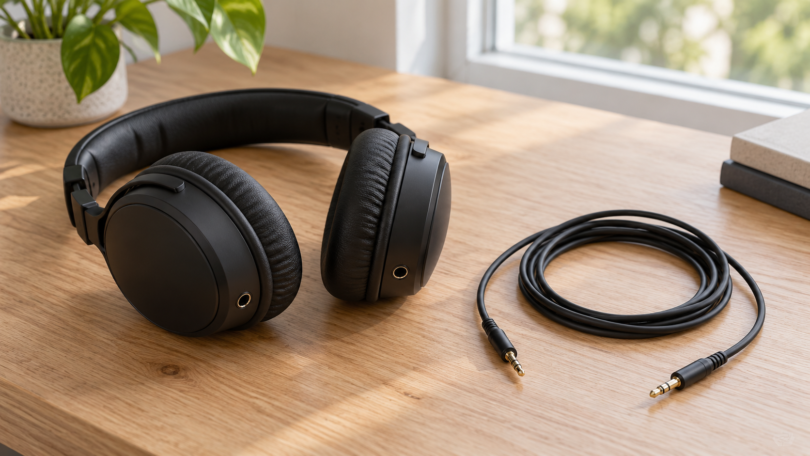
The photographed option is a black flat cable with straight metal-sleeved stereo plugs and no inline control module. That makes it suitable to consider when you already control playback and volume on the source. It does not add a microphone, and compatibility with a console’s audio output should not be mistaken for support for voice chat.
Check the plugs before ordering
The headphone-side plug must fit the QC25 socket physically as well as electrically. Look for an explicit QC25 fit statement and a slim 2.5 mm plug with enough exposed shaft to seat fully. A larger 3.5 mm plug, a bulky collar or a locking plug made for another headphone can prevent a proper connection. Do not force a plug that resists insertion.
Bose’s original-cable photos show a straight headphone-side plug and an angled source-side plug. The source plug on a microphone cable has an extra contact compared with an ordinary three-contact stereo plug. The Geekria option uses stereo plugs and has no microphone. Plug diameter, contact arrangement, housing clearance and remote compatibility are separate checks; a “2.5 mm” label alone does not establish all four.
If your phone has USB-C or Lightning instead of a 3.5 mm socket, choose a phone-compatible audio adapter. For calls, its specifications must also support headset microphone input. An adapter that plays music successfully has not necessarily established microphone or remote support.
What a replacement cable can and cannot fix
With the headphones switched off, the QC25 can still play wired audio. Bose’s QC25 owner’s guide explains that switching the headphones on activates noise cancellation and recommends powered operation for best audio quality. A new cable does not supply that power or restore noise cancellation when the AAA battery is depleted.
For intermittent sound, check both plugs are fully seated and try another source before blaming the cable. If music works but the buttons do not, check the Apple versus Samsung/Android version and source compatibility. If noise cancellation is the only missing function, check the battery and power switch first. Avoid buying a QC15-specific lead, a USB charging lead or an unrelated Bose speaker cable just because its listing includes the Bose name.
Which one should you buy?
For calls, match the original Bose cable version to the device you will actually use. For listening without a remote, the identified Geekria stereo cable provides a clear third-party option. In either case, verify the exact variant, physical plug fit and return terms before ordering; cosmetic similarity is not enough to establish compatibility.